Showing posts with label SEM Tool. Show all posts

Store Locator and Local SEO Plugin for Wordpress


Yoast has just released a major update to its Local SEO plugin. This new version has some new functionality; most important is the new store locator option. 

This option is especially handy if your company has multiple locations or your brand is sold in many different stores. 

The store locator will allow customers to easily find the nearest location of your company. 

Customers can fill in their home address and a list of the nearest locations of your company will appear! 

Check out the new functionality and buy the Local SEO plugin!

This Local SEO plugin largely improves the usability of the contact page of your website. It allows you to:
SEOlocal_icoon_mapsInsert Google Maps - This extra functionality will make it easier for your customers to  (physically) navigate to the location of your company.
SEOlocal_icoon_adressInsert address(es) of your company - Our Local SEO plugin makes it easy to show your company address(es) in a clear and uniform format, while adding all the necessary technical markup for search engines.
SEOlocal_icoon_openinghoursInsert opening hours of your company - Our Local SEO plugin makes it easy to show your opening hours in a clear and uniform format.
SEOlocal_icoon_storelocatorInsert a store locator - The store locator will allow customers to easily find the nearest location of your company. Customers can fill in their home address and a list of the nearest locations of your company will appear.


How OutBrain Amplifying Content Works?


Dreaming of seeing your article featured on the CNN, USA Today, NY Times, or many other big names?

Outbrain.com for amplifying content is offering an exciting PPC advertising method, not for ads like Google, Microsoft, and yahoo are doing, but for actual content titles.

So, how does Outbrain works?  


Here is what they say about themselves:


Outbrain is the only content discovery platform dedicated exclusively to the distribution of high-quality content.
With Outbrain Amplify, links to your content appear as recommendations on the web's largest content publishers including sites like Wall Street Journal, Reuters & People.com.
Plus, Outbrain optimizes on engagement so the more interesting your content and the more traffic you drive, the more you will be recommended around the web.


Top Free Essential SEO Tools For Mobiles


Top Free Essential SEO Tools For Mobiles 2012
Top Free Essential SEO Tools For Mobiles 


by Mina Adly Younan 

The growth in mobile browsing has been incredible over the past year. With nearly half of UK smartphone owners using their mobiles to browse and research products and Mobile Search accounting for an impressive 12% of all UK search clicks in December 2011 (Marin Software, 2012). Morgan Stanley Corp. have also found in a recent study that Mobile traffic is expected to surpass desktop traffic by 2015 as shown in the graph below.  For a website to remain its high ranking on search engines (Google) should do all needed efforts to make their mobile versions as friendly and functional as possible.
In doing so, webmasters will need the following Top Free Essential SEO Tools for Mobiles:

1- Mobilize your Site () : see how your current site looks in mobile, and find resources for building your mobile site.

2- Our Mobile Planet ():  View data about mobile users that Google has gathered. Select your key demographic and other potential customers, and view key differences.

3- Mobile Meter () gives an overview of how your site looks and performs on a mobile.

4- Google Adwords for Mobiles:  It is the same Adwords tool used for desktop searches. It gives a guideline on the monthly volume in searches. The tool can also show data for searches on mobile devices.  To do so, select ‘advanced options’ > ‘show ideas and statistics for’ > and select ‘mobile’.
Local search trends can be added to see seasonal fluctuations or if keyword searches are increasing in volume. Select columns and ‘local search trends’. This will show a simple bar graph, but if you download the data it will give some figures over time.

5-PageSpeed Insights (): test speed from both a desktop and mobile perspective. Very useful to see where the easiest performance improvements can be gained in terms of download speed. As site speed is considered part of Google’s algorithm, fixing issues could result in a real impact on mobile search positions.

6- Google Webmaster Tools for Mobiles:  It is the same Google Webmaster tool as it can also check mobile sites setup and investigate any performance issues or poor search results. Additionally, if you redirect mobile users to specific mobile versions of your URLs, then Mobile Sitemaps can be added in Google Webmaster Tools.

7- Mobilize your Business with Google Sites (): Build a test or mock up and see how it performs. The tool have different templates for several types of landing pages.

8- Google Mobile Ads (http://www.google.com/ads/mobile/): Although it is a PPC tool, it can be used to find a lot of potential methods to look at that can drive traffic to your mobile landing pages using mobile ads like:
·         Phone numbers in ads using ‘click-to-call’,
·         click-to-download
·         Mobile Ad Sitelinks
·         Seller Ratings
·         Location Extensions (Multiple Addresses too!)
·         Location Targeting

9- Speeking of PPC, there is of course there the AdMob that is now owned by Google 


10- Google Analytics for Mobiles (): The same Google Analytics for Desktop could be used for mobile browsers so that you can easily find out which mobile devices are working well, and which need optimization by asking the right questions like: Is some content getting a lot of mobile traffic but performing relatively badly? Can a page be optimized to generate more phone call leads? Which content drives more local mobile users? It is even possible to hook Analytics up to track downloads of mobile apps.


Email Marketing Tips Newsfeed


Can You Have More Sales, Too?

Helping over 120,000+ businesses like yours raise profits and build customer relationships using AWeber's opt-in email marketing software for over 10 years.


Take a Free Test Drive today!


Bounces to Leads Converter - The Ice Breaker of E-Commerce


I got a crazy idea that I believe will rock the SEO world.

let's agree first that SEO (and PPC) are not about traffic anymore but about Revenue and Sales.

Even if you are not selling any product, you need the traffic to sell ads of third parties.

OK then..

Do you know that the only challenge in SEO (and PPC) campaigns is not to drive traffic but to keep them? and what is really more challenging is to convert them to Leads to buy what you are offering.

70-96% of visitors abandoning your site will never return  

Here are even more facts:


  • 90%-99% Of Your Marketing Spend Is Completely Worthless
  • Email is a phenomenal profit driver, however most websites capture less than 1 in 400 emails from visitors (who have not purchased)
  • Up to 85% of shoppers who add to cart DO NOT BUY ANYTHING


Imagine:

Mrs. Lynda owns a store in a Big Mall and Mr. Christopher happened to pass by her nice store when he was doing his weekly shopping. He stayed for a couple of minutes, went through her products, felt interested in some of them, checked the prices, thought of dropping her store another visit when he is prepared to buy, then he left. 

30 minutes later, he entered another store selling the same products like you do, but the store looked better with more promotions and friendly staff. A cute saleswoman broke the ice and approached him. She asked him about what he is looking for, they talked for a while, she showed him some products, he was convinced and bought what he needed. 

And never came back to poor Mrs. Lynda who is selling the same thing. 

The Lesson here is: Sales NEED Ice-Breakers 


So,
The tool I created is not an invention per se albeit it does not exist yet. 
It is a combination of 3 already existing tools, but in one All-In-One Powerful onsite SEO tool
That I will call The Bounces2Leads Tool (AKA, The Ice Breaker of E-commerce) 

What it does:

It simply detects when a visitor abandons the website, then after they do, a window appears asking the visitor to chat with a representative if they have any inquiries before they leave.  
So, it is using the Bounce Exchange service but instead of popping up a banner, it will pop up a chatting window with a real person representative. 

Here is How Bounce Exchange Works:


As for the chatting services you can find hundreds of software online to choose from (I prefer those that can forward chats to Google Hangouts and can go mobile)

Finally, you can have an email marketing software to manage your newsletter in case your visitor preferred to leave their email address instead of chatting with a rep. 

But why have 3 services with a cost more than 3000$ if you can have only one that does it all for a fraction of that price (I did not price it yet but it will be way cheaper)


Top Resources to Learn and Master SEO


Zach Bulygo created a list of 58 resources to help any one becoming an seo expert. I would love to share the list with you as it is truly handy not only for seo newbies but also for seniors as well.

But since it is 58, a strange number in fact, I will added 2 more resources to make it a complete SIXTY :) Is not Sharing Amazing?

Ok Here we are:

SEO 101

1. How Google Crawls – Discusses the basics of how Google crawls the web, indexes, and serves results.
2. How Google Works – If you want to get into SEO, you’ll need to understand the basics of how Google (and other) search engines work. This video provides a background on Google search.
3. Getting the Basics – If you want to get traffic from Google and rank well, you’ll need to have a site that Google views as high quality. It has certain signals that it uses to gauge a site’s quality. This article covers the basics of what attributes you’ll need.
4. PageRank – To understand the Google search engine and why some sites rank higher than others, you’ll need to have an understanding of PageRank. This Wikipedia article gives a good background. (It’s even referenced by Google employees.)
5. Quick Sprout’s Guide to SEO – A 9 chapter, infographic-style guide to SEO. A good resource if you don’t want to read a book but want something more thorough than a simple explanation.
6. Moz’s Guide to SEO – Don’t want to learn about SEO through long infographics? Then check out this 10 chapter guide written by the folks over at Moz.
7. SEO Starter Guide – Written by Google – A 32 page document which explains how to run SEO. This document was written by Google in 2010.
8. 8 First Step SEO Tips for Bloggers – Are you a blogger who wants to increase traffic to your website? Try reading this article first to get a good start on your SEO knowledge.
9. SEO Tips for Beginners – Are you a total novice when it comes to SEO? If so, read this short article which lists 5 things you can do right now to get you pointed in the right direction.

Free Tools

Quality, free tools – what could be better? Check them out:
10. Google Webmaster Tools – Before you look at any other tool, check out this suite of tools provided by Google. For help using Webmaster Tools, check out this page. Also check out Bing Webmaster Tools.
11. Open Site Explorer – Also known as the search engine for links, Open Site Explorer is a Moz creation. This tool allows you to see who links to your site, find links that point to old and broken pages, and research competitors to see who links to them. To check out the toolbar and view the product demo, check out this page. In order to understand this tool, you’ll need to be familiar with the termsPage Authority and Domain Authority. Note: this is a limited free tool. You can pay for enhanced access.
12. Microsoft SEO Toolkit – The Microsoft web team made an SEO tool. Check it out here.
13. Broken Link Finder – Having broken links lowers the quality of your website, which in turn hurts SEO. Find them and squash them with this free tool.
14. SEO Site Tools – An extension for Chrome that pulls up page rank, meta description, incoming links, and more for the site you’re visiting.
15. Keyword Suggestion Tool – A free tool (with an account) from SEO Book. Shows the number of searches for a specific keyword and gives suggestions.
16. Majestic SEO – A good tool for viewing backlinks to your website. Also check out Link Diagnosis.
17. Spider View Simulator – View your website the way a spider would. This will give your site a different perspective and may help you find and fix errors. Also check out their other tools.
18. Spider Test Tool – Similar tool as above, but this one is from SEO Book.
19. Robots.txt Checker – Errors in your robots.txt can cause problems for a spider’s ability to crawl your webpage. Find them with this free tool.
20. WordPress SEO Plugin – A popular plugin for WordPress. View the webpage to see a list of all the features.
21. Anchor Text Over Optimization – Google is cracking down on websites that are overly optimized for SEO. Part of that involves anchor text. This tool highlights where you may be at risk for anchor text over optimization.
22. Test Page Speed – Your website speed affects your page ranking, so you want to ensure your website loads as quickly as possible. This tool (from Google) will measure your site’s speed and offer suggestions for improving speed.
23. Google Trends – Shows volume of searches over time. A good tool to view keyword popularity.

Knowing the Status of Your Website

Want to know how optimized your website is for SEO? Check out these for help:
24. Anatomy of a Perfectly Optimized Web Page – Unsure of how to make an SEO optimized page? Or not sure if your page is optimized? Print out this graphic and hang it in your office.
25. Webmaster Guidelines – Take a while to read these guidelines and make sure your site is in compliance with Google. Don’t forget to check out the Link Schemesdocument, which has recently been updated. For a background on the update,check out this article.
26. Marketing Grader – HubSpot’s popular free tool gives you an overview of your marketing efforts, including an SEO analysis.

Tips and Tricks

By “tricks,” I don’t mean “If you just do x to your site, you’ll soar to the top!” That won’t work. These articles don’t promise anything of that nature. They give quality information for you to know:
27. Setting up an SEO Friendly WordPress Site – WordPress is a publishing platform that is used by millions of websites. Read this article if you have a WordPress site or want to get set up with one and are not too familiar with SEO.
28. SEO for Blogs – Don’t have a WordPress site but still want SEO for blogs? Have a WordPress site and want to learn about SEO for any kind of blog? If yes, check out this article.
29. Patrick McKenzie’s SEO Tricks – McKenzie provides some SEO tricks. Even if you’re advanced with SEO, it won’t hurt to read this.
30. Making Content Memorable – If you run a blog, it’s important to not put your time and energy into getting tweets, likes, +1′s, etc. Why? Because it’s still not totally clear how these play into Google’s ranking. You should be spending your time focusing on producing great content. This SEO Copywriting (SuccessWorks) article gives a good overview of how to turn an article from “meh” to memorable.
31. Strategic SEO for Startups – More good SEO tips from McKenzie, this time focusing on “Startup SEO.”
32. Quick Wins in SEO – Want some quick wins (that you may not be familiar with already) in SEO? Are you familiar with title tags and h2 tags? If not, check out this article. It’ll help bring some quick wins to your website.
33. SEO for Software Companies – Run a software company and want to know how to get traffic to your website via content creation? Check out this article for all the details.
34. SEO Tips from Gabriel Weinberg – Ever heard of the DuckDuckGo search engine? The creator of that search engine, Gabriel Weinberg, gives a few of his SEO tips here.
35. SEO for ecommerce – An 8 part article which delves into optimizing an ecommerce site for SEO.
36. Conducting a Competitive SEO Audit – HubSpot gives an overview of how to conduct an SEO audit of the competitive landscape.
37. What Every Programmer Should Know – Are you a developer that’s a little unsure about SEO? Read this article written by a developer explaining the ins and outs of SEO.
38. Best SEO Tactics Post-Panda – In February 2011, Google released a relatively significant update to its algorithm. The update was known as Panda and it hurt the traffic of a lot of sites. This Quora thread gives good tips for surviving and maintaining strong Google traffic in a post-Panda world.

Staying Updated

As mentioned, staying updated on Google algorithm changes is important. Of course, there are a few principles that are timeless and good policy. For example, maintaining a quality site with accurate information is top priority, because content is king. These things won’t change.
But being aware of any changes or updates to the Google guidelines and complying with what they’re looking for is required, too. These resources will help you do that. They also contain solid advice that you can use for your SEO efforts. Add these blogs to your RSS reader to stay on top of all things SEO:
39. Google Webmaster Central Blog – The official Google blog for all things related to its search. Written for webmasters.
40. Google Algorithm Changelog – A good, unofficial resource where you can find the change history to the Google algorithm.
41. Google Webmaster YouTube Channel – Frequently updated with a Q&A from Matt Cutts. If anything about SEO is a “must watch,” it’s this. No speculation, no conjecture, just accurate information from a key employee on Google’s search team.
42. Moz Blog – A variety of topics in the SEO arena are covered. Features a variety of guest bloggers.
43. KISSmetrics SEO posts – A collection of SEO articles that have been posted to the KISSmetrics blog.
44. Search Engine Land – This homepage has lots of good articles related to SEO.
45. Dave Naylor – Dave Naylor is well respected in the SEO industry. Read his blog to get the latest insights.
46. HubSpot SEO Posts – A collection of posts HubSpot has relating to SEO.
47. SEO Book Blog – Aaron Wall is well known in the SEO community. This is his blog, which is part of his site.
48. Search Engine Journal – Gives you tips while also providing some industry news and commentary.
49. SEO Roundtable – Provides a good overview on SEO news.
50. YouMoz – Blog posts written by the Moz community.
51. Search Engine Guide – Contains lots of intriguing and educational posts..
52. Alltop SEO – A continuously updated collection of all the top posts from a variety of SEO blogs.

Getting Inside the SEO Industry

Want to engage and communicate with SEO enthusiasts? Check out these resources:
53. Webmaster Central Forum – A large forum hosted by Google where you can get help with SEO issues.
54. Moz Community – A community hosted by Moz that features a Q&A, articles written by others in the community, and webinars.
55. SEO Subreddit – An SEO community in Reddit. Features news, Q&A, case studies, and more.

Get Help

In addition to getting help with the 3 resources mentioned above, you can also try these paid methods:
56. Talk with an Expert – Need to talk to someone for help or advice with SEO? Check out the experts available on Clarity.
57. SEO Book Community – A popular SEO community. It does require a paid account of $300 a month.
58. Inbound – A Hacker News-like discussion board where many inbound marketing issues are covered. There’s a heavy focus on SEO here.

To Make them 60


Good LucK! 


Let your users log in with their existing social account from Facebook, Google, Twitter, Yahoo and over 20 more!


LoginRadius is a simple Social media tool with plugins for almost every type of CMS.
It enables social login on a website letting users log in through their existing IDs such as Facebook, Twitter, Google, Yahoo and over 15 more!

This plugin not only eliminates the long registration process of filling up form and verifying email ID but also saves the user from remembering another set of username and password. So, the users are just one click away from logging in to your website. Along with Social Login, LoginRadius plugin also provide features like Social Sharing, User Profile Data and Social Analytics.


PPC != Adwords: The Complete Guide for Pay Per Click Traffic Sources


I was astonished to find that there are many PPC specialists with years of online Advertising experience still think that PPC is Adwords. Yes, Google is a giant Ad server with its Mega Search engine and massive Display network, but still there are thousands of  websites with relevant audience to your business that you can reach without Google Adwords.

Below, is a list that will help all my PPC bros build their media buying plans and strategies:


  • Google Adwords – http://adwords.google.com
  • MSN Adcenter - https://adcenter.microsoft.com
  • Looksmart – LookSmart > Pay-Per-Click Search Advertising
  • 7Search – 7Search | Pay-Per-Click Search Engine Advertising Network
  • Facebook Ads – Advertising | Facebook
  • MyAds – http://www.myads.com
  • Clicksor – Contextual Online Advertising and Behavioral Marketing Company
  • Marchex - Marchex : Pay Per Click
  • AdSide – AdSide
  • Adblade – Adblade - Online Advertising and Monetization Services
  • Adbrite – adBrite Exchange
  • AdSonar – http://www.adsonar.com
  • POF Ads - https://ads.pof.com
  • Advertise.com – Online Advertising Company : PPC : Email Traffic : Remarketing : Display Advertising : Online Ads : Pay Per Click Advertising : Advertise.com
  • Pulse360 – Pulse 360 - The Leader in Content Targeted Sponsored Links on the Web's Best Sites
  • AdClickMedia – AdClickMedia Advertising Network - Pay Per Click Advertising, online text advertising, banner advertising, and Interstitial advertising.
  • Bidvertiser – BidVertiser - Pay Per Click Advertising On Sites Of Your Choice.
  • Adknowledge – Adknowledge.com | The leading long tail marketplace
  • Findit-quick - Pay Per Click | Pay Per Click Advertising | PPC | PPC Advertising | Pay Per Click Search Engine
  • AdManage – Admanage affiliate and advertising network - PPC, CPC Banner, In Text, Display Ads, CPV, Domain Parking
  • Findology – http://www.findology.com
  • AdMarketplace – Performance-Driven Search Advertising | adMarketplace.com
  • Ezanga - http://www.ezanga.com/
  • Media Traffic – Media Traffic - CPV PPV Contextual Advertising
  • Trafficvance – Trafficvance :: Advanced Display & Text Link Traffic | Home
  • DirectCPV – Pay Per View PPV Cost Per View CPV Contextual Online Advertising Network
  • AdOnNetwork – Pay Per Click Advertising | Pop Under Ads | AdOn Network
  • Lead Impact – LeadImpact
  • Infolinks – Pay Per Click Advertising - In Text Ads for Websites by Infolinks
  • Kontera – Kontera
  • 50onRed – Performance is Paramount | 50 on Red
  • Vibrant Media – Vibrant - The Leaders of Contextual and In-Text Advertising
  • Linkworth – LinkWorth | Search Engine Marketing - Text Link Advertising
  • Inlinks - inLinks - In Content Link Market Place
  • InText – InTEXT SYSTEMS (wwwserver2)
  • Casale Media – Casale Media - Home
  • Valueclick – http://www.valueclick.comhttp://www....ickformula.com
  • Tribal Fusion – Home « Tribal Fusion
  • Traffiq – http://www.trafficq.com
  • Yahoo AdReady - AdReady - Online Display Advertising Campaign Software for Agencies, Advertisers & Publishers | AdReady
  • Ask – http://www.ask.com/products/
  • Illyx - illyx Network | Affiliate platform Pay per install, impression, click
  • MegaClick - NOTICE
  • GoTraffic.com – Online traffic marketplace, where website owners and online marketers do business.
  • Advertising.com – Shopping Search | Ask.com
  • BuySellAds – Buy Ads | BuySellAds
  • DoubleClick – DoubleClick: The technology foundation for digital advertising
  • Burst Media - BURST MEDIA
  • Dashboard Ad - Dashboard Ad
  • Adengage - AdEngage - Engaging Internet Advertising
  • CPX Interactive - Welcome to CPX
  • Undertone - Undertone
  • Ad Pepper - ad pepper media: Home


Contextual Pop Ups


  • Adoori – Adoori - Reinvent Your Advertising.
  • Infinity ads - Contextual Advertising | Pop Under - Pop Up Ads - Targeted Internet Advertising Services


Retargeting, Remarketing, and Ad Exchange


  • AdRoll – Retargeting and Display Advertising | AdRoll Retargeting
  • AdRetargeting – Ad Retargeting - Behavioral Retargeting - Behavioral Marketing - Search Retargeting
  • Fetchback - FetchBack - The Retargeting Company
  • Recrue Media - Retargeting Advertising | Retargeting Companies | Recrue Media


Paid Domain Traffic


  • Elephant Traffic - https://www.elephant-traffic.com


Paid Traffic for Mobile


  • Admob – Mobile advertising with AdMob: mobile ads for apps ? Google Ads
  • Jumptap – Jumptap | The Leader In Targeted Mobile Advertising
  • inMobi – InMobi | Global Mobile Ad Network
  • Adfonic – Adfonic
  • Mojiva – Mobile Advertising with Mojiva's Mobile Ad Network
  • Mobclix – Mobile Advertising, App Advertising and Analytics, Mobile Ad Exchange, Mobclix


But Be Ware.... Because


Google Analytics Visual Dashboard and Reports Creation


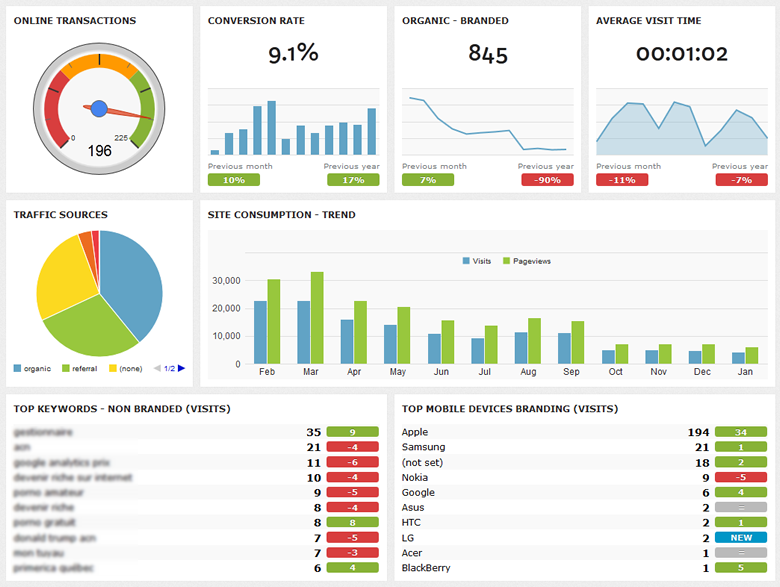
DashThis is an interesting easy tool that brings all your Analytics Data and Social Media Insights to a visually attractive Dashboard. 

It also saves you a lot of time in reports creation.

Moreover, if you are an SEO Agency and needs tailored white-labels reports, you can also create them with DashThis.

Further, you can add a dashboard for your Adwords accounts and see all the needed information from one place. 

The Only Problem with this lovely tool is that it is expensive for all the data it gives you are already free.
For 10 dashboards you have to pay 99$/month and for 100 dashboards you will pay 449$/month.

In Conclusion, if you are a really big agency, you might like it. If not, you can enjoy it during the 15 days trial (but only for 10 dashboards) 

analytics dashboard and reporting
DashThis Dashboard

What are the Best Online Marketing Tools for This Year?


What are the Best Online Marketing Tools for This Year?

If you have made a focus on search engine optimization (SEO) one of your priorities for 2013, then you have a number of possibilities at your disposal for making it happen.  Hiring a professional SEO services company might be your ideal scenario, but the costs may prove to be prohibitive, especially if you are a small business. This doesn't mean you should dismiss the potential to improve your SEO performance. If you are able to give some time to your online marketing, a number of excellent programs can help you to achieve your aims.
We explored some of your options, most of which come with free subscriptions or an option to pay a small fee for much more capability. In addition, we looked briefly at what each one can do, so that you have the best chance of choosing the service, or group of services, that will help you see your SEO performance improve over the coming months.

Google AdWords

The first part of any SEO campaign should be keyword research, and using Google’s AdWords keyword tool is a great place to start to ensure you are targeting the most relevant keywords for your market.

Keyword Spy

This service is excellent for analyzing what your competitors are doing. You can track the keywords they are targeting and even how long optimization efforts appear to have been going on for.
Remember you aren't looking to ape your competitors. See what they’re doing well, and improve on it!

Google Webmaster Tools

Google are not only the kings of search, but also the best place to get advice around building yourself a high performing website. Google’s webmaster tools are a must for many when it comes to the on-going optimization and auditing of a site, providing you with coding suggestions, checking for broken links, and so much more.

SEOmoz

As well as offering some excellent optimization tools, SEOmoz is a brilliant resources website, so even if you don’t use a service make sure you bookmark it for great articles and advice from the word of search.
We’re here to look at the tools, however, and their SEO dashboard is one of the best in the business, perfect for novice website owners and experienced webmasters alike.

Ontolo

Link building is the cornerstone of any successful SEO campaign, and Ontolo is a great tool for helping you to do well in that regard. This tool checks sites against your keywords to discover the best and most relevant link building opportunities, including websites that will be best for you to offer guest posts to.

HootSuite

If social media is part of your SEO campaign – and it should be – then you want a site from which you can manage all of your interests. HootSuite is a great option that supports many social networks, with the premium account options allowing you to produce a multitude of analysis reports.

Google Analytics

We go back to Google for our final suggestion. Google Analytics will help you to track the performance of your SEO activities, and give you an indication of things that are working and what you could be doing better.
Using these tools, even an SEO rookie can quickly get their sites well optimized and moving up the search rankings. Try them out, and see the success they can bring to you.
This guest post was brought to you by the team at Bright Local who specialize in delivering the best SEO tools for businesses.

How to Write a Blog and Also Get it Read! with an Exciting Infographic


Do you know that Shakespeare's Literature became that popular only after 100 years of his death?

Remember that when you write, blog, or even edit any piece of content.

yes i know that CONTENT is THE KING. But a king without subjects and servants worth nothing.
That's why, your content NEEDS to be served well to be treated as a king, assumingly it is a good content of course.

First: Create a Content Creation Strategy for Best Possible SEO:

  1. Strive For Originality and be unique in ideas, style, point of view, etc.
  2. Create Keepers! Your content needs to be served well to worth sharing, bookmarked and even referenced to. 
  3. Present it right, with headings, photos, and videos.and try not to make it too long or too short. 
  4. Create Authority by adding a rel=author snippet to your posts linking to your Google plus Account 


Second: Write What People Want to Read


  • Search Meter is a WordPress plug-in that records all the search terms your visitors are using.  These are all of the queries that people search for with your site’s internal search bar. If you already have  content that people are searching for then make it more visible on your blog e.g. link to it more internally.


  • SEO Search Terms Tagging 2 is yet another way to discover search terms being used to reach your blog.  Once again, it’s useful to have numerous sources of data. The plugin will also add a list of the 10 most recent searches that landed visitors on your site at the end of each post.  I recommend disabling this part of the plugin.  Because a lot of people do NOT disable this part of the plugin, we can use the footprint. A lot of people who allow the plugin to show the most recent search terms sending them traffic leave the default title that appears above the keywords.  This title is “Incoming search terms”. You can use this search string to find more long-tail keywords:

“Incoming search terms” Your Keyword
When you use this footprint along with your keyword you will find blog posts that got traffic with your keyword or similar keywords.  This will help you find yet more ideas for new posts not to mention additional phrases to include and optimize your post with.


  • Using Google Analyics you can see the search terms that are sending people to your site and how much each term is sending. Did you Know: The search volume in Google’s keyword tool is usually wrong.  I have found Google to over-report search volume by up to 75%.  Are you willing to trust Google enough to pursue a keyword that will only deliver 25% of the traffic promised? (You can useSEMRush for free to get different search volume data, and if you have the $, I’ve heard good things about WordTrackerMy point: Instead of trusting it, rely on real data that you are getting.


  • Use Tynt! It’s main functionality is that it turns people who copy and paste your content into link builders.  It does this by automatically adding a link to the pasted content and a short, customizable attribution text.  Tynt gives you a list of queries that sent search engine users to your site.  There are a lot fewer terms, but it helps to get more variation and another source of data. More importantly though, Tynt also shows you keywords that visitors are using to leave your site. 


  • So what People want? what people are Searching for? Use Ubersuggest and it will automatically extract Google Suggest terms for you. Another tool called Soovle.  It’s a lot like Ubersuggest except it also checks the top ten suggest phrases for Amazon, Bing, Yahoo, Google, Wikipedia, and Answers.com. Take these question-like keywords and enter them one-at-a-time into boardreader.com, a search engine for forums. By entering in these queries you can find people discussing these same questions. This will provide further insight into the kind of information people are looking for and will give you many new ideas for blog posts as well.  Also, you can always join the forums and link to a post after you write it for some quick traffic. Topsy is a social search engine. You can use it to find more instances of people Tweeting and discussing your search terms gathered from Ubersuggest. Using Topsy will provide you with a whole host of new, relevant sources of content. Besides helping you better understand what info people are looking for, you may also find some relevant pages to drop a link with a comment or other link building opportunities.

Third: Blog Post Writing Checklist