Showing posts with label Social Media. Show all posts

How to Create Custom Theme for Your Gmail Account


Google's Gmail is one of the most popular email service in the world. It is the free email service from Google. You can also use Gmail as a Web host services. It is giving 15 GB storage space for Gmail and Google Drive. Everyone like custom themes, Gmail provides to you create own custom theme. You can use your favorite photos in Gmail theme.


Step by step guide to How to create own custom themes in Gmail Account.

Step #1

Login Your Gmail Account

Step #2

Click the "Settings" icon Option, then drop down menu appear, after click on Themes

Step #3

Scroll the Theme option page and find Custom Theme

Step #4

Click the Custom Light, then appear Upload dialog box

Step #5

In Upload dialog box, Click on Upload Photos in left sidebar Menu

Step #6

Upload Your Photos and Select background image

That's it. Your Gmail background Image Theme will be changed.

How to Delete All Skype Chat History In Windows XP


Skype is the most popular video calling and messaging app.  It becomes a must have the Skype app for every users with friends, family member, clients and for professional purpose. Skype is available for most of the all platform. Every Windows XP users like to have Skype installed on their computer. Every thing is good at  Skype, but no option to delete the all Chat history and call history. It is serious about your privacy because Anyone can easily see you chat and recent call history.


Step by step guide for how to clear chat and call history from Skype

Step #1

Login Your Skype Account

Step #2

In the Top Menu >>Tools>>Options

Step #3

Left Sidebar Panel Click on Privacy Settings, then Click on Clear history button

Step #4

After that Confirm dialog box appears that you want to clear chat history. Click the Delete Button

How to Make Embed YouTube Video Responsive


Using Embedded Video Responsive is simple. You will first need to find what you are embedding video. You need the simply copy of the URL of embedding video.In this article, We will show you how to make YouTube videos responsive in your site, using simple CSS.

YouTube Embed Code

Paste the Embed Code into your web page.

Change Embed Code

Add div around the Embed code.

CSS

Paste the CSS Code in your Stylesheet
Your embed YouTube videos will be fully responsive.

How to Protect Your Facebook Account From Hackers


Then you wake up in the morning, just to find that you couldn’t log on to Your Fb account. While you are just thinking about the reason for this Problem, someone guy misuse of  your fob account. How do you protect your Facebook account cyber criminals. I am giving to you 5 simple steps for protecting your Facebook account.

Steps #1

 Don't share your passwords with any person, including your Fb account.

Steps #2

 A second precaution that you are going to do is to enable security Fb has Already added for you. One of the things that many people don't know is that Facebook provides to you many ways that will help to make your account secure.

Steps #3

Third is Don’t get your news feed flooded with dutiable links. You don’t click on links of games, apps, and others advertisement that you are not sure of. If you are not using apps, it’s better to remove those apps.

Steps #4

Change your Facebook id, password after a few days.

Steps #5 

You must log out to your Facebook account, when you don't use it.

So these are some of the steps we can help to protect our Fb account from hackers and cyber criminals, some of these processes can also Be used to prevent other accounts. I Hope this article has been helping to you guys,

Top Free Essential SEO Tools For Mobiles


Top Free Essential SEO Tools For Mobiles 2012
Top Free Essential SEO Tools For Mobiles 


by Mina Adly Younan 

The growth in mobile browsing has been incredible over the past year. With nearly half of UK smartphone owners using their mobiles to browse and research products and Mobile Search accounting for an impressive 12% of all UK search clicks in December 2011 (Marin Software, 2012). Morgan Stanley Corp. have also found in a recent study that Mobile traffic is expected to surpass desktop traffic by 2015 as shown in the graph below.  For a website to remain its high ranking on search engines (Google) should do all needed efforts to make their mobile versions as friendly and functional as possible.
In doing so, webmasters will need the following Top Free Essential SEO Tools for Mobiles:

1- Mobilize your Site () : see how your current site looks in mobile, and find resources for building your mobile site.

2- Our Mobile Planet ():  View data about mobile users that Google has gathered. Select your key demographic and other potential customers, and view key differences.

3- Mobile Meter () gives an overview of how your site looks and performs on a mobile.

4- Google Adwords for Mobiles:  It is the same Adwords tool used for desktop searches. It gives a guideline on the monthly volume in searches. The tool can also show data for searches on mobile devices.  To do so, select ‘advanced options’ > ‘show ideas and statistics for’ > and select ‘mobile’.
Local search trends can be added to see seasonal fluctuations or if keyword searches are increasing in volume. Select columns and ‘local search trends’. This will show a simple bar graph, but if you download the data it will give some figures over time.

5-PageSpeed Insights (): test speed from both a desktop and mobile perspective. Very useful to see where the easiest performance improvements can be gained in terms of download speed. As site speed is considered part of Google’s algorithm, fixing issues could result in a real impact on mobile search positions.

6- Google Webmaster Tools for Mobiles:  It is the same Google Webmaster tool as it can also check mobile sites setup and investigate any performance issues or poor search results. Additionally, if you redirect mobile users to specific mobile versions of your URLs, then Mobile Sitemaps can be added in Google Webmaster Tools.

7- Mobilize your Business with Google Sites (): Build a test or mock up and see how it performs. The tool have different templates for several types of landing pages.

8- Google Mobile Ads (http://www.google.com/ads/mobile/): Although it is a PPC tool, it can be used to find a lot of potential methods to look at that can drive traffic to your mobile landing pages using mobile ads like:
·         Phone numbers in ads using ‘click-to-call’,
·         click-to-download
·         Mobile Ad Sitelinks
·         Seller Ratings
·         Location Extensions (Multiple Addresses too!)
·         Location Targeting

9- Speeking of PPC, there is of course there the AdMob that is now owned by Google 


10- Google Analytics for Mobiles (): The same Google Analytics for Desktop could be used for mobile browsers so that you can easily find out which mobile devices are working well, and which need optimization by asking the right questions like: Is some content getting a lot of mobile traffic but performing relatively badly? Can a page be optimized to generate more phone call leads? Which content drives more local mobile users? It is even possible to hook Analytics up to track downloads of mobile apps.


Email Marketing Tips Newsfeed


Can You Have More Sales, Too?

Helping over 120,000+ businesses like yours raise profits and build customer relationships using AWeber's opt-in email marketing software for over 10 years.


Take a Free Test Drive today!


Women VS Men in Social Media Infographic


When it comes to Social Media (Facebook, Twitter, Google Plus, YouTube, and even LinkedIn), Men and Women are not alike. Here is an exciting infographic I found on the battle between sexes in the Social Media World. Enjoy!


Top Free and Paid Live Chat Support Providers for SEO and User Experience!!


By now you must be sure that SEO is mainly about the user experience. And what is a UX without actual human interactions? AKA: LIVE CHAT SUPPORT?!

If you want a cutting edge website with an unbeatable user experience, you might think of including a live chat support to your pages. If you have a busy and active website with many clients and visitors with inquiries, you may think of hiring someone to provide your clients with a decent customer support and boost your sails and retain your customers. And if you have a small business and you do not want to spend money on hiring someone, why do not you setup the live chat support snippet on your site and have it minimized on your computer and whenever a new visitor pops you up with a question, you can simply take it if you are available. You can also set specific times and days to provide such service.

You can leave a message like that: "NOTE : We are available online from 11 AM to 5 PM. If you have any sort of question regarding our services, you are most welcome to inquire your quarries with us. But if icon says we are offline, then please do not leave a message offline or use this icon to send us message. If you want to send us any sort of message use “contact us” icon listed on top menu of site or click here to leave a message. "

It is easy, professional, and will definitely add a lot to your site's SEO and UX


List of Top Free Live Chat Support Providers:

List of Paid  Live Chat Support Providers:

The List from Woorank Blog 

Let your users log in with their existing social account from Facebook, Google, Twitter, Yahoo and over 20 more!


LoginRadius is a simple Social media tool with plugins for almost every type of CMS.
It enables social login on a website letting users log in through their existing IDs such as Facebook, Twitter, Google, Yahoo and over 15 more!

This plugin not only eliminates the long registration process of filling up form and verifying email ID but also saves the user from remembering another set of username and password. So, the users are just one click away from logging in to your website. Along with Social Login, LoginRadius plugin also provide features like Social Sharing, User Profile Data and Social Analytics.


Sell Twitter for Local Business - Sales Material infographic


Some inspiring and compelling Twitter Headers for Local Business 


Source: 

10 Compelling Local Business Twitter Headers


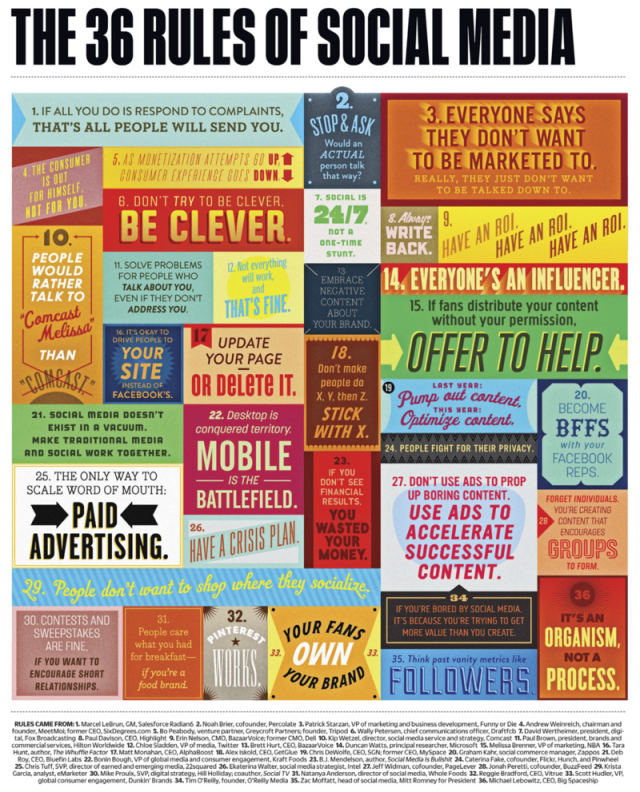
Community Managers Bible (Another Infographic)


How about one infographic (colorful illustration) with all the basic Rules you need to know as a Social Media Marketer or Community Manager.


Social Media Cheat Sheet - Infographic


Reddit Secret Plan for World Domination - Presentation


It's amazing to see how the Ugly looking Social Media Cat "reddit" is getting 5 Billion Visitors in 2013. Being the fastest growing social space in America, it's also one of the most influential.

Enjoy! this SlideShare Presentation


Today I Learned: How to add Google+ Comments to My Blog


Google+ Comments is an alternative to the default commenting system on Blogger, available to blog authors who have upgraded their Blogger profile to Google+. Google+ Comments lets you bring the following conversations together in one place, right under your blog post:


  • Comments made on your Blogger blog post
  • Comments on the blog post that you’ve shared to Google+
  • Shared content on Google+ that links to your blog post
  • Readers will need a Google+ page or profile to comment on your blog.


Features of Google+ Comments

Google+ Comments look similar to traditional Blogger comments, but have some important differences. For example:


  • When you leave a comment on a blog, you'll see the option, checked by default, to also share that comment to Google+.
  • Google+ posts that link to blog posts will show up as a comment underneath those blog posts
  • If original comment is shared to Google+, replies to the comment on the blog will show up in Google+ and vice versa, but only to the people that the original comment was shared with
  • If a comment is not shared with the blog author, the blog author will not be able to see the comment in either location
  • As the author of a post, you’ll receive Google+ notifications when readers comment on or share your blog post.


Here is How to add your Google Plus Comments to Your Blog


  1. Sign in to Blogger
  2. Click on the “Google+” tab in your blog’s Dashboard
  3. Upgrade to Google+ if you haven’t already done so
  4. Enable Google+ Comments. Comments already made on your posts will keep working in the new widget.


How to Associate your blog with your Google+ profile?


If you blog under your common name (eg. “Jane Smith’s blog”), you’ll find that associating your blog with your personal Google+ profile may increase your blog’s discoverability and make it easier to form communities with other bloggers and readers.

When you link your blog to your Google+ profile, you can share posts directly from Blogger to your personal stream.

You can change your blog’s association with your Google+ profile to an association with a Google+ page via the Google+ tab on Blogger.

Associating your blog with your +Page

If your blog is a brand (eg. “The Coffee Bar”), you can link your blog to a Google+ page. By creating a page for your blog you’ll find that linking your blog to your Google+ page may increase its discoverability and make it easier to form communities with other bloggers and readers.

When you link your blog to your Google+ page, you can share posts directly from Blogger to your page. If you associate your blog with a Google+ page, any Blogger gadgets that originally pointed to your Google+ profile will then point to your Google+ page. The same is true if you switch from a page to a profile.

If your blog is currently associated with a page, and you would like to link it to your Google+ profile or another page you own, you can do so via the Google+ tab on Blogger.

Blogging under your Blogger display name

If you don’t want to connect your blog to Google+, you can still continue to blog under your Blogger display name. Remember that you can have a Google+ profile or page even if you choose to have a Blogger display name -- the difference is that the two won’t be linked externally.

Advanced SEO techniques for e-Stores (infographic)


SEO techniques and Best practices for e-commerce and online Stores


  1. Use the semantic mark-up (rich snippets) to identify the specific content of the leaf and immediately give the user, since the SERP, information about the content of the ad, therefore maximizes the chances of clicks useful.
  2. If an item is no longer available instead of sending the user to a page completely useless, create a special that gives an indication of the possibilities offered him, maybe similar products or other alternatives. 
  3. Feedback: the ratings are low and you do not even produce them, will be the users will do it for you. Certainly will not be optimized, but since people are talking about naturally, most of passage.
  4. Use the filters and the pages tag: optimizes only the first page-level tags and filters, so as to avoid duplication
  5. Fill in the title: use generic keywords monetization. A good title can be: price / review / sale / Economic + product name.
  6. Geolocation allows not only to succeed in the SERPs, but also with users. If I live in Italy, even if I buy online, I will hardly offered in America. This speech is even more important when it comes to a store that sells both online and live. The watchword today, thanks to the development of the mobile is geolocation.
  7. Recent additions to the homepage post a direct link to the new arrivals. A user who frequently visit your site or search the news would appreciate because they do not have to dig into milel categories and filters to find new products.

Also, Do not forget:

  1. Pagenation
  2. Using USPs (Unique Selling Propositions) 


Newsletter Creator For Blogs: Chrome App


Use your blog to Create a Newsletter in Minutes:

With Chrome Clipper (News Letter Clipper/ Newsletter Creator by FlashIssue) You can Create newsletters and send them out through Gmail or to your mailing list (like Mailchimp).

Use the Clipper to save web articles as you browse and then create a newsletter:

Use with Gmail:
  • Compose a personal email newsletter
  • Select your clippings
  • Send to your contacts
  • You never have to leave Gmail.

Use with your external mailing lists:
  • Login to the FREE FlashIssue web app (app.flashissue.com)
  • Build newsletters from your clippings
  • Upload a mailing list
  • Or send to a list you already have with an email service provider, Mailchimp or Constant Contact.

Great for:
  • DIY marketers, bloggers, sales people, business pros, CEO’s & managers, entrepreneurs, & consultants

You can use the Chrome Clipper without creating an account. Install it now and create a newsletter to send with Gmail.


Social Media Strategy To Promote An Event


 1- Create Video People Will Share

Creating a stellar video with great visuals and sound can not only help drive people to your event, it also increases the chances people will want to share it with friends.


2- Giveaways to Heat things up

Nothing motivates people more than the opportunity to win something free! So why not give away a ticket or two for your event to really amp up the buzz? Contests and Free Stuff provide a rapid way to generate interest in your event.


.

Here are some tips on contests:

  1. Recruit judges who will help extend the reach of the contest.
  2. Keep the requirements super-easy to maximize participation. For example, a simple one-click tweet to enter is ideal.
  3. Run your contest at a time that will be helpful to your sales cycle.
  4. If you have a podcast, consider creating a special episode explaining the contest.

3- Add social proof to your paid Google ads.

You can add social proof to your Google ads by going under Ad Extensions and selecting Social Extensions from the drop-down menu.

4- Create a “Group Tips” Blog Post

Chances are you have great insight locked inside the minds of your event speakers. Why not pool that knowledge into a great blog post?
This is where you ask experts to contribute a short writeup on their favorite tip, tool or perspective on a specific topic. These types of articles are a great way to involve the experts and they provide ongoing exposure for your presenters.
  • Top 20 Social Media Engagement tools
  • Social Media Trends for 2013

5- Create a Special Graphic for Your Speakers

Add a photo, a teaser, event details, and of course a call to action

6- Create a Tweet for Attendees

If people are excited about attending your event, why not ask them to click a button and tell their friends about it?
This is something easy that you can place on the “Thanks for Registering” page.

7- Add a Twitter Widget to Your Event Page

If people are talking about your event on Twitter, why not take advantage of that social proof to encourage new site visitors to attend?

Twitter has a cool widget that scrolls all the tweets for you.
The great thing is you can include OR exclude Twitter search terms using Boolean logic.

NOTE: This Twitter widget code is hard to find, so I’ve included it below. You can customize the red text and paste it into your site.

Here is the code:


<script src=”http://widgets.twimg.com/j/2/widget.js”></script>
<script >
new TWTR.Widget({
version: 2,
type: ‘search’,
search: ‘#themobilehub.blogspot OR #HRSEO OR “Have Results Gathering” -sing’,
interval: 6000,
title: ‘Buzz About HAve Results Event’,
subject: “,
width: 300,
height: 200,
theme: {
shell: {
background: ‘#8ec1da’,
color: ‘#ffffff’
},
tweets: {
background: ‘#ffffff’,
color: ‘#444444’,
links: ‘#1985b5’
}
},
features: {
scrollbar: false,
loop: true,
live: true,
hashtags: true,
timestamp: true,
avatars: true,
behavior: ‘default’
}
}).render().start();
</script> 


8- Create an Event on Facebook

A Facebook event listing provides an easy way for attendees to share your event with their friends. Each time someone shares that they are attending your event creates the potential to drive more people to your Facebook Page.

A Facebook Event Page is also a channel for asking questions, providing an alternate means of customer service. You can also @tag event names in your Facebook Page updates.

9- Utilize Facebook’s FBX Ad Targeting

Facebook allows advertisers to remarket to people who have visited specific non-Facebook Pages using Facebook Exchange, also known as FBX ad targeting.
This means you can show event ads to Facebook users who visited your Event Page but did not purchase. This can be a very economical way to retarget possible prospects.

10- Create a Dedicated Page for the event.

A dedicated page for the event is like a movie page. It has all the details about the events and of course it should carry the event’s overall theme and feel. So, don’t be satisfied with just a page or an ad on your company’s website. An event needs a page and a search engine optimized content (Blog) 


Resources: 


Why having a Blog is Good for SEO?


If you need more traffic, more visits, returning visitors, and more online exposure, you will need content. A fresh and growing content means a Blog.

But having a blog has many other benefits like:


  1. A blog shows visitors that you know you understand your industry, market, and business.
  2. Having a Blog shows how generous you are sharing information with others.
  3. Blog posts are link baits. People will like your post, and link or refer to it.
  4. Blog posts are shared on Social Media
  5. Blog Posts when lined to Google Plus Profiles will increase CTR (Authorship Semantic Markup)
  6. You will own your content and have it all archived (indexed) for a long time.
  7. You can create “How to guides” posts for you products.
  8. Blog posts can serve as a channel for Customer support.
  9. Blog comments are free feedback.
  10. Blog insights are free market insights
  11. Blogging is marking your online territory. “I Blog therefore I am… Online”

search engine google robots crawling

Facebook Power Editor Guide For Chrome


FaceBook Power Editor is Google's Adwords Editor but even more Powerful.
Power Editor is a new, complimentary tool that replaces and enhances the capabilities of the Bulk Uploader . For businesses who manage multiple campaigns with a large number of creatives, or who currently use Bulk Uploader, Power Editor should lead to major improvements in efficiency by making it easy to create, edit, manage and optimize ads and campaigns in a bulk manner, even across a large number of different ad accounts.

key Benefits of Power editor:

Save time by mass-editing ads across campaigns and accounts and bulk-creating ads Optimize from within the tool itself by sorting ads by key stats and performance Compatibility with Excel: Save time by copying and pasting ad and campaign data from Power Editor to Excel, and vice-versa Smoothly transition from Bulk Uploader due to backwards-compatibility with that tool.


Facebook Conversion Tracking and OCPM for Direct Response Advertising


Last month, Facebook launched a new conversion measurement and optimization system for direct response marketers. Facebook conversion measurement allows advertisers to measure the ROI of their Facebook ads by counting relevant user actions, such as registrations and shopping cart checkouts that are driven by people seeing an ad on Facebook.

What is Facebook Conversion Tracking?

Conversion tracking helps businesses measure the return on investment of their Facebook Ads by reporting on the actions people take after viewing those ads. Advertisers can create pixels that track conversions, add them to the pages of their website where the conversions will happen, and then track these conversions back to ads they are running on Facebook. Conversion tracking also helps businesses leverage optimized cost per impressions (oCPM) to show ads to people who are more likely to convert off Facebook.

What are Facebook Conversions?

A conversion is an action that a person takes on a website such as checking out, registering, leads, Key page views, adding an item to the shopping cart, or viewing a particular page. Virtually any page on a website can represent a conversion. Facebook tracks conversions that happen within 1 day, 7 days, and 28 days after a person clicks on an ad, and 1 day, 7 days, and 28 days after viewing an ad.

Benefits of Facebook Conversion Tracking and OCPM:

Optimized CPM (OCPM) and Conversion Tracking tools are not only used to measure the ROI from Facebook PPC advertising, but are also used to deliver ads to people who are most likely to convert on their websites. Facebook’s Beta tests have shown that when conversion measurement is used with optimized CPM, ads reduced the cost per conversion by 40 percent when compared to CPC ads using the same budget. That is extremely valuable for marketers in e-commerce, retail, travel, financial services, and other direct-response industries that value actions taken on their websites.


How it Works?

Facebook ad manager will monitor which ads are generating more conversions and which users are more likely to convert from specific ad copies (e.g. Ad X drove Y sales). Then you can increase the CPC (or CPM), optimize the conversions page, adjust the ad copy, or even change the marketing strategy.  

OCPM conversion tracking facebook