Showing posts with label Cost-Per-Click. Show all posts

How OutBrain Amplifying Content Works?


Dreaming of seeing your article featured on the CNN, USA Today, NY Times, or many other big names?

Outbrain.com for amplifying content is offering an exciting PPC advertising method, not for ads like Google, Microsoft, and yahoo are doing, but for actual content titles.

So, how does Outbrain works?  


Here is what they say about themselves:


Outbrain is the only content discovery platform dedicated exclusively to the distribution of high-quality content.
With Outbrain Amplify, links to your content appear as recommendations on the web's largest content publishers including sites like Wall Street Journal, Reuters & People.com.
Plus, Outbrain optimizes on engagement so the more interesting your content and the more traffic you drive, the more you will be recommended around the web.


Email Marketing Tips Newsfeed


Can You Have More Sales, Too?

Helping over 120,000+ businesses like yours raise profits and build customer relationships using AWeber's opt-in email marketing software for over 10 years.


Take a Free Test Drive today!


Traffic Generation Strategy for Websites:What I learned from 5 Years of SEO


I asked myself what 5 years of experience in SEO has taught me to answer this Ultimate Question: 

How to Generate Traffic To a Website? 

To generate Traffic to any website, that is of course offering a good fresh and uniqe content, one needs to invest in:
  1. Onsite SEO
  2. Offsite Seo
  3. Social Media
  4. Link baits
  5. Traffic bank
  6. PPC and PPM for a specific Exact Match List of Keywords and Placements
  7. Brand Reputation Management (BRM)
  8. Monitoring and Analysis

1- OnSite Seo Tactics:

The Onsite SEO tasks vary between already developed and running websites and New Websites that have not been created yet. But the first thing that should be studied before doing anything is to identify a List of the Strategic Keywords and Phrases.

For Old Websites we need to fully audit the website and make a list of all onsite tasks to fix with the help of the website developers. These tasks include but are not limited to:
  1. Sitemap
  2. Broken Links
  3. 404 Navigation
  4. Site speed
  5. Meta tags (Titles, Description, Headers, URLs, Alt image, Microformats, etc.)
  6. Interlinking (and Anchor text)
  7. Mobile Optimization and Responsive Design
  8. Social Media buttons
  9. RSS feeds and newsletter subscriptions
  10. Contact us page (for Local Business)

 For new websites, the developer should have the previous list to make sure that the website is SEO’ed then whoever is responsible of the website content should create it witrh respect to the Meta Elements.

2- OffSite SEO Tactics:

A dedicated Team or member should manage the website Seo through “submissions”:
Such Submissions should be natural and only through sites with quality pages and high authority.
Types of Submissions are:
  1. Article Marketing (Eg: Alltop, technorati, Ezinearticles, Squido, etc.)
  2. Video Submissions( Eg: YouTube, Vimeo, metacafe, TubeMoguletc.)
  3. Infographic Submissions
  4. Wikis and How To sites
  5. Directories submissions (with PR 3 at least)
  6. Forums participation
  7. 3- Link Bait
  8. It is simply about creating that kind of content that other blogs or sites like to share like:
  9. How To articles
  10. Guides
  11. Top lists
  12. Trends
  13. infographics
  14. Short Animated Videos
  15. Reviews
  16. Comparisons

4- Traffic Bank:

Investing in a traffic bank is a must do strategy for any online agency. Such bank is simply a network of websites or even a Big website that is well-invested in through content, design, and advertising (online and offline).
This website (or network) will be used to support new products and clients through mentions, ads, blogs, or links. Ergo, drive them direct organic traffic.


5- Social Media

Social Media is divided into three main tactics:
  1. Social Bookmarking submissions; which is the same task done in offsite seo bu on Social bookmarks like Reddit, Pinterest, stumble upon, delicious, dig, tweetmeme, friendfeed, diigo, scoop it, Socialmaker, etc.)
  2. Community Management: A community manager is an online representative who comes with ideas, games, competitions, promos, new catchy stuff to share, to grab the social media fans to the page and make them interact. Such a representative will be a trusted source of information and can easily drive traffic to new content pages.
  3. Social Channels Update: It should be out of question that any created content should be live on the main social media channels (facebook, twitter, Pinterest, Google Plus, and Tumblr) either by an individual or automatically through RSS.

6- PPC and PPM

Although Pay per click and Pay Per impression is money consuming but if it is done wisely, it will be profitable. The best way to do it if you don’t have any special events or products is to select a very narrow set of keywords and placements (websites ad spaces) and target them. Try to be noticed every now and then.  

You do not necessarily have to use Adwords or Bing Ad Center, there are tons of other Ad servers, or you can even contact any website and have your banners on their pages for weigh less than you will pay for Google and Microsoft)

Use Remarketing and Ad Exchange, if you are selling products and want to target clients who have visited you before and showed some interest in your business.

Investing in Press releases also pays off. So, when you have a valued content don’t hesitate to let the Professionals talk about it (there are PRweb, market wire, etc.)

7- Brand Reputation Management

Finally, you cannot run an online Business without BRM.
  1. Add a review to your site, service, or products
  2. Watch out your mentions on search engines and Social media through Brand Monitoring (there are tens of tools to do that)
  3. Watch out your competitors mentions and don’t let them grab more attention over you.

8- Monitoring and Analysis:

All the Above efforts will cost you a lot of time and money and you need to know which tactic is profitable to you and which is not? Which channel is driving traffic, leads, or conversions, and which are blocked? And above all, which properties (sites) you have deserve to be maintained and which need to be executed to focus on more valued one.


How to Calculate your ROI for Online Advertising campaigns?


3 Years ago, a Sales Manager at Google Adwords, and a friend too, told me if you know the power of Online Adverting, you will keep your campaigns "Always On". Because if for every 1000$ you pay on advertising you gain 1300$ revenue, then why limit your budget if profit can be unlimited?

So, to be more convincing we need to Calculate the net profit by subtracting your costs from your AdWords revenue for a given time period. Then divide your net profit by your AdWords costs to get your AdWords ROI for that time period. 

Here's an example:
($1300               -
$1000)        /
$1000        =
0.3
Your revenue (measured by conversions)
Your overall costs
Your AdWords costs
Your ratio of profit to advertising cost is 30% -- this is your AdWords ROI.


always on marketing


Sometimes your ROI may require a different formula. For example, if you're interested in calculating the ROI for a page view or lead, you'll have to estimate the values of each of these actions.

A Yellow Pages ad for your business may cost $1000 per year and result in 100 leads. Ten of those leads become customers, and each customer provides a net profit of $120, after taking your business costs into account. So the value of each lead is $12 ($1200 net profit/100 leads), and your ROI for the Yellow Pages ad is 120% ($1200 net profit/$1000 advertising cost) x 100.
Here's the formula used in this example: (Total revenue - Total cost)/Advertising costs x 100 = Advertising ROI %

A simple alternative to estimating values for your leads and page views is to use a cost-per-acquisition (CPA) measurement. Acquisitions are the same thing as conversions: they're actions your customers take that you think are valuable, such as completing a purchase or signing up to receive more information.
Using this method allows you to focus primarily on how your advertising costs compare to the number of acquisitions those costs deliver. Using the Yellow Pages example again, your ad may cost $1000, resulting in 10 sales. So your CPA for that ad is $100. Here's the formula for CPA: 

(Costs/Sales) = CPA

Your CPA shouldn't exceed the profit you made from each acquisition. For your Yellow Pages ad, the CPA is 20% less than the profit the acquisitions provide.

Formula to calculate Cost Per Acquisition

Cost Per Acquisition (CPA) is calculated as:

ad campaign cost/[number of impressions x CTR x CR]. 


Example: an advertiser pays a CPM of $10. For 20,000 impressions the advertiser has 5 percent click-through rate (CTR) to the landing (destination page). 30 percent of those 5 percent convert to paying customers(CR).

The calculation is: ($10.00 * 20,000Impressions / 1000)/(20,000*0.05*0.30) = $0.67. That is, the cost per acquisition is $0.67.

See Also:

All Keywords Match Type Generation Tool for Adwords and Adcenter


Yesterday I stumbled upon a simple, yet handy, Keyword tool for PPC campaigns called Keyword Wrapper.
You insert a list of all your keywords as a broad match type and you hit "wrap". The tool will generate 4 lists of keywords with all the match types. (Phrase, exact, and Broad Match Modifier).

Here is how it looks like:


keyword wrapper tool screenshot

A Simple Way to Write Effective Ad Copies


  • Headline – Use your main keyword
  • Line 1 – Promote a benefit
  • Line 2 – Show your USP (unique selling proposition)
  • Display URL – Use Capitalization in your domain & add your keyword after the /. You can also remove the www from the Display URL if you need the extra room.


A Simple Way to Write Effective Ad Copies

What to Check in an Adwords PPC Audit? And How to Manage Adwords?


What to Check in an Adwords PPC Audit? And How to Manage Adwords
If you want to audit an Adwords account for your company or for a client there are some areas, or if you want to manage a currently running account, there are few areas that most people skip , but managing them will increase your accounts efficiency, increase your Quality score and ad rank and decrease your cost per click.

1- Search Terms A Gold Mine

You may have added a long list of keywords to your ad groups (let’s say 1000 keywords for all the campaigns) and you left them running for a couple of weeks, your audience will trigger your ads with different keywords variations (about 100,000 variations). So, do you know where these variations are? And what to do with them? Go to the Keywords tab, selected click “See search terms” and select ALL.

This will show you the actual keywords your Ad is being shown for, their CTR (click through rate) and even conversion rates (if you set the conversions tracking).
This report is highly important because you might think that your conversions are coming from specific keywords, but running this report will show you that actual conversions were coming from more specific variants of their main keywords. Once you identify these keywords you have to either add them to their right ad groups or create new campaigns (or ad groups) for them.


2- How long is your Negative Keywords List?

After you run your report, scan the keyword list it gives you for phrases that don’t match your product or business. Add those keywords as a negative search term for that Ad Group or Campaign.

3- Use Match Type to separate Important Keywords

If you have specific ad groups for brand keywords, competitors, industry related keywords, strategic exact match keywords, etc. you may need to exclude all the targeted keywords in one ad group from the rest ad groups to be able to know precisely how your keywords and ad groups are performing. For example, if you have an ad group for your exact match keywords [buy Samsung S4 online] and [buy iphone 5 online] you will have to add these phrases as negatives to the rest of your ad groups. Or if you have an ad group for your competitors, you will also add them as negatives to the rest of ad groups keywords lists. But be careful with this method because you might add a very important keyword as a negative keyword in a top campaign level without adding it as a positive keyword in the right place. If you are not sure of what you are doing, it is not important to use the above method as it won’t affect your campaigns performance. It is only helpful if you are savvy for accurate data.

4- Use Tightly Themed Ad Groups

When you start a new Ad Group Do Not Overload it with Keywords! This is a major mistake that many people make. You need to keep your Ad Groups very targeted.

  • Digital Cameras
  • DSLR Cameras
  • Compact Cameras
  • Telescopic Cameras

Those should be 3 unique Ad Groups. Resist the urge to pile them into one Ad Group because they are all cameras.

5- Play with the Quality Score rules:

If you do not have Quality Score enabled, click on the Keywords tab and select Columns. Make sure the Quality Score is checked. Try to get 7/10 and above for all your keywords. Try to improve any score lower than a 7 and anything lower than a 5 is a serious issue.
Usually Quality Scores can be improved simply by doing a better job of grouping your keywords and writing ads with the specific keyword appearing in the ad at least twice.
If you are doing that and still getting a low score it could be that your CTR is too low or your landing page needs to be more relevant for that keyword. As a last resort simply delete the problem keyword. This is much easier to do if it is a low traffic keyword to begin with.
Sometimes Google will give you a low Quality Score for seemingly no reason at all. You may think you are doing just about everything right and still get a lower Quality Score. In these cases you may want to use a high Quality Score broad match or phrase match keyword combined with a HUGE list of negative terms to get Google to mainly only show your ad for the keyword you’re having issues with. Hopefully you will not have to go to that extreme.


7- Split Testing

You need to be split testing ads against one another. Every Ad Group you have should be running at least two variations of an ad at all times in an effort to find a better performing ad.
However, after you have been split testing ads for a while you will find it harder and harder to beat your best ad. This is where split testing can actually hurt you because 50% of your clicks will be going to an underperforming ad.
The solution is to duplicate your best ad 3 times (or more) and run it against 1 copy of your new ad. This will keep your CTR steady while you test. You can play with the mix to get a percentage you are comfortable with.
Remember to go into your campaign settings and set your ads to rotate more evenly so you can get an accurate split test.


Source: 10 Details Tips for managing Adwords campaigns 

Advanced SEO techniques for e-Stores (infographic)


SEO techniques and Best practices for e-commerce and online Stores


  1. Use the semantic mark-up (rich snippets) to identify the specific content of the leaf and immediately give the user, since the SERP, information about the content of the ad, therefore maximizes the chances of clicks useful.
  2. If an item is no longer available instead of sending the user to a page completely useless, create a special that gives an indication of the possibilities offered him, maybe similar products or other alternatives. 
  3. Feedback: the ratings are low and you do not even produce them, will be the users will do it for you. Certainly will not be optimized, but since people are talking about naturally, most of passage.
  4. Use the filters and the pages tag: optimizes only the first page-level tags and filters, so as to avoid duplication
  5. Fill in the title: use generic keywords monetization. A good title can be: price / review / sale / Economic + product name.
  6. Geolocation allows not only to succeed in the SERPs, but also with users. If I live in Italy, even if I buy online, I will hardly offered in America. This speech is even more important when it comes to a store that sells both online and live. The watchword today, thanks to the development of the mobile is geolocation.
  7. Recent additions to the homepage post a direct link to the new arrivals. A user who frequently visit your site or search the news would appreciate because they do not have to dig into milel categories and filters to find new products.

Also, Do not forget:

  1. Pagenation
  2. Using USPs (Unique Selling Propositions) 


Google Display Network and Bing Content Network Media Buying


If you want to Buy Placements on Specific websites, you should master both Google Display Network (GDN) as well as Bing Content Network (because you do not want to miss sites like (Journal, CNBC, and FOX Sports.)

But since both Google and Microsoft are Rivals, you will find some differences between the two giant networks. Here is a comparison between the two of them:


If you know exactly which websites you’re targeting, and even which ad unit within that website your banner will be, then you’re going to be better off than the hordes of advertisers who blindly release their banners into the Display Network like a pack of hound dogs


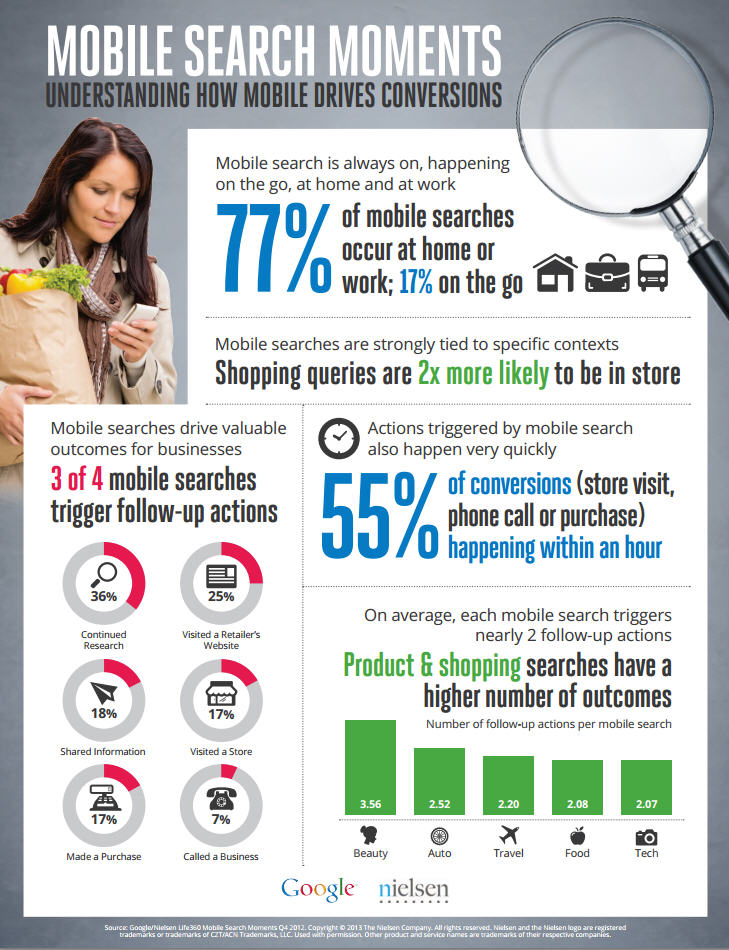
Conversions from Mobile Search: New Research - Infographic


Google and Nielsen have conducted a new research that all marketers should consider seriously:

77% of mobile searches happening at home or at work

and half of mobile search conversions happen in one hour

Facebook Conversion Tracking and OCPM for Direct Response Advertising


Last month, Facebook launched a new conversion measurement and optimization system for direct response marketers. Facebook conversion measurement allows advertisers to measure the ROI of their Facebook ads by counting relevant user actions, such as registrations and shopping cart checkouts that are driven by people seeing an ad on Facebook.

What is Facebook Conversion Tracking?

Conversion tracking helps businesses measure the return on investment of their Facebook Ads by reporting on the actions people take after viewing those ads. Advertisers can create pixels that track conversions, add them to the pages of their website where the conversions will happen, and then track these conversions back to ads they are running on Facebook. Conversion tracking also helps businesses leverage optimized cost per impressions (oCPM) to show ads to people who are more likely to convert off Facebook.

What are Facebook Conversions?

A conversion is an action that a person takes on a website such as checking out, registering, leads, Key page views, adding an item to the shopping cart, or viewing a particular page. Virtually any page on a website can represent a conversion. Facebook tracks conversions that happen within 1 day, 7 days, and 28 days after a person clicks on an ad, and 1 day, 7 days, and 28 days after viewing an ad.

Benefits of Facebook Conversion Tracking and OCPM:

Optimized CPM (OCPM) and Conversion Tracking tools are not only used to measure the ROI from Facebook PPC advertising, but are also used to deliver ads to people who are most likely to convert on their websites. Facebook’s Beta tests have shown that when conversion measurement is used with optimized CPM, ads reduced the cost per conversion by 40 percent when compared to CPC ads using the same budget. That is extremely valuable for marketers in e-commerce, retail, travel, financial services, and other direct-response industries that value actions taken on their websites.


How it Works?

Facebook ad manager will monitor which ads are generating more conversions and which users are more likely to convert from specific ad copies (e.g. Ad X drove Y sales). Then you can increase the CPC (or CPM), optimize the conversions page, adjust the ad copy, or even change the marketing strategy.  

OCPM conversion tracking facebook


Interactive Images Advertising for Publishers with Luminate


If you have an active website with pictures (photos) more than text content, and you choose to monetize these images, "Luminate" systems will review them and match the image to compatible advertising campaigns running.

Overlay advertising is available for all approved publishers and if your site generates a large amount of traffic, Luminate will contact you directly to set up Luminate premium advertising where their team of experts will tag products in your pictures.

The Luminate icon alerts consumers that an image is interactive. Consumers can access relevant content just by mousing over an image.

To set up the Luminate Image App Platform on your site, simply add one line of JavaScript to all pages that have images you would like to turn interactive. Within minutes of adding the code, the Luminate icon and sharing app will appear. You can then add additional apps, including apps that help you monetize your images, by visiting the app store.


Should I add and pay for my Brand name Keyword on a PPC Campaign?


What does it mean to have a PPC Campaign and you are already on top of Google's SERP?


Two reasons:

1- You don't want your competitor to take your name and fill your ad space
2- You want to cover the SERP with your presence 


Check this amazing example!


How to sell SEO Services to Hard Clients?


If you are a sales executive or a business Development Specialist, or an SEO consultant working for an Online Marketing Agency, you might have met that savvy client who has SEO background and cannot accept your “we will make your site better” speech, but needs professionally explained procedures and techniques without being too jargoned at the same time.

The language of an SEO consultant is different from that of the business decision maker buying SEO services. To more successfully sell SEO services, consultants can become more fluent in both languages. More directly addressing the points above will curry favor with business decision makers and likely result in more, and higher value, sales.


Hence, here are some statements, I read in article, you might hear from hard clients, when you are approaching them with your sales proposal or during your presentation’s meeting, to put in mind doing your SEO Sales Pitch


1.  SEO budget and SEO results

Please don't ask me my budget first thing in the conversation. If you can work with us to deliver ROI, I can deliver budget. If we can't work together to deliver ROI, I can't deliver budget. Since you're unlikely to discuss results this early in the conversation, I'm unlikely to discuss budget this early in the conversation.

While you are unlikely to guarantee results, you probably want me to guarantee payment. Let's discuss how we can structure an agreement that will work for both of us. Unless you've made a very strong case for results, I'm more likely to hire you on a project/deliverable basis than a monthly retainer basis, although various structures are possible.

2.  The SEO Mission and Vision

Ask me about my business goals and objectives. If you don't understand them, dig into them with me. If you have suggestions or recommendations about my goals, feel free to propose alternative business goals. But before moving on, let's make sure we're both aligned here.

3. Be a family member

Ask me about my existing results. These may be confidential, but I'll tell you what I can, or ask you to sign an NDA, and then tell you what I can. Plus, based on the questions you ask, I'll have a better understanding of how you approach SEO. And of course, knowing such confidential data will make you part of the family.

4.  SEO Services

Let's get clear on whether this is an SEO project, or an SEO/conversion/usability project. Although the teams need to work together, each of these areas requires different skills. I often have teams working on these other areas already, and I am looking to add specific SEO expertise into the mix, not broad web site optimization expertise. If you want to pitch me on these other areas, let me know early. In general, I'm looking to bring your SEO expertise into the mix and really want to focus on SEO.

5. No hats please!

I told you our numbers and stats. So please it is your turn to discuss your tactics. Don't tell me "it's a secret". Secret means black hat. Black hat means trouble with google. Trouble with google means I won't hire you. I'm not going to hire you because I hope you know what to do. I'm going to hire you because you've convinced me that you know what to do. Tell me which tactics you've had the most experience and success with and which will most likely be applicable to our situation. You'll qualify yourself by working openly with me and gaining my trust about your tactics. Once you've gained my trust, you have to show me you can operationally execute these tactics.

6.   SEO methodology

Discuss your methodology. Tell me what steps you'll be going through during the engagement. Bring samples of the reports and deliverables you'll use and provide during the engagement. You probably have planning and measurement reports that baseline current results, address keyword selection, plan on-page factors and track ongoing results, among others. A sample project plan would be nice too. If your only competitive advantage is your methodology, and you're unwilling to discuss it, I'm less likely to be convinced that you'll be able to deliver positive results, and less likely to be able to interally sell your capabilities. And I won't know if your methodology is better than the one we're already running internally.

7.  Who is the SEO team?

Tell me who is going to do the work on this project and put them in front of me. No sense in having the A-team pitches me, and delegating the work to the C-team.

8.   SEO in-house training process

Tell me about your in-house training process. This helps me understand that you (a) have a sustainable business that can withstand employee turnover and (b) have a method of keeping up with any of the latest changes in SEO tactics. It's okay if you're a one person shop — then only (b) is important.

9.  SEO speaks numbers

Without breaching client confidentiality, liberally use examples in your discussions. Statements like "we changed X on a commerce site, and that drove up traffic by Y, and we think a similar tactic could work on your site" helps me better understand the experience upon which you're building knowledge. Be specific about which knowledge is based upon your teams' testing, which knowledge is based upon reputable third party testing, which knowledge is based on accepted folklore, and which knowledge is an educated guess (that you think is worth testing).

10. SEO estimates

Estimate business impact. Let me know some of your initial thoughts or recommendations, and the upside we might get from implementing them. Tie this into past improvements you've seen. I know there are no guarantees — there rarely are. Google may change (a little bit). So, when you provide estimates, estimate low. Under promising and over delivering always makes everyone happy.

11. The SEO Cost Vs. Return Formula

Engage me in a conversation about our costs of implementation. Some high impact recommendations may be very expensive for us to implement. Some will be less expensive. I need your inputs on the return side; you'll likely need my inputs on the cost side.

12.          Seo Action Plan

Prioritize. Let's run through the ideas, prioritize those that have "big impact / low cost", and execute those first. Together, we'll create a top 3-5 list to help me see the fastest, largest ROI, up-front.

13.  SEO expectations and realizations

Tell me when you expect to see positive results. You might say some version of "I need to look at your log files to see how often the pages we are working on will be crawled; we'd expect to see results within 2 weeks of the pages being crawled, which may happen 1 month after the changes launch". Or you might say "With a previous client, we used a similar strategy and generated results of X within Y weeks of launch."

14. Criticize SEO wisely

If you point out shortcomings in our current SEO efforts, do it constructively. You're going to have to work with the people you're talking to. Good: "You guys have done really well with your in-house efforts. I have some ideas on how to build further on them." Bad: "I don't know how you missed these really basic things". You're selling not just your expertise, but also your ability to make friends with us and work with us. In the medical profession, they call this "having good bedside manner". All other things being equal, good bedside manner trumps.

15. When you talk about such shortcomings, please also share the results we can expect from addressing them. You may find that we already know these shortcomings exist, but have chosen not to prioritize addressing them because of poor ROI. Or, we may learn that you've identified some new areas that do have upside opportunity, which further bolsters your credibility.


16. When is a good time to talk about cost?

Generally, you want to sell the business value you can deliver first, then talk about cost. Once I'm confident about the business results we are likely to achieve, I can start estimating value and ROI. Is (Probable Value of Results) > (Cost of Consultant + Cost of Managing Consultant + Cost of Implementing Changes)? I am responsible for allocating limited resources and money to areas that will deliver business results. Having discussed the above with you, I can start comparing the return Cost of Consultant will give me in SEO with the return I can get from other marketing or conversion generation activities. Now I'm ready to think about allocating budget and to talk about money.
               

17.  Catch the Small fish that can Catch the Big one:

Sometimes you will find yourself, as an Seo consultant, not addressing a decision maker, like CEO, CMO, or a marketing director. You may be pitching an influencer who could be a junior SEO technician, or a marketing specialist, or maybe someone from the technical guys who created the website or designed it. These guys might get interested quickly but unless you give them a strong reason focusing exactly on the benefits their websites will have if they recommended you and spoke on your behalf to their decision makers.


Setting Up Landing Page Experiments on Google Analytics


Landing pages are a crucial element of any PPC campaign, so it is important to test them regularly.
Google Analytics offers up a nice tool to help us testing some items on websites landing pages.
Formerly known as Website Optimizer (standalone product), Analytics Content Experiments is now integrated within Analytics and acts as a tool for testing changes to your landing pages. One of the best parts about this tool is the fact that it automatically reveals if a test is statistically significant based on the KPI you select.


1. Click on Experiments under the Content Reporting section as shown below.


2. Enter the destination URL of the page you’re trying to improve.


3. Give your experiment a name and enter the destination URLs for each page you want to test. If you want to test more pages, simply click the Add Variation link at the bottom, as shown below.


4. Specify your experiment options. First, you need to select a KPI that Analytics can use to determine the results. In the example below, I’ve selected Email Leads. You also have the ability to decide how much traffic you want to participate, setup email notifications and more.


5. Add the Analytics Experiment code to your control/original page. If you want to add the code yourself, simply select that option as shown below. You also have the option to email the code to your developer if you don’t have access to the javascript.


6. The last step in the setup process will check to make sure the code has been placed on your page. As shown below, you can see that the system has recognized the fact that my code hasn’t been placed yet. If you want to check this later, you can select the skip validation and continue link at the bottom.


You can learn more about Analytics Content Experiments and other features for improving conversion rates here.


THE Formula You Need For PPC Account Success


Top Landing Pages A/B Testing Elements


  1. Call-to-action buttons – Refers to the phrase that you use for the desired action (conversion) or the button that users click on to go to the next step in your conversion process. Items to test include size, shape, color, wording and more.
  2. Headlines - Should be relevant, timely and appropriate for your audience. Consider testing emotional vs. benefit-driven headlines or questions vs. statements, for example.
  3. Body Copy – Should also be relevant, timely and appropriate for your target audience, as well as sufficiently backup your headline. For example, you might try testing out shorter vs. longer text or paragraphs vs. bullet points.
  4. Images & Symbols – Images and symbols can also be nice compliments to a PPC landing page if used sparingly. Images should be engaging and help compliment the basis of the landing page itself. Symbols and certification badges are also helpful for building trust and credibility. For example, you might test different types of images or placements of your trust badges.
  5. Navigation – Adjusting the usability and navigational features of your website can also be worth testing. As a rule of thumb, it should be relatively easy to get around. If your mom can’t find her way around the site, there are probably others experiencing the same problem. Things to test include different placements of your navigation bar or the number of steps in your checkout process.
  6. Different Pages – After you've tested some of the elements on your page, it might also be worth testing different pages against each other. For example, you might consider testing your main homepage against a PPC-specific landing page or two different PPC-specific pages against one another.
  7. Promotions – Seasonal or time-sensitive offers are also worth testing on your landing page. These both create a sense of urgency that might help boost conversion rates. Whether it’s free shipping or 30% off all merchandise, benefits like these are attractive and can encourage visitors to take action.


Geo-specific Sitemaps for Local Business and increased Credibility


We've all heard of sitemaps, but geo-specific sitemaps are used far less often. These give latitude and longitude information to search engines, along with the NAP, in a structured code they can understand.

It might seem like repeating addresses and other location information is getting redundant, but it is important to make these small changes because they strengthen your credibility and lead to increased visibility. 

HTML Validation Test for SEO Audits


HTML Validator is a Mozilla extension that adds HTML validation inside Firefox and Mozilla. The number of errors of a HTML page is seen on the form of an icon in the status bar when browsing.

The extension can validate the HTML sent by the server or the HTML in the memory (after Ajax execution).

The details of the errors are seen when looking the HTML source of the page. 

The extension is based on Tidy and OpenSP (SGML Parser). Both algorithms were originally developed by the Web Consortium W3C. And now extended and improved by a lot of persons. Both algorithms are embedded inside Mozilla/Firefox and makes the validation locally on your machine, without sending HTML to a third party server. 

Each algorithm has advantages and inconvenients. The program will give you the choice at startup. But mostly,

- The SGML parser is the same program than the one running behind validator.w3.org.
- Tidy has accessibility check for the 3 levels defined in WAI 
- W3 Online validator to validate HTML 5 pages

The extension is translated in 17 languages.

For technical reasons, the extension is available in this site is only for:
- Windows 

Other platforms are available here:


Test WordPress Speed and Optimize it to load faster


Google found that moving from a 10-result page loading in 0.4 seconds to a 30-result page loading in 0.9 seconds decreased traffic and ad revenues by 20% (Linden 2006). When the home page of Google Maps was reduced from 100KB to 70-80KB, traffic went up 10% in the first week, and an additional 25% in the following three weeks (Farber 2006).
Tests at Amazon revealed similar results: every 100 ms increase in load time of Amazon.com decreased sales by 1%. (Kohavi and Longbotham 2007). (source)

It’s quite clear. Everyone hates slow websites. The question is, how can you make your WordPress website faster?

What Determines Website Page Speed?
The Yahoo! YSlow and Google Page Speed Mozilla Firefox plugins evaluate your site against the widely accepted rules of website performance. The problem is, they don’t tell you what to do with the information they provide.

So, I’ll break down the top performance recommendations and show you you can apply them to your website.
1. Minimize the number of HTTP requests
Translation: Limit the number of files required to display your website
When someone visits your website, the corresponding files must be sent to that person’s browser. This includes CSS files, Javascript library references, and images.
As expected, every file you use to enhance your design detracts from its performance. Similary, WordPress plugins are notorious for injecting extraneous CSS code in the head of your site without giving you the option to manually add the required styles to your stylesheet.
The key takeaway is this: eliminate everything that’s unnecessary. If you’re using a plugin because you like, take a look at how it impacts your code. The extra page-load time may not be worth it.
2. Optimize and correctly display images
Translation: Make images as small as possible and don’t require the browser to resize them
Depending on the format, many images contain a ton of extraneous metadata that can drastically increase the size of the file. Many designers fail to compress their images before uploading them to the web, and the overall impact of this can be dramatic with image-intensive designs.
Another cardinal sin of inexperienced webmasters is to upload and serve an image far larger than what is required for the design. WordPress is an unfortunate enabler of this, as many novice website owners upload large images directly off of their digital cameras and utilize WordPress’s image resizing functionality to display a smaller version.
With free applications like Picnik and Image Optimizer at our disposal, there is simply no excuse not to resize and optimize! Visitors (and your server) will thank you.
3. Minify HTML, CSS, and Javascript
Translation: Remove all white space from code when possible before serving it to visitors
The spaces, tabs, and orderly structure used in code is to make it more human-readable. Servers and browsers don’t care about what the code looks like as long as it’s valid and executes without error. If you want your files to download faster, you can remove this whitespace before serving your code.
Since it would be impractical to remove white space from files that are constantly edited (unlike Javascript libraries like jQuery, which are almost always served minified), we’ll want to leverage a plugin like WP-Minify (good) or W3 Total Cache(best) to handle this at runtime without affecting the files we need to edit.
Whitespace is great for web design but in our code? Not so much.
4. Use a Content Delivery Network (CDN)
Translation: Use a CDN to lighten the load on your server and turbocharge its performance
A CDN is a high-performance network of servers across the globe that replicate the static assets of your website and serve them to visitors from the closest POP.
What?
I know, I know. The good news is that we don’t have to understand the mechanicsbehind Content Delivery Networks in order to understand their power: you have a team of servers distributing your static assets to visitors across the globe. I’ve written a post on making WordPress faster by integrating a CDN if you’re interested in further reading on the topic.
CDNs are among the most effective ways to absolutely turbocharge the speed of our sites. We can’t neglect the other areas of optimization in the process, so this should be treated as the crowning jewel atop your beautifully optimized website.
5. Gzip and compress components
Translation: Compress files at the server level before sending them to browsers
If you were instructed to hurl a piece of paper across the room as far as it can go, would you lightly crumple it or squeeze it with all your might? That’s right, you’d get your Hulk Smash on.
The sample principle applies here: we want to allow our webserver to compress our files before sending them to visitors. We can drop a few lines of code in our .htaccessfile to accomplish this:
#Begin gzip and deflate
<IfModule mod_deflate.c>
    AddOutputFilterByType DEFLATE text/html text/css application/x-javascript text/plain text/xml image/x-icon
</IfModule>
This code might look a bit intimidating, but it’s actually pretty simple. We’re just checking to see if the Apache mod_deflate module exists and if so, electing to serve HTML, CSS, Javascript, plain text, and favicon files using gzip compression.
Note that this requires the Apache webserver and the mod_deflate module. To enable gzip compression with NGINX, ensure that the following lines exist inside of the appropriate directive:
server {
        gzip on;
        gzip_types text/html text/css application/x-javascript text/plain text/xml image/x-icon;
    }
Easy!
6. Choose <link> over @import
Translation: Beware the suck of IE!
When including your stylesheets, always link to the files instead of using the @importreference. IE handles them differently by loading them as if the reference was at the bottom of the document. [sarcasm] Nice work, Microsoft! [/sarcasm]
7. Put stylesheets at the top
Translation: All interface-related stylesheet references should be included in the<head> of your document
We never, ever, ever want to display unstyled content to visitors—not even for a split second. Files responsible for the appearance of our site should be loaded first so they can be applied to the HTML as it loads. Makes sense, right?
Nothing more to it.
8. Put scripts at the bottom
Translation: All functionality-related files can be loaded after our content is loaded
As we think through how to deliver our content to visitors as fast as possible and the subsequent steps that users will take, we will use the following priorities:
1.        Get content to visitors as fast as possible
2.       Don’t allow unstyled content to appear in the browser (put CSS in the <head>)
3.       Load the files required for interaction (tabbed widgets, certain external API calls, etc.) last
The thinking behind this is simple: users aren’t going to interact with the content before they can see it!
9. Utilize browser caching
Urban Translation: Where the cache at?
Standard Translation: Don’t require browsers to pull down another copy of static files every time
With browser caching, we’re explicitly instructing browsers to hang onto particular files for a specified period of time. When the file is needed again, the browser is to pull from its local cache instead of requesting it from the server again.
Running a website without caching in place makes as much sense as driving to the store for a glass of water every time you’re thirsty. Not only is in impractical and short-sighted, it takes more work!
The ExpiresByType directive is used to tell browsers which files to cache and how long to hang onto them. The example below would tell our visitors’ browsers to hang onto HTML, CSS, Javascript, and images, and favicon for an hour (3600 seconds):
<IfModule mod_expires.c>
    ExpiresActive On
    ExpiresByType text/html M3600
    ExpiresByType text/css M3600
    ExpiresByType application/x-javascript M3600
    ExpiresByType image/bmp M3600
    ExpiresByType image/gif M3600
    ExpiresByType image/x-icon M3600
    ExpiresByType image/jpeg M3600
</IfModule>
Again, the code above is for your .htaccess file on an Apache server. The corresponding settings in NGINX would look something like this:
location ~* \.(jpg|png|gif|jpeg|css|js)$ {
        expires 1h;
}
Boom.
10. Use CSS Sprites
Translation: Serve one highly optimized image for your design to minimize the performance impact
A CSS sprite is an an image comprised of other images used by your design as something of a map containing the coordinates of all the images. Some clever CSS is used to show the proper section of the sprite when your design is loaded.
There are fantastic articles on the topic available across the web that dive into the mechanics of CSS sprites and wonderful resources for creating them. SpriteMe is a utility that generates the sprite and code required to make it work. If you inspect the code for the nav menu on Pearsonified.com, you’ll see a great example of how to implement a CSS sprite.
Whew! Still reading?
If so, great! You’re well on your way to a much faster website. If you implement even a handful of the techniques outlined in this post, you will see an immediate and dramatic improvement in your site’s performance. It’s not important that we know how everything works from database calls to HTTP requests—I surely don’t—it’s important that we’re familiar enough with the concepts to work towards them on our sites.
Work smarter, not harder
You could spend a few months learning the ins and outs of web server architecture, how different browsers implement caching, and how to tie it all together…or you could simply install and configure the W3 Total Cache plugin by Frederick Townes (CTO of Mashable).
I can give no higher recommendation for a performance-related plugin than this one. The features could easily fill another post, but I’ll give you the important part: W3TC helps you thoroughly address 80% of the recommendations outlined in this post. There are other solid options for caching plugins, but W3TC stands head and shoulders above the rest.
Handy resources
In your quest for website speed, you might find these resources helpful:
§  Pingdom—test how fast your site is before and after making changes
§  WordPress Caching—an in-depth comparison of WordPress caching plugins
§  Working backwards—Mashable CTO Frederick Townes delivers the keynote at WordCamp Denmark
§  Screaming Fast WPMU—Dan Collis-Puro shows how Harvard dramatically increased the performance of their websites