Showing posts with label Blogging tips. Show all posts

Add Nofollow Tag To all Download, Demo & Iframed Link Pages


This is a short informative post for all those who share Download files or any other web related resources with there readers. A PageRank by Google is an important rank that determines the importance of your website or blog in the eyes of search engine spiders. A spider is a robot that is responsible for crawling your content and indexing it on data bases. Since the entire infrastructure of GOOGLE PR is based on quality backlinks therefore it very important that you should flow the PR juice wisely and do not waste it on useless links.  By useless links I mean websites that use login structures or IFrames. An I framed webpage is not crawled by spiders because it can not access it. All social media networks have a login algorithm that allows visitors only with a unique password. When you link Facebook Profiles, Twitter or Blogger Profiles or any other social network, make sure you add the nofollow tag to them. Further you must also add a nofollow tag to the links in your table of contents. If you write tutorials like me and share a DEMO link or Download Link then make sure you tag them as nofollow because linking files and hosting websites will drink all your PR juice and will slow down your PR progress on next PR update.


There is also a noindex tag which should be added only when you feel that even the text of the link is not important.


How to add Nofollow Tag in HyperLinks


A link has this HTML code,


<a href="http:xyz.com">Download</a>


To make any link nofollow just change the link in this way,


<a rel="nofollow" href="http:xyz.com">Download</a>


To add a noindex tag which is not very necessary do this,


<a rel="noindex" rel="nofollow" href="http:xyz.com">Live DEMO</a>


now your PR is more healthy and safe.


What links should be kept dofollow


UPDATE: A detailed post has been written please read: When should you nofollow links?


Always make it a habit of linking well established websites and services. If you are sharing a Facebook Plugin then feel free to link the developers page else if you are sharing a news on AdSense then you must link to the AdSense blog and openly mention things that matter with relevant source links. This will increase your BLOG reputation in the eyes of robots and will help you you rank higher. Blogs become authorities by linking relevant stuff and avoiding useless iframed pages.


Even I have done the plunder of linking demo and download links a lot but the better you know the good it is. I hope this little info may help you preserve and protect your newly gifted PRs and may help you to utilize it wisely. Wish you all the best.


Publish Several Posts Per Day To Boost Traffic!


Post-Frequency Today’s post can turn out to be the biggest utopia of your life if you take it seriously and apply it for at least a month. What do webmasters dream of? Obviously Traffic because it is the only tool that brings along all other blessings like success and revenue. Just look around internet and see it for yourself that how many tutorials are written every single day on Traffic tips and tricks where short cuts of driving huge number of visitors to your blogs are shared. Same is true about today’s post but then how come our post today is exceptional? With my small blogging network I have observed some guys like my home buddy Rafay owner of Rafay Hacking Articles and Techlo Tips receiving thousands of visitors within first few months of their blog release. Neither do they advertise their blog nor invest money anywhere else to promote it. So how do they actually do it? I chatted and visited them and then they shared just one simple tip that is the reason behind their huge traffic and subscribers and that simple rule of thumb is “Write More to Earn More!”

Yes the simplest yet the most effective key to the Blogging door of Success is publishing 5-7 posts a day if you are the only author and 10-12 if there are multiple authors. The more posts published per day the better the results. 

How can Good Post Frequency Increase Blog Traffic?

Blog traffic Look around some mega blogs like Tech Crunch and Mashable. They publish several posts per day. One after each 3-5 hours. And that’s why these giants have occupied a great portion of the online traffic. But you can surely achieve that stage with better planning and time management. If you have a good friend circle then you can encourage them to write posts on your blog. After all great number of good articles is what you need to receive your desired traffic.

I have always personally observed my traffic expanding greatly when I post more and more. You might have observed that the traffic Percentage Change goes red in your Google Analytics when you don’t post and goes green again when you start posting actively.

Top 10 Reasons why you must Post Frequently!

This is how this simple yet most effective trick works:

  1. Robots visit blogs periodically depending on how often the blog is updated
  2. The faster a blog updates the faster it is crawled and indexed by Search Engines
  3. Since there is big competition amongst search engines themselves so they always look into more updated content and try their best to provide the searchers with the most up to date content
  4. By posting more your blog becomes an encyclopedia for Google where it can find variety of topics
  5. The smaller your number of posts and posting frequency, the smaller you get in the eyes of search engine robots.
  6. Robots are more like school teachers they love you when you provide them with complete homework on time and they penalize you (lower your ranking) when you turn lazy.
  7. When you post more, your readers will remain active and would often visit your blog and read your feeds. Thus you multiply Pageviews and page impressions. As a result revenue through Ads blossom.
  8. The only thing with which you can beat any competitor is by turning your blog into an Encyclopedia of your selected Topic. Remember the weakest point on a competitors side is always laziness so make his dumbness your strength and burst him with tonnes of articles and grab all his readers and traffic. That is surely legal!
  9. When you update more, your readership would increase because readers would often check back to see if you have something new to share. Subscribers mean a lot!
  10. Frequent updates when shared on Twitter and Facebook will surely expand your followers/ fans list.


How To Choose Posting Frequency For Your Blog?

Keep your Blogging goal in your mind and then decide which of the suggestions below best fits your needs:

  • For Rapid Boost Up In Traffic: Publish Several times per day to drive tremendous flow of Traffic. As a rule of thumb posting 3-5 times a day is considered best for Power Bloggers.
  • For Steady Boost Up In Traffic: Publish at least Once a Day.
  • For Slower Boost Up In Traffic: Publish 2-3 times per week. This campaign suits those who blog as a hobby and with no goals in mind. 

So which plan did you choose?

Do let me know how you find this new yet somehow very useful sharing. I would love to know which Post frequency Plan will you adopt to achieve what you always dreamt of. Peace out! :)

Let Search Engines and Visitors Enjoy Your Blog Posts! – How To?


search-engines-love After having shared the importance of Post titles and Post title limit in the eyes of search engines, the next step is to understand the difference between an online blog post and an English essay. Remember the old school days where a teacher would assign us a topic and we had to write a long essay on the chosen topic. Unfortunately some people still haven't get rid of that habit and still waste their precious time by adopting a wrong online writing style. What we write online should not be just appealing and worth reading for our visitors but for search engine Robots too and that matters more. A blog post with straight, plain text, with no headlines, no use of font styles, images, media etc is as boring to a robot as it is to a reader. So today we will learn some important basics that will surely add a delicious spice to your writing styles plus will bring up a significant change in your current organic traffic.


Why Should I read Your Blog?


This is the question that comes first in our mind when we visit a blog and start roaming here and there. But this question is justified and you should always ask yourself as why should someone read your article and to answer it you must fill up all empty buckets. Before I may explain the optimization related tricks I would like you to first carefully see these two examples,

Below is a screenshot of a poorly optimized and organized post,un-optimized-article 

And below is the screenshot of the same post but with a look that both readers and search engines welcome warmly.

Optimized-Post

See the difference? Now learn the good way of beautifying your written style and making the best use of your online time.


How To Let Search Engines and Readers Love Your Posts?


My main focus today is not just to share optimizing tips but on how to write a best post possible. So lets learn the basic building blocks of a good online post. Following are some of the secrets and tips of adopting the best online writing style in order to attract both readers and search engines.


1-   Write a highly optimized starting paragraph –The Intro


What catches a reader’s eye is how you win his interest from the starting intro Para and what catches a search engine robot’s attention is how you choose good keywords. So how exactly we do this. The tips are simple,


Start your Paragraph with an old story. i.e Link previous posts that may be related to the new one or link important tools and related websites. If the post is a unique one and has no relation with your previous posts then simply give some background story of it with a latest rumor related to it. Try drawing reader’s attention and let him believe that this post is not just an ordinary one.  Use Google Keyword tool and choose the best words for your intro.

Advantages:


  • Correct Keywords will attract robots more and more.

  • With back links to Older Posts, their importance (PR) in the yes of robots will significantly increase.

  • With an old story and link to previous posts, readers will get interested in the post.


2-   Always Add an Intro Image

Add an intro image and align him at the left of your intro paragraph. Tag the image with proper keywords that may describe your post content. For example in the intro image of today’s post I have tagged the image in this way,


< img alt="Search Engines Love" src="Image-Link"/>

Advantages:


  • This way you will drive traffic from Google Images too. Tag also all other images  that appear in your posts with relevant keywords but don’t tag them with same keywords again and again. Be versatile.


3-  Add Anchor Tags To Important Sections Of Your Post


Divide Your Articles/posts into sections and link each section using an anchor link. Links do surely play more significant role than a plain text. The more you tag your posts with links the better it is. Anchor tags to each separate portion of your post will force the robot to crawl and index your posts more deeply. In fact engaging a robot more into your content is like seducing it with your play of words! 

Advantages:


  • Your content will be crawled and indexed better and not overlooked.

  • This technique helps you to win over your competitors. Few months ago MBT blog was ranked 7th for the keyword “Blogger Tricks” and today it is ranked the third. See it for yourselves,


Search-Engine-Ranking


4-   Add h4 and h5 Tags


UPDATE:  Since We have recently updated the structure by adding H2 Tag to post titles so now instead of H4 use H3 and instead of H5 use H4. Rest everything remains the same.


What do we read and give importance first when we read a Newspaper? Of course the Headlines! Similar logic does apply to Headlines that appear in our posts. Readers and Robots attraction is greatly drawn by the HTML  Heading tags. Heading Tags have more importance then a normal plain text. The largest size and most important Heading tag is the H1 tag and this tag by default is added to your Blog Homepage title in Blogger, next comes H2 which is added to Blog Description and the H3 which is added to Blog Post titles and what is left are H4 and H5 tags. So you must make use of this golden opportunity. The Blue headline text that you always see in my posts are the H4 tags and the green ones are the H5 tags in descending order of importance. As shown below,

 Optimized-Post

Advantages:


  • These tags will highlight important sections to robots and Readers

  • Again an edge over your Competitors!

  • More chances to get better indexed!


In order to know how to customize the HTML Heading tags in your blogs I am sure you would love reading  6 ways To Customize Heading Style In Blogger and Wordpress


5-  Highlight  What is important!

Read the text below,

Un-customized-Text

Now Read this text,

Customized-Text


Which one attracted your eyes the most? I am sure you chose the second one and that’s where the secret lies.. Just how it attracted you , a highlighted and well presented post attracts Robots and makes their job more easy and enjoying. Thus they rank you higher and fall in love with what you write!


Final Word Of Advise


I will let the rest things on you and would end up today’s tutorial with just a simple rule of thumb and that is “Whether it be a human or a machine, they all love grace and colors, so be graceful and be colorful. At least one of them could fall in love with you!”


That’s all for today! :>

How To Write Search Engine Friendly Blog Post Titles?


seo Nearly 80% percent of the traffic that you receive from Search engines depends on your Post title. Titles are termed as second to Content. Content is surely the King in SEO terminology but Titles follow just after in priority. If blog authors dedicate a minimum of their attention towards how they write their blog post titles then I believe there is nothing else left to optimize. Search engines need a reason to rank you higher in a particular topic and you must know how to provide them with a good reason. Learning SEO is the simplest yet the most important thing when it comes to earning Online and we all should know how to make proper use of this art. So lets look at some useful tips that have always helped me and thousands others.

What is an Optimized title?

An optimized title is one that succeeds in drawing maximum attention of search engine robots towards itself. The simplest way to understand how to develop good SEO skills is to treat search engines like humans and take their likes and dislikes as those of humans. Using this approach here are some of the things that you must know while writing a title. And again its not a philosophy subject with thousands of confusing things to remember. I am just sharing few tips that work and make sense. The three tips below are more than enough to understand what exactly is a search engine friendly title.


1- Use Google Keyword Tool

Always research the words that you use. Using smart words bring smart results. For example if you wish to write a country’s  name in your title like America, then check how majority of people write it. Do they write it as America, US, or  United States 

To know which word is used widely globally then you must research it using Google Keyword tool. Simply Write one word per line and hit the Search button to see the results as shown below,

Note:- Always select All countries in Advanced Options and English as the Language

 keyword-tool

You can clearly see that the word US is the highly search word with 83,100,000 Monthly Global searches followed by the word America with 45,500,000 searches. So if you use the Word US instead of United States or America then obviously the traffic flow to your website will be greater. Always use this tool for keyword analysis. It takes minutes to know what keyword you should use.

2- Keep the Title length to 66 characters

Web masters and even most search engine optimizers use repeated  keywords/phrases that are relevant to their site. Though this seems like a great idea, you're actually destroying your chances of being ranked higher on a particular category on search engine results. Search engines gives importance to keyword density i.e Keywords per line. So if you use too many keywords in your title then you are simply making your title more confusing to search engines and they will take it as a spam. Google displays about first 66 characters of your title and yahoo displays 120. The rest of the title is chopped off. See some of my mistakes of the past,

CHOPPED-TITLES

See how the titles are chopped off just after about 66 characters? This is what you need to avoid. Now see these titles,

 unchopped-titles

See the difference? In fact the above two posts bring us around 100-200 visitors per day which counts a lot.

And this is how the current post appears in Google while appearing on the top first link. Even if you search for “How to write search engine friendly titles” this post appears on first page and that’s how optimize title gifts you in the end! :)

optimized-title

To make sure you may not exceed the maximum number of characters in your title, our Character Counter tool will always be at your service.

3- Make your title Attractive

Why should your article be ranked higher by search engines? You must prove it to search engine robots that your title is the best in every aspect. Keep robots and your readers always in mind. Robots love keywords and short titles and readers love what attracts them the most!

See the following title as an example,

Learn best tips on how to write search engine friendly titles for your websites

The words in the above title contain many useless phrases and count a total of 80 characters including spaces. Now see this title,

How To Write Search Engine Friendly Blog Post Titles?

The above title is attracting, contains three keywords i.e Search Engine Friendly , Blog and Post titles with an attracting How-to start and question mark (?) at the end of the title and all this count a total of 53 characters. That's how you hit three birds with one stone!

Analysis,

  • The word websites in the first title is useless for me because this post is for bloggers only and they will often write blogs while searching a query instead of websites.

  • The words Learn, best tips are less effective and not well organized compared to the keywords used in the second title.

  • The first title uses no question marks or good starting keyword while the second does. Exclamation marks (!) and question Marks (?) will always entice the searcher to click, and visit your website over your competitors.

I don’t need to add anything more here because you all are genius enough to apply the common sense and make things more smarter, stunning and intriguing.

Summary

This is what you always need to do while writing highly optimized and attractive Post titles,

  1. Always analyze your keywords using Google Keyword tool.

  2. Spell your words correctly and keep School Grammar in mind

  3. Write Short titles with one or two keywords

  4. Always Keep title length less than 66 characters

  5. Make your title attractive to both robots and readers by adding attention-drawing phrases and symbols. Use  words like How to, Best tips, Top 10, free, easy etc

  6. Always try to end your title with a question mark or an exclamation mark when necessary.


That’s All!

On my next tutorials I will share some important tips on how to optimize the opening paragraph of your articles/posts and will share some secrets of mine. I have also not discussed some more basic things related to title URLs in today’s post because I don’t wanted to make things difficult and we will surely discuss it on coming posts. Till then I hope you will find it really useful and I just hope you learnt something new today. Peace and blessings! :d

Do also read the following post,

Is Directory Submission a Waste of Time?


Blog-Directories Driving continuous flow of traffic to your blog is a wish that never seems to end. With the growing expansion of social media networks and creation of more advanced search engines, traditional methods of driving traffic to your blog is slowly loosing its importance. Indeed Blog directories that once flooded the blogosphere are loosing reputation considerably. Check your Google Analytics and discover it for yourselves that how much Traffic are these directories paying you in return for their reciprocal links and banners? I am sure the answer would not be a delightful one. So today we are going to remove all doubts regarding directory submission and will try to educate you all with something that may be worth trying.


Why Should You not Submit Your Blog to Blog Directories?

Following are some of my strong reasons against this tradition.


Reason #1

search_engine

When there is competition then quality service emerges by its own. Five years back Search engines were battling with one another to reach a status and today we finally have Google as an ever developing Search Engine that has turned out to be a multi million dollar company now. Before 2005 blog directories were trusted and often visited by all international traffic to find blogs of their interest and read the specific articles. But today what do you do when you have to find an answer to a problem? Of course you Google it. Who will in today’s hectic life would waste time navigating blog directories in order to read content of their interest.

Reason #2

Most Blog directories seem inactive and their service seem dead. Many exist today just by name with no active query service. You will have to wait for weeks in order to get something done. For instance I once submitted my blog to xyz.com (This anonymous directory has good PR and traffic but dead!) with my previous domain tnt-by-stc and when I changed to themobilehub.blogspot. I requested them to kindly update my domain and months past but got no reply. I had to then remove my URL from the list.

Reason #3

Most of these directories share reciprocal links which means in order to submit your blog to them you will have to add their banner or link to your homepage. This surely benefits them but harms your search engine ranking. Its best when people link you. But when you link websites which are not in your niche, you simply flow your precious PR juice in waste!

Reason #4

Most Blog directories have no authority. Directories with PR<3 and with Alexa Rank> 100,000 itself have no proper traffic then how can it benefit you? Many of these directories have Alexa Rank in 132,000 which means they receive around 300-400 daily visitors.

Reason #5

Linking Directories and adding their banners on your homepages diverts your traffic and effects your PR. Ask yourself what impression do you get from blogs which have long list of ugly banners added on their sidebars? The first impression that you get is that “Man he is just a newbie!”

You blog needs a professional touch and your readers want a clean touch. Serve them with justice.

Do not be a Blind Blogger!

Blind Blogging

A good blogger is one who respects what others share but do not take things blindly. You should test what others are advising and examine if they really make some sense. Almost every tutorial on Blog Directories tell you that by submitting your Blog to one of them can boost your Traffic significantly. But your criteria of work should be such that you must always keep a good look at your Google Analytics and ensure if a particular Directory is bringing you some traffic. If they are bringing you one or five visitors a month then you must rethink your idea of submission and may give priority to what is more important.

Are All Directories not useful?

Well of course not. There are some directories where search engine robots love to crawl. They sometimes provide the biggest hits and do really contribute in building fair traffic. It can be accepted to some extent that well established Directories like DMOZ and Yahoo Directory do bless you with good PR and Traffic but then again the traffic even from these directories is temporary.

For newbie Bloggers Who wish to drive readers to their Blogs, I have shared below some Directories which can help you to some extent.

But again don’t add their widgets. Just add their code in your templates. Keep your template as clean as possible. Add only those widgets which the readers want and not those which makes your blog look like a Widgets Shop.

What is Alternative to Blog Directories?

search_engine_optimization

The answer is simple. Its all about better understanding the Search Engine crawling, indexing and ranking criteria more and more. In other words, do what Search robots love and stop what they hate. I may be sounding complicated here but my future posts on SEO will help you better understand how exactly are people getting several visitors a day by making use of their good optimization skills.

Optimizing your Blog is the easiest but the most significant thing when it comes to achieving your Online Goals. The only way to drive consistent and good traffic is to write what the current era demands and give more importance to Post titles, Post frequency and search engine likings. Simple but fact. I will write consecutive posts on SEO from today on wards. I will try my best to make this SEO term look more like eating chocolate for all of you. Things that will be required will be shared and those tips that never helped will surely be avoided.

That’s All!

Hope you may understand my point and may take mature steps in making your Blog a place where readers may find comfort. Do let me know about any interesting story that you may wish to share with all of us. Peace and blessings :)

Meta Tag Generator Tool For Blogger


meta-tags-generator-tool Meta description and meta keywords are the most popular html tags which are still recommended despite many arguments by several expert Search engine Optimizers. The first thing that every blogger must do after creating a log is to optimize his template by submitting it to search engines and by adding important meta tags inside the template. To make your job easy I have created a simple Meta Tag Generator Tool below which will help you create important tags within seconds with no SEO knowledge required at all!

Follow these tips for writing best blog description and for choosing the most relevant keywords for your blog.

Meta Description:

Describe your blog in max 150 letters. The Character Counter tool can help you. For example I have chosen the following words for describing my blog,

A Blog about Blogger Tricks, Blogger Templates, Widgets, SEO, Make Money Online, CSS and HTML Tricks etc.

You can choose a similar format to describe your blog with most relevant words.

Note:- I have enclosed the meta description inside a dynamic HTML tag in order to avoid duplicate content issue. Confused? Let me explain. If Meta description appears for all pages in your blog then search engine robots would think that all your pages are having same description. Since robots deal each page as a separate website therefore your blog could get penalized for using same meta description over and over again. To avoid this I have added two pieces of code before and after meta description  so that it may appear to robots at homepage only. Following are the two codes added to the tool by default,

<b:if cond='data:blog.url == data:blog.homepageUrl'>
<META NAME="Description" CONTENT="Your Blog description">
</b:if>


Meta Keywords:

Choose words that describe the core topics of your blog. Keywords are high traffic targeted words that define your blog content. Most people use dozens of most competitive keywords but doing this is unnecessary and further effects your search engine listing. Choose few but smart keywords that may reflect the overall content of your blog. Google keyword Tool can immensely help you in choosing the right keywords. The best tip is to use similar keywords as used by your competitors. You can press Ctrl + U to open the source file of your competitor while you are on his blog. Through source file you can easily see what keywords and description your competitor is using.

Write a maximum of three words per keyword and separate each keyword using a comma. See my keywords as an example,


Blogger tricks,blogger tips, SEO guide, make money online, blogger widgets, css html tricks

Meta Author:

This is not a very important tag but still everyone likes to attach his name to his website so why should you left behind! :p Simply write your full name and avoid using nicknames or special symbols.

If you don't want to add your name then simply leave the blank empty in the tool below.

Meta Robot:

Sometimes you don't want search engine robots to crawl and index your blog so you can simply tell the robots that don't crawl the data of the blog using the No follow tag or No index tag.  By default blogger tags all blogs as ALL

If you don't want to be bothered with this tag then simply leave the blank empty in the tool below.


Meta Tag Generator Tool


Description:
Keywords:
Author (Optional):
Robots (Optional):

class="mbt4" TYPE="reset" VALUE="Clear All">

Google Crawls This Blog Every Minute!


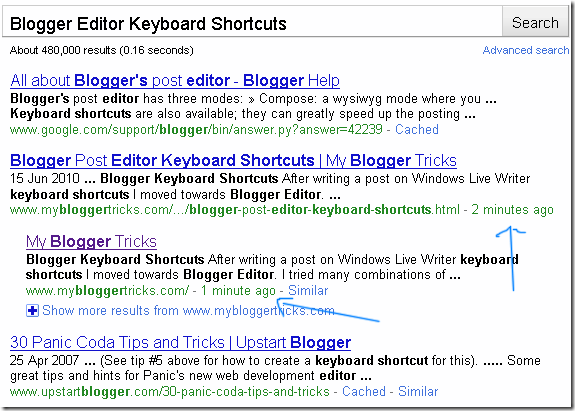
fast-crawl-rate I published two posts today and was shocked when I found out that how fast is Google crawling this website. It took less then a minute for my search results to appear. It was interesting to see how fast Google crawls a blogger site. I immediately took a screenshot as a proof to show it to most of you. I will share just one Search engine optimization tip which will help you achieve the fastest crawl rate possible! But first have a look at the screenshot below,


Keyboard-shortcuts-for-blog


Note:- In actual it might have taken even less than a minute for Google to crawl the last post that I published. Due to my reaction delay I took long to observe this amazing crawl rate and then to take the screenshot.

How to let Google Crawl your Website Faster?

As I promised that there is only one SEO tip which will boost the crawl rate of your blog or website and the tip is,

Start publishing useful and valuable content so that more and more people could link to your blog. The more one way linking you receive the better your rank increase in Google search listings. PageRank greater than 2.0 in short means a faster crawl rate! The higher your Site PR grows the better your ranking increase in Search engine listings. So work hard from today to flow the PR juice from other developed blogs to your blog.

Write Guest Posts at blogs with good PR and traffic and just don't waste any further time by commenting on forums and blogs! MBT has just started offering guest posting and is offering three Links to your blog for one post that you write for us. Further we have promised that if you come up with at least 6 quality Guest posts for MBT we will add your homepage link to our Friends list permanently! You can read further details here -> All Brilliant minds invited to write Guest Posts at MBT!

Kindly let me know what are your valuable views on increasing the crawl rate of a site.

Surprisingly MBT Blog Finally added to DMOZ Directory! Learn How To Get Listed


DMOZ---Open-Directory Having your blog or website selected into DMOZ’s Open Directory Project is the dream of every blogger or web owner. And same is true for me as a newbie blogger who just started learning blogging and thanks to God now MBT blog is added to the Blogger Templates category where only 17 blogs could make it out of thousands of quality blogs out there! How did MBT do it?

Well there are many factors that played well in my part and we will discuss all DMOZ Submission tips today so that one day you may feel the same joy that I am feeling at the moment :p

How to check if your blog or website is selected into DMOZ?

Go to Dmoz.org and write your blog URL or your Blog Title inside the search box. For example type my blog title in the search box and you will be brought to the sub directory where my blog is added.

get-listed-in-Dmoz

You can also go directly to the sub directory by following this root –> Computers: Internet: On the Web: Weblogs: Templates: Blogger

MBT-DMOZ-listing

Note:- DMOZ has added a sub-page of MBT i.e Magazine Style Templates and not the MBT homepage. So you will get no results when you type in the MBT homepage URL but if you type MY Blogger Tricks or Just Blogger Tricks MBT will appear. I am contacting them so that they may correct the URL.

Why is DMOZ listing is so important?

DMOZ is the largest human-edited directory of the web. With over 85,559 editors, DMOZ’s Open Directory Project (ODP) has listed more than 4.5 Million quality websites in 590,000 categories. It has played an influential role in the rise of social media, inspiring projects like Wikipedia. Believe it or not Google’s directory is made up of DMOZ directory. Most of the data that Google spiders crawl and index is from this amazing open directory. DMOZ is an open directory project (ODP) where any blog or website can be submitted for free with no submission fee  or recurring annual fee like that of Yahoo Directory which charges a nonrefundable fee of US$299! Of course for students like me it is far ahead of our budget.

An amazing fact about DMOZ is that if your blog gets listed in this huge directory then your blog will automatically be listed in all mega search engines except for Overture! Which means that you don’t need to submit your URL to hundreds of search engines if by luck you get selected at DMOZ. Dmoz reviews every single page submitted to them and they are very picky about what they include. Therefore, Dmoz’s Open Directory Project is a Trusted source of high quality websites for all search engines including AOL Search, Google, Yahoo and bing

Summarizing the benefits of adding your site to DMOZ,

  1. DMOZ data is consumed by thousands of search engines and websites in over 80 languages, from Google to smaller special interest websites. .
  2. Almost all search engines results are aggregated from DMOZ
  3. DMOZ is a PR 8.0 directory and indeed one link from this directory can turn out to be a blessing for your site.
  4. If your site has been accepted into the DMOZ Open Directory then it will be listed in hundreds of search engines automatically.

What must You do so that Your Blog is selected at DMOZ?

There are many questions that hover in website owners mind like,

  1. Why hasn’t my site been accepted into DMOZ?
  2. Why aren’t DMOZ accepting my submission?
  3. What should I do to make sure my website is included in the DMOZ Open Directory?
  4. And so on…

Having your site successfully selected into DMOZ Open Directory is not very difficult if you follow some simple tips as follows,

  1. The most important tip is to read the DMOZ’s criteria of accepting a submission
  2. The second most important thing to keep in mind is that DMOZ doesn’t keeps on adding websites, they aim at creating a valuable and useful category that may offer relevant internet resources. Therefore DMOZ’s editors will accept your site only if it offers unique content rarely found elsewhere i.e Content which is not generic.
  3. Stop making your blog a Fish Market of Ads. Websites that sell too many products or have ads everywhere are never appreciated by DMOZ expert editors.
  4. Keep your blog’s interface user friendly and avoid un-professional widgets, banners, multimedia etc.
  5. Treat DMOZ more like a reader who will appreciate your work only if you offer high quality, valuable and worth-reading content. Make your articles more informative.
  6. DMOZ editors if assumed as readers will surely give a thumbs up to blogs with fastest load time. Carefully read this article to minimize your blog load time as much as you can –>12 useful tips to reduce your blog load time
  7. If your blog is not selected during your first submission then don’t loose hope and try again with a more precise and meaningful blog description. Try at most three times but each try should be done wisely as explained in DMOZ’s criteria for selection. 

Follow the above steps carefully and quickly make use of this amazing Open Directory which can indeed bless you with several good news during your future Blogging experience. :>

If you have any question regarding submitting your URL at DMOZ then feel free to leave your query in the comment box below.

Facebook and YouTube Banned in Pakistan For Promoting “Draw Mohammad Day” !!


Facebook-and-Youtube-Banned Never expected a leading social networking website like Facebook and a video casting blog like YouTube will take such un-professional steps in promoting anti-religious activities. Just few days ago a group at Facebook was formed called "Draw Mohammed Day" (i.e 20th May). The group encouraged a "contest" of drawing caricatures of Prophet Mohammed(PBUH). This group again outraged the Muslims worldwide and countries Like Pakistan have temporarily banned both Facebook and YouTube till 31st May. Upon the orders of Lahore High court the Pakistani Telecom Authority (PTA) immediately put a ban on these two websites. They have also banned browsing in in cell phones like black berry. On the other hand both Facebook and YouTube are facing major threats in terms of revenue, traffic and security. Servers of Facebook are continuously under threat by hackers from every corner of the world. Reports from several sources have proven that some Turkish hackers have badly damaged the Facebook servers and especially the website “Draw Mohammad Day”. Twitter has suffered too!

What’s New?

Today I have chosen such a topic because it is relevant to the category “Social Media” There are many important things that we will learn today. I am writing this post not because I am a Muslim who is outraged but as a Blogger who always promises to discuss what is important. In today’s tutorial we  will learn many things that will help you in taking good decisions when dealing a crowd in millions. For you as bloggers understanding your readers and their behavior must be among your first priorities.

How will “Draw Mohammad Day” effect Facebook’s reputation?

Just  imagine a website with PageRank 10, Alexa Rank 2.0 and with millions of unique visitors per day has lost its reputation in the eyes of approximately 47% of its traffic. There are 1.57 billion Followers of the religion ISLAM worldwide.  The second largest religion in the world. If we assume that only 50% of this population use social networks like Facebook then the traffic that Facebook receives from countries like Middle East, USA, North Africa, Asia will mount up to 785, 000, 000 visitors per day!!

I received many text messages and emails where Facebook’s revenue statistics were shared but most of them were almost difficult to be trusted when put to logic. I decided to do a simple calculation and tried my best to come as closer as possible to the daily, monthly and yearly revenue that Facebook generates from its Muslim visitors. Below I have shared a table where all data is my mere deduction and observation and slight research. Hope it will clarify many things.

FaceBook’s Estimated Revenue Chart 2010

(Earning through Muslim Visitors Only)

REGION MUSLIM POPULATION INTERNET USERS FaceBook
Users
DAILY REVENUE ($) MONTHLY REVENUE($) YEARLY REVENUE ($)
Worldwide 1.57 Billion 785 Million (estd.) 235.5 Million 2.36 Million 70.65 Million 0.85 Billion
Pakistan 180 Million 47 Million 14.1 Million 14,100 423,000 5.08 Million

Lets analyze the above table now:

World Wide Facebook Revenue Analysis 

graph-going-down-thumb6876903

I found it through Wikipedia that the over all population of Muslims in the world is 1.57 billion. Then I estimated that what will be the daily revenue earned by Facebook from Muslim visitors if suppose just 50% of this population use Internet (i.e 785 Million. I then assumed that 30% of the entire Muslim Internet users are Facebook users i.e 235.5 Million. Then I took 0.01$ as average cost received by Facebook for Pay Per Click(PPC) and Page Impressions. This has logic like advertisements in Facebook that are based on Life Insurance, Technology, Cell phones, Digital Camera’s by Sony and Canon, College and University and renown services and goods can pay up to 7-$25  for each click made by the user.

Note:- I took all amounts as minimum as possible while in fact Pay per click can mount up to $7-$75. Adword Keyword Tool by Google can be used to compare Adsense Paying scheme to that of Facebook’s

And of course not every visitor will click the ads so surely Facebook is not earning $7 or $25 from each and every visitor. Some ads can be as cheap as 0.001$ (PPC). So if we take $0.01 as an average for PPC then it is not a bad approximate. I multiplied 235.5 Million visitors by 0.001 to derive 2.36 Million US Dollars and this is the amount Facebook earns daily from all Muslim Visitors put together. Then Monthly and yearly amounts in the table were calculated by multiplying the daily income by 30 and 12 respectively. The yearly amount that come up is 847.8  Million US Dollars! And this is what I approximated as annual income earned by FaceBook from the Muslim Nation.

But can you just guess how much is Facebook earning yearly from all traffic put together? The answer is 15 Billion US dollars!! (Source –> Times Online ) So 0.85 Billion US Dollars from 1/3rd majority of the world is again not a bad approximation. In fact the earning from Muslim Nation can be far far greater than $0.85 Billion but this is calculated as minimum as possible for better assumption of FB’s revenue.

Pakistan’s Facebook Revenue Analysis

Pakistan-bans-facebook

For Pakistan I adopted a more correct approach. From many sources I found out the 47 Million people in this country use Internet. I then let 30% of this population to be Facebook users i.e 14.1 Million. Since most of the visitors in Pakistan are usually normal surfers and browse more for fun so I estimated the average Pay Per Click to be as less as $0.001 i.e Ten times less than the International Muslim Internet Users. By doing the same calculation I came to an annual amount of 5.08 Million US Dollars! which again is a big amount but not as big as 15 Billion US Dollars! Since Pakistan has banned Facebook till May 31st, we can easily calculate that the average revenue loss to Facebook can go up to 155,100 US Dollars and of course this amount is no less than a peanut to Facebook’s Overall Daily revenue!

In what Possible ways can Facebook badly suffer?

If a developing country like Pakistan is causing just a loss of 155,100 US Dollars to Facebook which is almost negligible loss in the eyes of the Mega Social Media Giant then how come this bring a nightmare to Mark Zuckerberg (Facebook's 23-year-old chief executive). Well the story doesn’t just end here. Below I have shared some of the points which can badly effect Facebook’s reputation in Internet if you see them in long term and with a more broader approach.

Advertisement on any website depends on many factors like Number of Daily Unique visitors, Pageviews, PageRank and Alexa Rank.

  • There are a lot of Muslim Web masters and if they all start a campaign of removing the Facebook links from their websites or tagging them as nofollow then this can turn out to be a disaster for FB’s Search Engine Optimization(SEO) department. The PageRank 10 that Facebook has achieved after shedding a lot of sweat and tears can decrease to 7-8 with-in a month or two if web owners do start such a campaign.
  • Pakistani Nation Banned FaceBook till 31st May only and authorities at Pakistan have promised that they will discuss this act of FB in OIC and UNO too and if other Muslim Nations do agree to ban Facebook in their respective countries then advertisements from these Muslim countries will seize up!
  • If Facebook is banned in Middle East then this can cause a lose of approximately 1.1 Billion US dollars to Facebook because most of the ongoing world investment is done in UAE, Saudi Arabia and Persian Gulf.
  • Muslim visitors can remove their Alexa toolbar which can dramatically reduce FB’s Alexa ranking which is the second most significant ranking in terms of attracting advertisers after Google PageRank.
  • Further The company’s security can highly be threatened from Muslim hackers all over the world. Since past records have shown that Facebook has been abused and attacked several times and today under such crucial period the risk of hack attacks are even larger. If Chinese Hackers can hack Pentagon’s highly secure computers then why not Facebook?

In a nutshell if Facebook does not make quick and professional decisions in the coming days then from what we have deduced so far it can clearly be seen that it wont take long for this Giant Social Media Website to crumble to its knees and loose all advertisements, loyal visitors and customers.

Moral:-

If Mark has read this post then I am sure his mind would have blown off!

What are your views?

The publication of satirical cartoons of Mohammad (PBUH) has always hurt the sentiments of the 1.57 billion Muslims all over the world. Muslims believe in Prophet Mohammad as the last and final Prophet after the decent of Prophet Adam, Solomon, Abraham, Moses and Jesus (Peace Be Upon Them All). Depiction of the images of a Prophet is strictly prohibited in Islam and is considered as blasphemy. In Islam After Allah (God) Mohammad (PBUH) is considered as the highest authority and they consider him as a master, guider, preacher and love them more than their family. Do you think freedom of speech and expression means that you can humiliate even such scholars and personalities of highest eminent?

I request all my loyal readers and visitors to post their views and comments about this latest happening and about the stats and info shared in today’s article. Kindly also cast your votes below and let us all know what you think. God bless you all!

Do you support or do not support anti-religious activities like “Draw Mohammad Day”?


Surprisingly MBT Blessed With Page-Rank 3.0!!


Google PageRank-3 Never thought 2010 could be such a blessing in my life! Just within 10 months of its release, MBT has amazingly being blessed with a Google Page Rank 3, which is a measure of a web’s importance in the eyes of the Mega Search Engine i.e Google. Luckily not just the MBT homepage but a lot of internal pages have got PR-2-3!


I am extremely thankful to all my readers for their continuous love, support and dearest motivation. Verily I could not have achieved this without the active participation of our readers because half the credit goes to you guys for gifting MBT with precious content everyday with your lovely and relevant comments. It was also indeed your trust on us that EntreCard restored our account and appreciated MBT’s EntreCard-Buckets Service.

Thumbs up to MBT and thumbs up to all of you for believing and trusting in the Moto of publishing unique content on Blogosphere. I thank Allah and then every single visitor, follower and subscriber without whom this day’s success indeed would have no taste and flavour. God bless you all!

Today’s Lesson:- Be Unique in everything that you do for success itself is coloured uniqely and when success knocks your doors it really feels mind blowing! :D

How To Drive Traffic To Your Blogs From Facebook?


This is a Guest Post by Rafay baloch. Follow him on Facebook @Hacking and Cracking

DRIVE-TRAFFIC-FACEBOOK As we know that facebook has became the most widely used social networking site these days,its Alexa rank is 2,which means the second most popular website on web after Google,Hence bloggers are using it to drive a lot of traffic,but some of bloggers even after having all the resources struggle to drive traffic from Facebook,So i am writing this article for ones who are struggling to drive traffic using facebook. Below are some most important steps you need to take to drive traffic using Facebook:


Add a lot of Friends: 

friendsYes,you need to add a lot of fans friends in order to get traffic from facebook,i suggest you to make an individual Business profile,The more friends your status is seen by more people and hence more traffic.

Connect Facebook with twitter

facebook-and-twitter

As we know twitter is favorite micro-blogging tool,you can connect Facebook account with twitter for better productivity,Now whenever you will update your status on Facebook OR twitter it will appear on both Facebook and twitter and hence no need to individually update status of both Facebook and twitter Use Facebook notes applications:Follow the steps to interconnect Facebook with twitter:
  1. Log in to your Facebook account
  2. Now go to this url "http://apps.facebook.com/twitter/"
  3. Add the 'Twitter' Facebook Application.
  4. Choose your preferred settings and click on"Add twitter"
  5. No log into your twitter account
  6. Allow and Authorize Access for Twitter to Facebook.

    That's all! Every time you update your Twitter, your Facebook status will update automatically!

    Import your blog with notes application

    Notes application is a very useful application in blogger. It imports all your blog posts and post into your friends automatically when ever you update your blog, Follow the steps to add Note applications in your facebook account
    1. http://www.facebook.com/editnotes.php?import
    2. Agree to TOS
    3. And start importing!!

      Use Facebook fan Pages

      facebook fan page icon

      I recommend every blogger to use it,this method is the most powerful one,Bloggers are using fan page to drive huge amount of traffic.Facebook Fan Page helps you into Branding, Socializing and more over sending a message to all your Blog or service Fans. Follow the steps to Add Facebook fan page to your blog:
      1. Follow this url: http://www.facebook.com/pages/create.php
      2. Write down your category and name of your facebook fan page which must resemble with the category of your website
      3. And Click create and see your new facebook fan page
      4. Just add it into your website and invite your friends to join it!

        Use Facebook share button

        facebook-digg-twitter-butto Like digg,twitter,stumble upon etc. Facebook has also a share button through which your readers can easily share with their friends. To add the Facebook Share button to your blog then follow these steps, 1. Log into Blogger > Layout > Edit HTML 2. Click the Expand Widget Templates box
        3. Now find this code,
        <div class='post-header-line-1'/>
        4. Now paste this code just below the code in step#3

        <b:if cond='data:blog.pageType == &quot;item&quot;'><span style="text-align: right;">
        <a name="fb_share" type="box_count" href="http://www.facebook.com/sharer.php">Share</a><script src="http://static.ak.fbcdn.net/connect.php/js/FB.Share" type="text/javascript"></script>
        </span></b:if>

    5. Save your template and see a beautiful button hanging at the top right of your posts, facebook-digg-twitter-butto  I hope you liked this article!

    About The Author:
    Rafay Baloch is an engineering student. He is a techie Blogger, hacker and programmar. He loves to learn and share Ethical Hacking/Security Tips. He is the author of the blogs Learn how to hack and Make money online

How To Inter-link Pages Smartly To Flow The PR Juice To Ever Single Page!


Internal-Linking-Seo-Tips I was waiting for this day so that I could show it with prove that how can one easily flow the Google Page Rank Juice to all internal pages. That means that if your homepage has a PR-2 or more you can undoubtedly make most of your internal pages a PR-2 or more ranked pages. You know that most of my pages are either PR-1, PR-2 or PR-3. Only Few authorities have linked to my internal pages but yet you can see that most of my internal pages have the same PR as that of the homepage. If you think this technique of spreading the PR evenly in all internal posts or pages is hectic or may require plenty of hard work then be sure that you have mistaken yourself :>

I have selected randomly just few internal pages in a hurry which have some PR. You can browse old posts yourself to see it with your own eyes that PR has really been equally shared in most of the MBT pages.

Blogger Templates Page      PR-2

Special Characters Tool      PR-1

Read More Link Page            PR-2

Advance Multi Tab Widget      PR-2

Feedback and Back To Top Button Page     PR-2

CSS Color Chart     PR-1

Now there are more example pages as well but I hope these are enough to convince you. Lets know learn how to really make good use of your Homepage PR through the concept of Internal-Linking.

What is Internal Linking Of Pages?

By this term we mean that when you write a post you should make it a habit to link to one of your old post so that the reader may be engaged even further. This linking to your older posts relevantly while writing new posts is termed as Internal Linking. When all pages in your blog are linked to one another, then you will have a fairly optimized blogs which will be loved by search engines while crawling and will be gifted quite often by Google with a cool Page Rank!

In this post I have linked to six pages which are,

  1. Blogger Templates Page 
  2. Special Characters Tool    
  3. Read More Link Page          
  4. Advance Multi Tab Widget     
  5. Feedback and Back To Top Button Page    
  6. CSS Color Chart    

All these pages will enjoy a further flow of PR Juice to them. It doesn’t matter whether the current post I am writing is a PR-0 or more but what is more important are the number of links to a single post from several posts all coming under your main domain which in my case is www.themobilehub.blogspot.com

What Are The Advantages Of Internal Linking?

The main purpose of internal linking is to give your internal pages some Rank which is termed as “Google Page Rank” The advantages of Pages with some PR are,

  • The biggest advantage is that if most of your internal Pages receive some PR then they will rank higher in search engine listings. Thus blessing you with quality Traffic!
  • Pages with some PR are always crawled and indexed within minutes. Google crawls my homepage every 5-6 minutes.
  • Blogs that have good flow of PR to all internal pages are respected by Advertisers and indeed advertising services will offer you handsome adds.
  • And so on

How Should You Start Know?

Now whenever you write a new post make sure to first link to one of your older post which is related to the topic of the current post. For example I often link to my tools while writing a new post. Moreover I always link posts related to one another, like If I am writing a post on a “Advanced Multi Tab Widget” I will certainly link it to one of my previous posts i.e “Multi Tab Widget –The Tabber!”  This way I am able to give every page some importance in the eyes of both the readers and search engines.

If you want to link together some of your already published posts then simply start editing them one by one and add a relevant link to each one of them either at top or at the bottom of the post. Like in this post at the end before concluding the post I can encourage the readers to read another post in this way,

You can also better optimize your posts if you write the Post Tiles smartly. May be you will like this post too –> Importance of Post Title Limit In The Eyes Of search Engines

Internal Link Your Pages Sensibly With Good Keywords

While linking to older posts make sure that you use relevant keywords to describe the content of the post you are linking to. It is a good practice to choose the Post Title as the Link Description. Confused? Let me explain :>

For instance if you wish to link to a post with URL “http://www.themobilehub.blogspot.com/2009/11/11-useful-tips-to-reduce-your-blog-load.html” and Post Title “12 Useful Tips to Reduce Your Blog Load Time”  Then link the URL and title in this way,


<a href="http://www.themobilehub.blogspot.com/2009/11/11-useful-tips-to-reduce-your-blog-load.html” > 12 Useful Tips to Reduce Your Blog Load Time</a>

This will appear like this,

12 Useful Tips to Reduce Your Blog Load Time


And Avoid Linking your pages with these keywords,

  • Click Here!
  • Go Here!
  • Read this Also
  • Check This Out

All these ways will bring you nothing but waste of time. So I hope you have understood in detail on how to better optimize your internal pages and let search engines better crawl and rank your Blogs.

That’s All!

If anything is still unclear then kindly do not hesitate to post your questions. I love it when you guys ask queries :)