Showing posts with label Symbian. Show all posts

what are nokia s40 s60v2 s60v3 and s60v5 phones ?


hi dear blog readers ,
all of you know that nokia has many phones on SYMBIAN platform os .
this phones are in 3 groups .
nokia s40 nokia s60/v2 - nokia s60/v3 - nokia s60/v5
nokia s60v2 : Symbian 2nd Edition
Nokia N72
Nokia N70
Nokia N90
Nokia 6682
Nokia 6681
Nokia 6680
Nokia 3230
Nokia 6670
Nokia 6630
Nokia 6260
Nokia 7610
Nokia 6620
Nokia 6600
nokia s60v3 : S60 3rd Edition 
Nokia X5-01
Nokia E73 Mode
Nokia X5-00
Nokia C5-01
Nokia E5-00
Nokia 6788i
Nokia C5-00
Nokia 6700 slide
Nokia 6788
Nokia 6790 slide
Nokia 6760 slide
Nokia 6790 Surge
Nokia E72
Nokia 6730 classic
Nokia E52
Nokia E71x
Nokia 5730 XpressMusic
Nokia N86 8MP
Nokia E55
Nokia 6720 classic
Nokia E75
Nokia 6710 Navigator
Nokia 5630 XpressMusic
Nokia N96-3
Nokia N85
Nokia N79
Nokia 5320 XpressMusic
Nokia 6650
Nokia N78
Nokia N96
Nokia 6220 classic
Nokia 6210 Navigator
Nokia E63
Nokia E66
Nokia E71
Nokia 6124 classic
Nokia N82
Nokia E51
Nokia N95-3 NAM
Nokia N81
Nokia N81 8GB
Nokia N95 8GB
Nokia 6121 classic
Nokia 6120 classic
Nokia 5700 XpressMusic
Nokia 6110 Navigator
Nokia E90 Communicator
Nokia N76
Nokia 6290
Nokia N95
Nokia N77
Nokia E61i
Nokia E65
Nokia N93i
Nokia N91 8GB
Nokia E62
Nokia E50
Nokia 5500 Sport
Nokia N93
Nokia N73
Nokia N71
Nokia N80
Nokia N92
Nokia E61
Nokia E60
Nokia E70
Nokia 3250
Nokia N91
 nokia s60v5 : Symbian 5th Edition
Nokia 5250
Nokia 5228
Nokia C6-00
Nokia 5230 Nuron
Nokia 5235 Comes With Music Edition
Nokia N97 mini
Nokia X6-00
Nokia 5230
Nokia 5530 XpressMusic
Nokia N97
Nokia 5800 XpressMusic
nokia maemo phones
Nokia N900
Nokia N800
Nokia N810
Nokia N810 WiMAX Edition
nokia symbian^3 phones 
Nokia C6-01
Nokia E7-00
Nokia C7-00
Nokia N8-00
nokia s40 phones (it support only java apps )
Nokia C3-01
Nokia X3-02
Nokia C1-01
Nokia C1-02
Nokia C2-00
Nokia X2-00
Nokia C3-00
Nokia 6303i classic
Nokia 2710 Navigation Edition
Nokia 7230
Nokia 5330 Mobile TV Edition
Nokia 2220 slide
Nokia 2690
Nokia X3
Nokia 6750 Mural
Nokia 3208 classic
Nokia 3720 classic
Nokia 3710 fold
Nokia 7020
Nokia 5330 XpressMusic
Nokia 6700 classic
Nokia 6303 classic
Nokia 6260 slide
Nokia 7510 Supernova
Nokia 6600i slide
Nokia 2730 classic
Nokia 2720 fold
Nokia 6216 classic
Nokia 2700 classic
Nokia 6208 classic
Nokia 8800 Gold Arte
Nokia 2330 classic
Nokia 2323 classic
Nokia 7100 Supernova
Nokia 5130 XpressMusic
Nokia 8800 Carbon Arte
Nokia 3610 fold
Nokia 7210 Supernova
Nokia 7610 Supernova
Nokia 7310 Supernova
Nokia 6600 slide
Nokia 6600 fold
Nokia 3600 slide
Nokia 5220 XpressMusic
Nokia 3600 slide
Nokia 5220 XpressMusic
Nokia 6212 classic
Nokia 1680 classic
Nokia 5000
Nokia 2680 slide
Nokia 7070 Prism
Nokia 6300i
Nokia 3555
Nokia 3120 classic
Nokia 2600 classic
Nokia 6263
Nokia 8800 Arte
Nokia 6301
Nokia 5310 XpressMusic
Nokia 5610 XpressMusic
Nokia 6555
Nokia 7900 Prism
Nokia 7500 Prism
Nokia 6267
Nokia 6500 slide
Nokia 6500 classic
Nokia 2760
Nokia 2630
Nokia 2660
Nokia 3110 Evolve
Nokia 3500 classic
Nokia 8600 Luna
Nokia 3109 classic
Nokia 3110 classic
Nokia 6131 NFC
Nokia 6300
Nokia 6086
Nokia 6133
Nokia 5200
Nokia 5300
Nokia 6288
Nokia 6085
Nokia 7373
Nokia 7390
Nokia 8800 Sirocco Edition
Nokia 6275i
Nokia 6151
Nokia 6275
Nokia 6126
Nokia 2865
Nokia 2865i
Nokia 6131
Nokia 6136
Nokia 6125
Nokia 6282
Nokia 6233
Nokia 6234
Nokia 6165
Nokia 7370
Nokia 6280
Nokia 6265i
Nokia 6265
Nokia 6270
Nokia 6111
Nokia 5070
Nokia 2626
Nokia 6080
Nokia 2610
Nokia 6070
Nokia 6103
Nokia 6102i
Nokia 2855
Nokia 7360
Nokia 5140i
Nokia 8801
Nokia 6030
Nokia 6101
Nokia 6102
Nokia 6230
Nokia 2355

tags : nokia phones models list - nokia 2013 list - nokia symbian phones - nokia s60v3 - nokia sis platform - nokia edition lists - nokia s60v5 - nokia s60v2 - nokia symbian phones model list

Nokia reportedly closing it's relations with Symbian and MeeGo by the end of this year


The Finnish multinational communication and information technology corporation, Nokia is reportedly ending up all their support and relations with the Symbian operating system and Linux based free mobile operating system, MeeGo.

According to reports coming in from a forum, where one of it's user has recently reported of receiving an email from the Nokia Developer Support Team, that claims the Finns are no longer willing to allow Developers publish their new Symbian or MeeGo based applications to the OVI Store by the start of January 1, 2014.

Even though, Developers can no longer publish their Symbian or MeeGo based application to the Nokia's OVI Store, users of Nokia devices will still be able to download the existing apps and the Developers will continue receiving their revenue reports on the published applications. But by the beginning of 2014, Developers will no longer be able to publish any new content or update their existing contents on Symbian or MeeGo.

Source: MAEMO.ORG

nokia n73 amazing trick - video


hi dear blog readers,
in this post i have to you a new amazing trick for nokia n73 phone .
nokia n73 is a symbian phone S60v3 .
nokia s60 trick - secrets - codes
nokia n73
 and know you can watch the video

tags : nokia s60 tricks , nokia n73 tricks , nokia n73 secrets , nokia ticks codes , nokia n73 youtube , nokia n73 codes , nokia n73 s60v3 trick , nokia n73 me trick

Nokia 808 PureView review - The last of the Symbians


The Nokia 808 is nothing short of a wonder,a miracle. The looks of the phone don't and can't tell much about what goes on inside, about what the 808 is all about.


The device has a very weird shape, going from beautiful to outright ugly depending on the angle you look at it from. The hump on it's back is responsible for this transmogrification of the device. The curved body, however, is a pleasure to hold, fits neatly in the hand and the polycarbonate shell that covers the phone's back provides an excellent grip.


The front of the phone is dominated by the 4 inch display covered in Gorilla glass. The hardware buttons are grouped in a plastic strip much like the 603 and the Lumia 710. The display is curved like on the Lumia 800, but the curvature is not as prominent as on the WP device. The curved display makes swiping left and right easier and the phone also slides in and out of you pocket easier.

On the right hand side you'll find the volume rocker, the lock/unlock knob and the dedicated camera key. The camera key fires up the camera application even when the phone is locked.

On top of the phone you'll find the HDMI port, the micro-USB port and the 3.5mm jack port. The HDMI port is protected by a plastic lid, and considering you won't use it everyday, that's a good thing.


The box contains the phone itself, a data cable and charging adapter, and a pair of hands free headset. I was kind of disappointed because I was expecting accessories at least like the N8 box. There is no USB-On-The-Go cable and no HDMI cable either. For such an expensive phone, I think those two were supposed to be in the box.

On the back of the phone you'll find the gigantic camera hump that hides the amazing 41MP camera sensor. The camera is helped by the Xenon flash which is said to be 4 times more powerful than the unit on the Nokia N8. The camera can shoot 38MP photos in Creative mode, 8MP photos in PureView mode and record full HD videos at 30 frames per second. The cherry on the top here is the fact that the 808 provides lossless zooming while recording videos, which is a first for smartphones.

The phone is powered by an 1400mAh battery which is good for about two days of moderate to heavy usage, including shooting photos and videos.


Unfortunately the micro-SIM card and the SD card slots are located under the battery so they are not hot swapable.

If you're thinking of buying this phone you'd better do your homework first. This phone is going to offer you so many shooting modes that you won't know where to start and where to finish. Don't get me wrong, that is a good thing, no, actually an amazing thing. This phone will shine in the hand of a person who knows he/she's way around a camera. That does not mean that non camera savvy people cannot use it. Just switch to the PureView mode and you'll get some amazing 8MP photos without breaking a sweat.

The phone is powered by a 1.3GHz CPU which is helped by a dedicated camera GPU to process the enormous amount of data the camera sensor captures. The device packs 512MB of RAM, 16GB of onboard storage and it's animated by Nokia Belle Feature Pack 2 formerly known as Symbian Donna.

Feature Pack 2 is the last steer in the MeeGo direction that was started with the original Belle. I don't know about the performance improvements that Feature Pack 2 brings because I have no means to compare Feature Pack 2 with it's predecessors. All I can say is that the last Symbian iteration runs unbelievably smooth on the 808. Considering the experiences with Feature Pack 1 that other people wrote about, I believe that Feature Pack 2 is indeed an improvement.


Feature Pack 2 mainly brings changes to the aesthetics of the OS and not so much on the functionality. The only major functionality change is the portrait QWERTY keyboard that has been almost completely replaced. I say almost because in full screen edit mode, for example, the old QWERTY shows it's ugly head once again.


A new button has been added to the homescreen toolbar, and that is the search key, which is a shortcut to the search app. No biggie there.


The context menus now appear all centered and that is a good thing since you no longer have to chase the context menu around the screen. This change also brings consistency across the OS. The apps menu has also been refined and now looks more like the menu Qt apps have, with the first and last menu elements having rounded corners.

As with any device, there are some pros and some cons. Here they are in my opinion.

Pros

- Mind blowing 41MP camera
- Xenon flash
- Amazing camera app - very customisable helps you make the most out of the amazing camera sensor
- Speed is better than ever
- Good battery life for a smartphone
- Lock/unlock knob is very useful
- The curved glass display is a real treat
- ClearBlack display has really deep blacks

Cons

- Symbian is dead a.k.a. In maintenance mode
- Web browser still not as fluid as should be with heavy pages
- nHD resolution it's kind of stretched on the 4 inch display
- Poor choice of apps compared with rival app stores
- Way too thick by today's standards
- Lack of a power button makes accidental shutdown a real problem until you get used to how it works

Conclusion

For Symbian fans this is the phone of their dreams with a decently sized display, a fast processor, amazing camera and superb build quality. The price however, will be a setback for those of you who are not crazy about having a phone that can shoot photos better than a digicam, but the 701 will provide the same user experience considering the similar specs.

All in all the 808 is a competitive smartphone. The only glitch that I can complain about is the web browsing experience that is not on par with today's top shelf smartphones. The web experience is the fastest Symbian has ever seen, but compared to Windows Phone or Android it's in the mid-range. It's not a showstopper like it was on first generation Symbian devices. It seems that Nokia had managed to finally find a hardware combination that brings Symbian into the present of smartphone OS's. Too bad this is the end if the line for Symbian.
The Nokia 808 is proof of what Symbian could have been and but never got the chance to become until it was to late. It's ironic that Nokia manged to bring Symbian to a competitive level two years after it practically buried it. It's Nokia's latest, last and greatest Symbian. It's Symbian's greatest device and death sentence all in one.

Nokia Belle Refresh - What happens after the dust settles


The first impression Belle Refresh left me was a big disappointment. And in some aspects it is. This is supposed to be the last big update for the N8 generation so I was expecting more. And by more I mean more FP2 features. But it didn't happen. Now that I got over that initial WTF moment it's time to take a look under the hood to see what are the performance improvements that arrives with this new update.


First of all let's tackle the browser. Updated to version 8.3 the browser brings some subtle but worth noting user interface updates. Besides the back and forward buttons we have the windows and a favorites buttons that make your life a bit easier when navigating the web. The favorites button opens up a three tabs panel with most visited, bookmarks and history. It's good thing that all bookmarks and favorites are in the same place. The usual web browser menu, a reminiscence of S60v5, is now gone and you can do basically the same operations as before from the context menu.
Another improvement, and this is a big one, is the browser rendering speed. It's a big improvement over the old version with zooming in and out being now way smoother than before. You can even zoom in and out as the page loads and it works pretty well. Unlike before when you used to get lots of lag even after the page was fully loaded, now you won't see anymore if those lags. So, the updated browser gets a big thumbs up. If you compare this version to the S60v5, you can't tell the current one is an evolution of that old version.


Between all the clock widgets that were included in this update, there are others that were really needed and welcomed by us all. The first is the Data Counter widget that comes with a small app too and tells you how much mobile data you've consumed. You just need to set your monthly limit and the day your limit gets reset. You can also choose to disable the mobile data when the limit is hit to avoid extra costs.

The second much needed widget is Mail,New arrival. This one can replace the big old half homescreen mail widget with a shortcut that shows you a badge notification when you have new mail. I would have liked to see the new mail notification in the system pull-down area and on the lockscreen, just like the notifications for new messages and missed calls. It's not very ergonomic to unlock you phone whenever you want to check if you have new mail.

The third widget that is worth mentioning is the Contacts widget that can now show a group on the homescreen and not just your favorite contacts. In the old Belle if you would have added the Contacts, favorites to your homescreen three times, you would have got the same contacts in all widgets. Now, if you define 3 different groups you can have three different widgets, one for each group. A big improvement over the old approach.

Also, worth mentioning are the toggle widgets fro 3G, Mobile Data, Offline mode and Silent mode.

Belle Refresh also includes the latest QT version, 4.8. The new version seems to have boosted the speed of the apps written in this language. Apps seem to scroll smoother and the touch input has been optimized for swiping gestures. Without needing to update the existing apps they run smoother and accidental scrolling when you intended to swipe happens a lot less now.

But the Belle Refresh update didn't just improve things, it also broke some apps. That was expected from third party apps that had compatibility issues, but I wasn't expecting that to happen to the Microsoft Office suite. The new update rendered OneNote useless. Synchronization was gone and I wasn't able to login to my account again for one simple reason: I could not type in my username and password. When I touched the input fields the keyboard did not pop up. Maybe a hard reset will fix it, but at the moment I am don't want to lose all my user data because of this issue. Maybe Microsoft will issue an update, but it's unbelievable that Nokia's new best buddy didn't do it's homework to properly test the office suite with the latest Belle update.

Even though not all expectations were met with this new update, it's clearly an improvement over the original Belle, but I hope this is not the end of the line as far as updates are concerned for the first generation of Symbian^3 devices.

Switching from Symbian to Windows Phone


My journey with Windows Phone began a little over a month ago. Used to be a big Symbian user and fan at the time but was very curious to see what would change in the way I use my smartphone everyday after the big switch. So here are the questions I was asking myself at the time:

1. Would I find all the apps I needed and used daily in the WP Marketplace?

2. Would I be able to live without multitasking?

3. Could Lumia's 8MP snapper take the place of the 12MP monster of the N8?


All these questions got answered and then some. So let's take it step by step.

Question 1: Would I find all the apps I needed and used daily in the WP Marketplace?

The Windows Phone Marketplace is full of surprises and hosts a lot more apps than Nokia Store does. You can find official apps for most services and social networks. Unlike Symbian, Windows Phone has an official app for Facebook, Twitter, Evernote, IMDb and so much more. I'm not saying the official apps are the best, but they're there and that means the platform is endorsed and will be supported for a long while. For an average user Windows Phone social networking integration is very well done, and basically removes the need for third party apps as far as social needs are concerned, but if you are a power user and want multiple accounts on Twitter and Facebook, then you need to find yourself a different app. What Windows Phone Marketplace misses compared to Nokia Store is the ton of HD games that made Symbian a gaming "phon-sole". Oh an the pay by SMS option too.

Question 2: Would I be able to live without multitasking?

Symbian is well known for it's brilliant multi-tasking and many think that the in transition to Windows Phone one may me missing that aspect. To be honest, at first you do miss the multi-tasking, but over time you get used to it and the resume app functionality along with the ability to have background agents working even when an app is dormant does make up for the lack of true multi-tasking. The resume-app approach was used my Microsoft to allow a smooth user experience even when multiple apps are started. The background agents work really well. Initially I thought that having no real multi-tasking would get in the way, but if the apps you use are well written, you have nothing to worry about. For example, I had an app that uploaded a large photo to Dropbox. The app had the ability to upload in the background so while I was playing Angry Birds the app took care of the upload neatly. If that's not multi-tasking I don't know what is. Windows Phone 7 is labeled as no-multi-tasking OS, but the matter of fact is that it does have multi-tasking, but not your traditional multi-tasking. Instead of keeping your entire app in memory doing whatever you need it to do, Microsoft used the background agent approach. The background agent is actually a piece of the app that uses no user interface and can do stuff in the background. For example, you may use an app that could eat 400MB of RAM when running in full UI mode, but only 20-30MB when running the user agent. That is called resource friendly app development.

Question 3:Could Lumia's 8MP snapper take the place of the 12MP monster of the N8?

Here is where I really missed my N8. The camera. I snap a lot of photos of my kid and lots of them are in low light conditions. The N8 clearly beats the Lumia 800 in this department, but when it comes to daylight I noticed that the Lumia 800 actually takes better photos, catches more detail. It's fast lens captures more light in broad daylight and it shows. You get less motion blur in your photos. So basically it's a trade-off. You get better photos in daylight and worse in low light. It's up to each and every user to choose. But I have to say that even in low light, the Lumia takes far better photos than other phones with LED flash. And that's, as I said above, because of the fast lens. The Lumia 800 does not claim to be a cameraphone, that's left for the 808, but it does hold it's ground against most smartphones out there.

Bottom line is this: it takes a while for you to get used to it, but once you do, you won't be able to move back to Symbian. The speed of the Lumia cannot be matched by any Symbian device. Windows Phone is missing some features, but it has others(lots of them) that more than make up for what you were missing in the first place.

Nokia Belle Refresh - What's new


Refresh is the best name Nokia could have named this update. It tells you all about it. Just like when you go on your web browser, hit refresh and nothing happens, just a page reload, the same happens with Belle Refresh: not much. I was a bit sarcastic there but that's only because I think Nokia could have put a bit more effort into this update and bring us some exciting and much awaited features. I think that after almost 8 months of development they simply could have done more.


Let's see what's new. Nokia added a bunch of new widgets with a gazillion clock widgets(important right?), the much awaited Mail,new arrival, toggles for 3G, Mobile Data, Offline mode and Silent mode, contact groups and a weather widget with the associated app.


The new bookmark widget makes a very welcomed addition, along with the data counter widget which most of use were eagerly waiting for.


We also got a new and welcomed Notes widget, a new calendar agenda widget, two music player widgets and the photo wall widget.


The music player was revamped.


The web browser got updated to version 8.3. Not much of a speed improvement, but on paper it's HTML5 compatibility has been improved. The browser also got a small UI overhaul, with a new Favorites button making it's way to the toolbar replacing the old Add bookmark button. The favorites view is now split into three tabs: Most visited, Bookmarks and History.

What Belle Refresh DIDN'T get? Well, here is the list of commons sense expectations that were not met:

1) New keyboard a-la FP2
2) Notifications split from activities and new email in notification area
3) Minimal overclock
4) New camera UI (for N8 at least)
5) Gallery

Maybe expecting some of these features to make it to Belle Refresh was wishful thinking, but let's hope that maybe they will still arrive along the way.

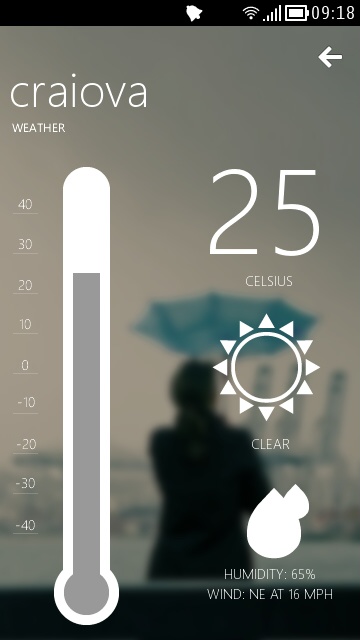
nWeather review - Free weather app for Nokia Belle


Today I will show you a fresh new weather app. It's called nWeather and it's been on the Nokia Store for short while. It's not your usual weather app with lots of screens and lots of features, it doesn't have a widget(yet) but it gets the job done. The application is written in Qt by Badcoke.


The application has two main screens. The first one that you are presented with is the screen where you need to enter the name of your city. Once you press the "Let's go button" you are taken to the second screen that shows you the current weather conditions and a three day forecast. You can swipe across this screen to get either the forecast or the current weather conditions.

The app is not some award winning weather app, but it looks gorgeous, and that's the main reason I decided to present it to you guys. For me it's the perfect weather app that shows you all you need to know in the most pleasant and simple way possible.

The app weights 3.4MB and you can download it from here: nWeather on Nokia Store

SymPaper for Nokia Belle review - Read it later


SymPaper is Symbian’s only Read it later client, or at least the only that I know of. It is a paid app and this review is meant to help you make this decision: is it worth it?

It all depends on how often you use Read it later/Pocket on your Symbian device. But first of all, let’s see what Read it later is all about. Well, let's say you encounter a nice little article that you want to read but don’t have the time to do it. Usually you just bookmark it and come back later to read it. But what it you can’t find that article anymore? What if it was removed, or something else happened and you just can’t read it anymore? Here is where Read it later/Pocket comes in handy. When you add a page to Read it later it’s not like you’re just bookmarking it. Read it later will download that page and will keep it’s content in your account until you decide to delete it. So even if that article that you were interested in is no longer online, you can always read it with Read it later.

Next question I hear is “what apps use Read it later?”. Tough question. Unfortunately not too many. It would be great if the Belle browser used it, but Nokia did not integrate such functionality in it. The main social applications, however, do support Read it later. Gravity is my choice when it comes to Twitter and fMobi when it comes to Facebook, and both support Read it later. I have to note here that Gravity too has a Facebook client and Foursquare client with Read it later support.

But the advantages do not stop here. You can have these pages across all your devices, be them Windows Phone, Symbian, iOS, Android or desktop computers, and that my friends is the power of Read it later. You see an article on your phone, you send it to Read it later and later when you’re at home, you get your tablet and you read.


The application main view consists in the list of articles that you have added to your account. From the context menu you can choose to see All articles, Read articles or Unread articles like a filter.

Using the “plus” button you can add an article by specifying it’s URL and optionally it’s title.


The article view is very simple and offers you a simple toolbar with the ability to mark the article as read or share it. You can share the article by SMS, Email, Twitter or Facebook. From the context menu you can delete the article, re-sync it which means the app will try to re-fetch the original URL of that article or open it in browser.


In the settings there are lots of tweaks that can be used to customize your SymPaper experience and data usage. First you have the Fetch mode where you can decide if the articles you already read should be fetched from the Read it later server or not. Second you have the number of articles to be fetched. By default this number is set to 500. You wouldn’t want to download a whole bunch of ancient articles, right? Next you have the search mode that decides how you want to search for your articles. Here you have two options: search in title or in article content. I suggest you use the title search and only if you can’t find what you need switch to content search as this may be an exhaustive search. Next option is Auto Sync At Startup which synchronizes with your Read it later account each time you run SymPaper.

The article settings section is all about the reading experience, so here you can tweak that. First of all we have the font size and here you can choose from four predefined sizes, which should be enough for anyone regardless of their screen size. Next we have the theming or skin options. The Light list theme and Light reader theme will instruct SymPaper to use white background an black text color within the items list and article reader. While that may be OK for non AMOLED screens, I strongly recommend you keep using the dark theme on AMOLED displays. The Images option decides if your article reader displays images or not and the maximized reader option removes the system status bar from the same article reader. The Automatically Mark As Read option will mark an article as read once you’ve opened it.

I have to say that SymPaper may be Symbian’s single Read it later client, but it’s basically all you need. It’s written by the same Talv Bansal that wrote SymNote I reviewed last week.

The app is paid and you can get it from here: Download

Tweetian for Nokia Belle review


Twitter just got a new client on Belle. After the classic Gravity the shaky TwimGo and the AMOLED killer Tweeties, it's time for Qt to deliver it's best Twitter client yet. Don't get me wrong, it can't hold a candle to Gravity, but it's biggest advantage? It's free. If Tweeties was meant to help you migrate to a new OS, Tweetian is here to make you stay.


Tweetian is very easy to navigate and use. It has three homescreens for your Timeline, Mentions and Messages. Swipe to the left to reveal each of them. I would have liked Tweetian to include loop scrolling here so I could reach the first screen from the last easier.


Tweetian offers pull-down to refresh, cached images and tweets which is good to have in order to keep your Twitter API rate up. The user interface is as quick as it gets with Qt apps but I have to say that the author used a paining system similar to Gravity's, meaning that while you scroll trough your tweets, the images are no loading. When you take you finger off the screen they start loading. That means no more chunky scrolling. It's actually a very impressive app.

You can add photos and location to your tweets easily and the tweet editor integrates well with both the default Belle keyboard and Swype. Retweeting, replying and adding a tweet to your favorites is a breeze and can be done from the bottom toolbar.


In the user profile panel you can see practically everything about that user, the Bio, the tweets, the followers, the following, the lists, the favorites by swiping trough them.


The settings are comprise of three tabs. In the General tab you can switch the theme, enable the option to include hashtags in replies and a sign out button in case you want to switch the account. It is good to know that unlike Gravity, Tweetian does not offer support for multiple Twitter accounts, so enterprise users need to look elsewhere. The second tab is called Refresh and there you can set the automatic refresh timings for various items. By default auto refresh is off. The third tab called API Limit does exactly what it tells. It shows you your Twitter API limits. It's just a status panel that you can check after using Tweetian heavily.

That being said I can honestly tell you that this app is going places. It can easily replace your Nokia Social client when it comes to Twitter. The app is very fast and I like it. Usually with Qt apps the scrolling and loading of panels is chunky and slow but somehow Tweetian works around those issues making it very fast and clean.

Download:Tweetian at Nokia Store