Showing posts with label Application Reviews. Show all posts

Install Focal Application on Any phone


Hey friends, so when Android 4.3 was released, after some days we got CyanogenMod 10.2 ROM too! CyanogenMod team was working on a project "Nemesis" and they have finally completed it with a brand new Camera Application- Focal. It is really good camera applications and you get really good features in this application. This app is very easy to use and you can swipe from down (to up) to get access to settings. The UI of the Focal is also very good, but it is not very good, other applications are having great UI. You can capture pictures, record videos, continuous shots etc. People and CM users said "This is the best Camera application" but I don't like it's UI


You can install Focal application on any device having Android 4.0 ICS, 4.1 JellyBean, JellyBean 4.2 or JellyBean 4.3! In most of the devices it's working, no matter which is your device. It is still BETA and you might face some force close, lags, flaws in this application but don't worry! CyanogenMod team is working on it and you can hope to get FINAL version of Focal within some days or months. Anyway, you can install it easy! NO! no need of placing it in /system/app and change permissions or flashing it, flash this application like you do it always! And it won't replace your stock Camera application. 


Downloads
1) CyanogenMod Focal app- Click here to download it.

Requirements
1) Any Android device having Android 4.0, 4.1, 4.2 or 4.3 aka Ice Cream Sandwich and JellyBean.

How To Install this Application
1) Download this application in your device and move it your SD card.
2) Now install it like you install any other applications :P 

How To Unbrick Micromax A116 Canvas HD


There are some moments when you want to reset your device like it frequently hangs and you feel many flaws or some application making a problem. Most of the cases are when you want to remove your Google GMAIL Account, if you want to do it follow this guide (no need to reset!)- Click here. Resetting is very easy and one can do it within 5 minutes, even newbies can do! And some cases are when your device gets bricked! You might installed an application and after that phone is not booting. It's guide for soft brick and not for hard brick, if you are here for HARD BRICK then flash a ROM again, it will fix it. There is no need for ROOT or CLOCKWORKMOD Recovery in Micromax A116 Canvas HD because we can do it on the stock recovery too! Now Let's see some of the highlights of Micromax A116 Canvas HD.


Specifications of Micromax A116 Canvas HD`

Micromax A116 Canvas HD is a Dual SIM device which supports 2G and 3G (Dual SIM Standby) Micromax A116 Canvas HD has got the screen size of 5 Inches (720 x 1280 pixels) IPS HD LCD capacitive touchscreen with up to 16 M colors! with scratch resistant glass. It is boosted with (Fast) 800 Mhz processor (Cortex A5). GPU is also same, Adreno 200. You get 4GB (1.77 GB available for user) internal space in Canvas HD which can be further expanded up to 32 GB via External SD card. You get 1GB RAM in this device and it's still not common in these latest devices. Micromax A116 Canvas HD boots with Android 4.2.1 which can be upgraded up to Android 4.2.1 Latest Android OS- Click here8 MP of camera, 3264 x 2448 pixels, autofocus, LED flash and with some features like Geo-tagging, touch focus, face detection. You can record videos at 720p HD and you can get 30fps in Playback. 1.2 Ghz Quad-Core super fast processor powered with MTK MT6589 chipset. It supports Wi-Fi, 2G, 3G, bluetooth, A-GPS and other common android features.

Enough of specifications and other things, now let's see how to fix your BRICKED Micromax A116 Canvas HD.

How To Unbrick Micromax A116 Canvas HD

1) Shut off your device and remove your battery from Canvas HD. After 5-6 seconds, put it back again. Don't touch any button and don't boot it.
2) Press Volume UP + Volume Down + Power Key simultaneously untill you see a new screen.
3) The new screen will have two options, select "Recovery" by using volume keys and you can select by using Power button.
4) Now, soon you will be in recovery. Move down (with volume down keys) and select wipe data / factory reset. 
5) Now, select YES with power button.
6) It will take up to 20 seconds to Wipe data. It won't take much time.
7) Now, Reboot your device and it will be like you had it on the first day!

So, you have finally unbricked your Micromax A116 Canvas HD, enjoy and share this guide with your friends.

How To Install iOS 7 UI in Android (iLauncher)


Apple, these days iOS 7 is very rumored. And many people saying that Apple cloned the features of Android in their latest iOS, iOS 7. Some people like iOS and some Android, iOS users say Android is poor and many Android user says that iOS is poor (I also feel the same!). Apple copied everything. They copied notification bar, but it opens from the down (it is better than of Android, means the UI is very colorful). The recent application is also cloned by Apple. Lockscreen is also copied! They haven't forgot our Music application, they have cloned it too! I think even Gallery is cloned. They cloned swiping gestures, mail application and almost everything. When Apple were designing their iOS 7, they asked themselves just a simple question, "How Can We Make It like Android OS", it was a line said by an Facebook user and was published on XDA Memes page. Okay, we won't talk of cloning anymore, I just want to tell you that your Android community is the best! So, we were talking how to make Android look like iOS 7 (Actually, to look like Android only :P) It has many features included like smooth scrolling, round corners icons, dock bar, folder support, shortcuts, back button to exit edit mode and it looks very cool and awesome. It supports Live Wallpaper and that's good part because some launchers (iOS) did not have Live Wallpaper support. You might also change the logo in the launcher if you want. It supports 5 rows mode, just like iPhone 5. If you want to edit any icon, you just need to just press on it for a long time (for 1-2 hours :P). Un-install applications from the launcher, I like it because some of the "best" launchers does not have this features! So, which application is offering us these much of features? It is iLauncher application which we will be using to make Android look like iOS 7.


What's the feature of this launcher

* SMOOTH SCROLLING (No lags at all while scrolling!)
* Icons have rounded corners and gloss effects
* Long touch icons to move them around and position them as you like.
* Dock-bar
* Easily uninstall apps from your home screen. (long press icon and select uninstall)
* Press the back button to exit edit mode.
* You Can change each application's name and icon by touching the app shortly in jiggle mode
* Support 5 rows mode, just like iPhone 5
* Folders support
* Shortcuts support
* Support tablets (iPad mode)
* Changable logo
* Support live wallpapers (Thank god!)


How To Make Android UI look like iOS 7
1) Open download page (Google Play Store) of iLauncher- click here.

2) Now, download the application. You just need to pay Rs. 122.43 Rs or 2.05 dollars to buy this brilliant launcher. You can pay be Google Wallet. After you will pay, the application will automatically download. And if you want to update iLauncher (if the updates comes in the future), you can update for free if you paid one time!

3) Okay, after the application will download, it will automatically install in your Android.

4) Now, press the home button. You will see two launchers i.e., iLauncher and the launcher you are currently using.

5) Select iLauncher (you might press "Always" if you want to make this launcher as default or press "Just Once" if you want to roll back to your launcher.)

6) Now you are in the UI of iOS 7 (Android :D).

So friends, hows it? Please comment here if you liked it or not and don't forget to share it with your friends because "Sharing is Caring"!

Temple Run 2 Download for Android and iOS


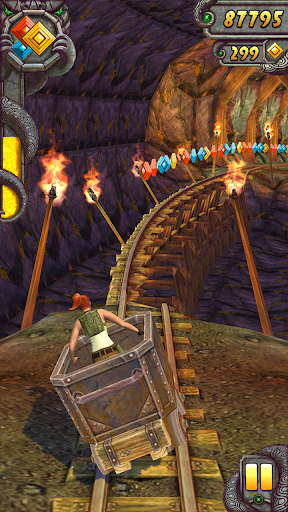
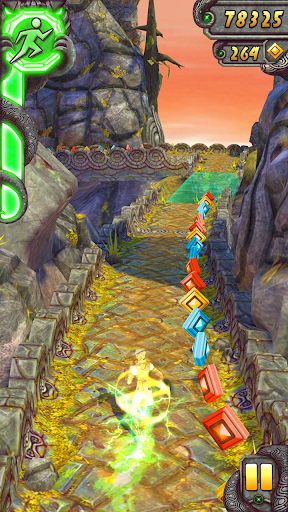
The most addictive game of 2013, Temple Run 2. Over 100 millions download, makes this game best game of 2013. There are other running games like Subway Surfers and other games which are also popular but Temple Run is still best. I don't like Subway Surfers at all. Temple Run (1) got over 170 millions (over 1000 crore) and with the great success of Temple Run. Imangi Studio made Temple Run 2. It comes with brand new features and it works even in some devices which can't even handle Temple Run for ex. Micromax A54, Micromax A45, Micromax A87, Micromax A57 and some other low-end devices. Really beautiful graphics, Gorgeous environment which looks like real. Disney made Temple Run: Oz, you can see it on Play Store or Apple App Store. The monkey are 3x bigger now and runs better than old one(s) and many other awesome updates/features. People gave reviews to this game and said it's the best games. It got 4.5/5 (ratings: 625,141) from Play Store. So, you might know how popular this game is. 


What's new in Temple Run 2
1 Beautiful Graphics, not like that old edged UI, it comes with edge-cutting UI.
2 Awesome environment, you will feel to jump inside the game.
3 New Obstacles, new challenges!
4 More Power ups, over 10 powers included for the stock character (there are many other character too!)
5 Bigger Monkey- can it catch you? :)
6 Special Powers for each of the character, means you can have different powers for different characters, some might be available for one and some might not be available for one!
7 More Achievements- like, you will get achievement for running X meters and for some other tricks you might perform.


What's new in this update (for both Android and iOS)


Android-
Reduced the difficulty of the Narrows
* Fixed a glitch that caused you to fall through narrow paths after jumping or sliding
* Removed the river / grinder double obstacle combination from the forestIn the 1.2 update:
* Watch your step in The Narrows, a treacherous new terrain!
* Spinning saw blades!
* Don't miss a chance to earn free coins and gems under Free Stuff in the menu!* Fixed the skip button crash
* Many other bug fixes and performance issues 


iOS
* Reduced the difficulty of the Narrows
* Fixed a glitch that caused you to fall through narrow paths after jumping or sliding
* Removed the river / grinder double obstacle combination from the forest


ScreenShots


Download Links of Temple Run 2 for Android and iOS


Android users can download Temple Run 2 from Play Store. The latest version of Temple Run 2 is v1.2.1. You need android OS 2.1 Eclair to play this game on your device.


iOS users can download Temple Run 2 from Apple app store. The latest version of Temple Run 2 is v1.2.1. Supported devices- 
iPhone 3GS
iPhone 4
iPhone 4S
iPhone 5
iPod touch (3rd generation)
iPod touch (4th generation)
iPod touch (5th generation)
iPad. 
Requires iOS 4.2 or later. This app is optimized for iPhone 5.

How To Download WhatsApp for Any Device


WhatsApp WhatsApp WhatsApp, this is the word on everyone's tongue. WhatsApp is really popular these days. WhatsApp offers you very good features like sending pictures, instant messages sending, sending videos, sending any audio clip and other things. I don't use WhatsApp but I used it for a few days, I have Micromax a87 and after WhatsApp, it is full of flaw! because it has 256 MB RAM. I liked it but I need to use phone for other works and removed WhatsApp. WhatsApp offers you some other things like Group Chats, Share your locations. WhatsApp runs on mostly all OSes available for phones like iOS, Android, BlackBerry OS, Windows OS, Nokia S40, Nokia Symbian, and in some other Java devices like Samsung Chat and other devices (in some, it might don't work). Installing WhatsApp is very very easy. As you install other apps, you can install WhatsApp in the same way, no extra requirements.


Requirements
1) Internet Plan on your device.
2) iOS/Android/Java/BlackBerry/Windows/Nokia S40/Nokia Symbian device.
3) Basic knowledge of installing applications in your device.


Download links of WhatsApp for Your device-
For Android

This is direct link means just click and the download will started. Push this application to your device through USB and install it, it will work. It is just for 12 months, after 12 months you will need to pay for WhatsApp. You need Android 2.2+ on your android device.


For iPhone

This is the link from iTunes, you might download from iTunes (available for computer) and install to your device or install from your iPhone (by Itunes). The WORST thing of this is, that it is PAID. You need to spend 0.99$ from your pocket for enjoying WhatsApp forever. You need to have iOS 4.3+ device so iPhone 3G users cannot enjoy this awesome application.


I haven't used BlackBerry but I have the download link. You need to have BlackBerry OS 4.3 to install WhatsApp. It is free for BlackBerry users. As you install application, install the WhatsApp in the same way. The download link is of BlackBerry world. I don't know how to install so please google it.


For Nokia S40

Nokia was the best phone manufacturers in the India but they are not. Okay, we won't discuss that. You can download WhatsApp from the Nokia Store (Ovi Store)

Supported devices

- Nokia Asha: 201 · 206 Single Sim · 300 · 302 · 303 · 306 · 308 · 309 · 310 · 311 
- Nokia C3-00 · Nokia C3-01 · Nokia X2-01 · Nokia X3-02 · Nokia X2-00


For Nokia Symbian (S60)

This is for Nokia S60 Users, for Symbian users, 'OS by Nokia'. The download is direct, means download it, place it in SD card, install it. This is very easy. DIRECT LINK means click to download.

Supported devices
- Symbian: X7 · E6 · N8 · C6 · C7 · E7 · 500 · 600 · 603 · 700 · 701 · 808
- S60 5th edition: Nokia 5800 · Nokia 5530 · Nokia 5230 · Nokia 5233 · Nokia 5235 · Nokia N97 · Nokia N97 mini · Nokia X6 · Nokia X5-01 · Nokia C6 · Nokia C5-03 · Samsung i8910 Omnia HD · Sony Ericsson Satio · Sony Ericsson Vivaz · Sony Ericsson Vivaz Pro
- S60 3rd edition: Nokia 5700 · Nokia 6110 · Nokia 6120 · Nokia 6121 · Nokia 6124 · Nokia 6700 · Nokia 6290 · Nokia E51 · Nokia E63 · Nokia E66 · Nokia E71 · Nokia E90 Communicator · Nokia N76 · Nokia N81 · Nokia N81 8GB · Nokia N82 · Nokia N95 · Nokia N95 8GB · Nokia 5320 · Nokia 5630 · Nokia 5730 · Nokia 6210 · Nokia 6220 · Nokia 6650 fold · Nokia 6710 Navigator · Nokia 6720 · Nokia 6730 · Nokia 6760 Slide · Nokia 6790 Surge · Nokia C5 · Nokia E52 · Nokia E55 · Nokia E72 · Nokia E73 · Nokia E75 · Nokia E5 · Nokia N78 · Nokia N79 · Nokia N85 · Nokia N86 8MP · Nokia N96 · Samsung GT-i8510 · Samsung GT-I7110 · Samsung SGH-L870 · Samsung SGH-G810 · Samsung SGH-iNNN


Java devices, many many people own this and each of us want everything in our device. While I was 'Googling' WhatsApp for Java devices, I found it but it may not work on some Java devices. It will work on over 89% devices. You can download this from Opera Mobile store.


Windows phones are these days popular. Some of the popular devices are by Nokia. They released some popular phones like Nokia 920, Nokia 720, Nokia 1020 (rumored). You can download it from WindowsPhone.com. 


Woh! Here the list ends. Now, you can download your WhatsApp and use it. There are many tricks online to make WhatsApp free for an iOS device. I won't share this because it will be against Policies. Share this with your friends and comment here if it worked for you or not.

RoundR Application- Make your Android's Window Round!


Hi guys! are you bored of that screen having 'edges'? eh! you might tried some of the OS which are having round corners windows and they feel amazing while using. Android don't have Round corners support till now but...wait...there is an application RoundR which makes corners of android window round and not like that old 'rectangle' shaped window! you can now have round window which feels amazing to use in android OS. This application can make application's corners round (Any app) and cannot make round booting screen and notification bar and also not pop-up but still it is an amazing application! and not just this! you can control the size of making round and shall application work on boot or not too! and you can disable it at anytime too.


About the Developer and the Source code of RoundR-

The developer of this application (RoundR) is Mohammad_Adib the original development thread can be found here and for the source code, refer here.


Requirements-
1 Any Android Device having Android 2.1+ (Froyo 2.2, GingerBread 2.3, HoneyComb 3.2, Ice Cream Sandwitch 4.0, JellyBean 4.1, JellyBean 4.2)
2 Mind to use any application eh!
3 NO NEED TO ROOT, if you are rooted then okay if you are not rooted then also okay! so finally non-rooted users also got something!


How to make Android Windows Corners Round by RoundR application-

1 Open RoundR application.
2 In General Settings, select Start on boot if you want that RoundR always work even without opening it when you reboot android device and click on ON if it is not enabled.
3 Restart Android Device.
4 Now, again open RoundR application and on the bottom of RoundR you will see a slider which you can use to keep the radius of the corners. Now, use slider and choose which you liked the most.
5 Oh! yes! you have made round the corners of your android device by RoundR application!!


Facebook Home- Now working on every android device (Android 4.0+) | Ported


Facebook Home

Hi guys! facebook home is a great application for android but available to very less android devices. Facebook porting to as many androids they can but our XDA developer is faster and completed this work before facebook. No matter if you are rooted or not. It works on each android having 4.0 (Ice Cream Sandwitch) /4.1.x/4.2.x (JellyBean). If you are Gingerbread user huh  like me then you just enjoy facebook application and messenger or try atrium application. This is unlocked, work by developer. Now, lets see that it works on every android device or not. Many users said it is working on their android devices which are GingerBread+ (2.3) device.


What is Facebook Home-

Facebook Home is the mobile experience that puts your friends at the heart of your phone. From the moment you turn it on, you see a steady stream of friends' posts and photos on your home screen. Upfront notifications and quick access to your essentials mean you'll never miss a moment. And when you download Facebook Messenger, you can keep chatting with friends when you're using other apps.

Read More: Facebook home for android (play store link)


ScreenShots of Facebook Home-


About Developer

The original developer is theos0o and he did an awesome work on this original thread- click me


Note:

It is working on all ICS/JB OS and will not work on Eclair/froyo/Gingerbread/honeycomb so don't waste your download if you are not ICS/JB user!

How to install Facebook Home on Any Android device-


1 Download facebook home- Facebook Home and Facebook app (ported to every android)
2 Download facebook messenger (fixed- chat heads and SMS fix)- click me
3 Uninstall your facebook application, facebook messenger or any facebook home application.
Note: if you have facebook installed as stock like in Micromax A57 or any other android device, you need to root your android device and remove facebook app(s) from /system/data and then you can continue. If you don't want to root then wait till facebook ports it (wait forever eh!).
4 Now, extract the .rar file FB_HOME.rar.
5 Now, install facebook.katana.apk (the facebook application) and then com.facebook.home.apk (Facebook home application which is ported to all android devices.)
6 Install fborca242.apk (Messenger application.)
7 Now open facebook, login and goto settings of facebook app. From there enable facebook home.
8 Now, goto home and see your friends' new news feeds!


This is an awesome work by developer, so please donate him or say thanks to him via XDA! Enjoy the new Facebook Home application on your any android device.

Atrium for facebook- Faster Facebook App


Hi, do you hate that slow facebook application? do you think it needs to be replaced? but there is no alternative application for facebook so you have to use that. But..There is an application named Atrium for Facebook. This is a great application for facebook. You will surely uninstall original facebook application and will install this. So lets see further details of Atrium for Facebook.

Its currently BETA so don't think it will having ALL facebook features, its having options like updating status, Chat, News Feeds, Friends list etc.

This is only for Android 2.3+ i.e. GingerBread, Ice Cream Sandwitch, JellyBean (4.1/4.2/4.3)

Its developer is, radiantbits Not me.


What's features of Atrium for Facebook-

• Share status updates, photos and videos;
• Get notified when friends like and comment on your posts;


• Instantly see who's online on Facebook;
• Send instant messages to your friends (even when they are offline);
• Express your emotions with cool smileys and rage faces;
• Quickly access your complete Facebook chat history;
• One-click access to your most recent conversations;
• Check-in at interesting places all around the world;
• No additional fees, 100% free!
• Explore your friends’ profiles, including photos, videos and timeline;

• View hi-res photos directly in the news feed;
• One-click access to comments and likes in the news feed;


What's New in version 1.2.0 APK-

- Fixed issue with swiping through photos;
- Fixed issue with message duplicates in chat;
- New option to hide app icon from notifications bar;
- Like/Unlike comments;
- Fixed issue with publishing comments;
- Various performance improvements.
- Like/Unlike posts;


Its Really Fast, Cool and with cutting Edge UI. Its a Client of facebook actually.

The list of supported languages already includes English, German, French, Italian, Portuguese, Spanish, Korean, Russian and Ukrainian. I am looking forward to translating Atrium for Facebook to other languages. Feel free to drop me a line if you are ready to help.


Download URL
Download From Google Play Store

Seeder Apk- Remove lags on Android|Boost Android


Hi, you may running big applications like google chrome, firefox, HD games but, they may lag? Yeah they lag on Low-End Android Devices, so i am posting an application which will remove lag from android (it fixes, removes Entropy ie data)


This app does not increase raw performance, but rather eliminates some types of annoying lag (ie. applications briefly freezing, jerky scrolling, delays returning to the home screen, etc). The effect seems to be more noticeable the longer the device has been running prior to activating the RNG service. This will make your android fast but not in 'Games or in High Apps', it will decrease freezing and all.

Must See:
How to expand (increase) RAM in android devices
Using chainfire3d to improve gaming experience
Developer

I am not its developer, i am just posting the original developer is lambgx02


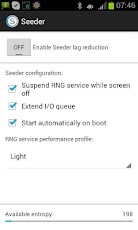
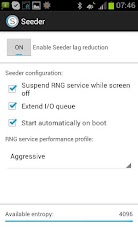
Some ScreenShots


Downloads

Click Here to download Seeder 2.0.0 Apk


How to make it work

1 Download and place is SDcard

2 Install this APK

3 Click on "ON" option, voila! your android's lags are removed!