Showing posts with label smart. Show all posts

Babble Messenger No Data Charge For Smart Subscribers


Babble is a realtime mobile messaging app which allows you to send unlimited messages for FREE.

DOWNLOAD  Babble Messenger

Smart Communications (Philippines) recent advisory is about Babble Messenger.
You can connect to your friends through this mobile app even if you don't have a SIM load
or not connected to a WiFi. All you have to do is to turn on your mobile data connection.
Smart Communication assures that this service is FREE and they won't charge you even if you have a balance on your prepaid card.


This mobile app si similar to: Whatsapp, Viber, WeChat, Line, KakaoTalk.

  • GROUP CHAT - Chat with all your friends at once! Join groups or create your own.
  •  SECRET MESSAGING - Send messages to your friends and watch them disappear, leaving no trace!
  •  JOIN CHATROOMS- Find & make new friends. Meet random people and talk about absolutely anything!
  • NEW CHATROOM FEATURES- Send PRIVATE MESSAGES to fellow chatroom users, or IGNORE pesky users.
  • SEND PHOTOS & VIDEOS - Attach photos & videos and send them instantly to your friends or groups
  • EMOJI & STICKERS - Make messaging fun! Use Emoji & Stickers to express yourself!
  • VOICE CHAT - Send audio notes to friends or groups with just a click of the button.
  • AUTO BUDDY MATCHING- Your Address Book contacts who have Babble installed will automatically appear.

Vodafone Smart Chat Zte P752D hard reset


Hello world!
Today will show how to make hard reset on Vodafone Smart Chat aka Zte P752D hard reset.


How to hard reset:

Warning! All data will be lost!
1.Power off your phone
2.Press together volume up + power button until Android logo apperas on screen
3.Select with volume buttons "wipe data" and press power to confirm
4.Select "yes" and press power key to confirm
5.Press power to confirm "reboot"
6.Wait until the phone restarts
That's it!

Here is video how to do:


Alcatel OT Smart 991 hard reset


Alcatel OT Smart 991 data:

Other names :OT-991, One Touch 991 Smart
GSM frequencies :850 900 1800 1900
Standard UMTS :900 2100
Type :Touch
Dimensions (W x H x D) :122,00 x 68,00 x 10,80 mm
Weight :131,30 g
Main display :Color / TFT
                     256k colors
                     320 x 480 px (4.00") 144 ppi
Talk time (max.) :2G: 720 min. (12,0 h)
                          3G: 600 min. (10,0 h)
Stand-by (max.) :2G: 400 h. (16,7 days)
                          3G: 400 h. (16,7 days)
Standard battery :Li-Ion 1500 mAh
Internal memory :150 MB
RAM memory :256 MB
Memory cards : microSD, microSDHC (up to 32 GB)
Operating system :Android 2.3 Gingerbread
Processor :MediaTek MT6573
Processor clock :800 MHz
Touchscreen : yes

How to hard reset:

If you forgot your pattern code or password of your phone  follow these steps.
Warning!All data will be lost!
1.Power off your phone
2.Press together volume up + power button 
3.Press home button when android logo appears 
4.Choose "wipe data" with volume buttons
5.Press sensitive key from left corner to select it
6.Choose "yes" with volume buttons
7.Press sensitive key form left corner to select it
8.Wait until format ends
9.Select "reboot"
10.Wait until the phone restarts
That's it!

Here is video how to do:


Chikka Text Messanger: Absolutely free Text Message Application


Chikka Text Messenger
by Chikka Philippines

 DOWNLOAD Chikka Text Messenger


This mobile application allows you to send text messages from anywhere in the world to any mobile carrier in the philippines all for free. The advantages of this app from other same mobile application like Viber, WeChat, Line, KakaoTalk and other is that
  • You can send text messages even if the receipient of that message don't have chikka application installed on his mobile.
  • The receipient don't need to be connected in a Wifi or data connection.
  • The message can be receive on their phone as a normal text message without charging them.
  • The message can be received  even if the recipient have zero balance on their prepaid or postpaid SIM card.

LIMITATIONS
  • There is a credit given per pay and per receiver.
  • The total number of messages that you can send per receiver per day is only 8 messages. You can send another 8 messages for the same receiver and the same day as long as the receipient of the message reply to you via the number you were using in your chikka account.
  • There is a maximum of 160 characters per message.

MOBILE CARRIER CREDIT PER DAY
SMART: 32
GLOBE: 30
SUN: 20

In the credit given above, you can only send 32 text messages to SMART Subscribers per day, 30 for GLOBE and 20 for SUN.


Huawei U8160 Vodafone 858 Smart hard reset


Huawei U8160 Vodafone 858 Smart data:

Other names :Vodafone Smart, U8160, VF858
GSM frequencies :850 900 1800 1900
Standard UMTS :2100
Type :Touch
Dimensions (W x H x D) :103,80 x 56,80 x 12,60 mm
Weight :104,00 g
Main display :Color / TFT
                    256k colors
                    240 x 320 px (2.80") 143 ppi
Talk time (max.) :2G: 240 min. (4,0 h)
                          3G: 270 min. (4,5 h)
Stand-by (max.) :2G: 250 h. (10,4 days)
                          3G: 380 h. (15,8 days)
Standard battery :Li-Ion 1200 mAh
Internal memory :130 MB
Memory cards : microSD, microSDHC (up to 32 GB)
Operating system :Android 2.2 Froyo
Processor :Qualcomm MSM7225
Processor clock :528 MHz
Touchscreen : yes

How to hard reset:

Warning! All data will be lost!
1.Push long together power button and volume up till recovery menu appears 
2.Select "wipe data" with volume buttons
3.Press power to select
4.Wait till the process ends
5.Press power button to reboot

Here is video how to do:

How to stop losing your prepaid load when you are surfing on the internet?


If you are using a prepaid SIM card and you have a regular load, and you want to surf on the internet using the WiFi connection, most probably, your load balance will be lessen if your mobile data  network is enabled.

To check the current settings of your data networks,

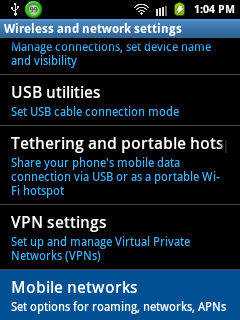
go to your Settings


then tap Wireless and networks


then tap Mobile networks


if the Use packet data is checked,
this means that you can use your mobile data network to connect to the internet.


To prevent losing your SIM prepaid load while surfing using the WiFi connection, unchecked the Use packet data.


enabled this only if you are registered to your network provider promo for internet surfing, or if you really want to use your SIM prepaid load to surf on the internet.