Showing posts with label infographic SEO. Show all posts

Animated infographic - Catch up with the new Trend


Have you seen the new animated Cheetah infographic?
Most probably you did, because it's gone viral, with thousands of shares since it was created.
Be crazy, Be mad, Be Creative, and Get our of the Box!
That is the #1 rule for Link Baiting and Link Building.

Infographic designed by Jacob O'Neal

9 Components of a High Converting Page - Infographic by Neil Patel


You may spend thousands of dollars on a PPC campaign to drive traffic to your site. But once you get visits, they bounce because you do not have the right components on the landing page.
So what are those components and how to place them on your page to make the best use out of them?

Source: The Anatomy of a High Converting Landing Page - Quick Sprout - Neil Patel

Mobile Marketing FutureTrends Infographic


There are 1.2 Billion people accessing the web with their mobile devices whether they are smartphones, tablets, or a regular phone with a browser. Did you also know that 58% of people who own smartphones have used them for store-related shopping? It’s no surprise that ecommerce and brick-and-mortar companies are all working hard to bring mobile shopping options to their customers.

The real question is: are you leveraging mobile technology?

It’s estimated that 63% of people expect to do more shopping on their mobile devices over the next couple of years. As mobile shopping continues to rise steadily in popularity, it’s important for you to stay ahead of the game in order to maintain relationships with your customers to make sure they keep coming back for more.

With Black Friday just around the corner, now is the time for businesses to learn more about how their customers will be shopping this holiday season. My hopes are that the following infographic convinces you to leverage mobile devices:

Infographic Source: http://www.quicksprout.com/2013/09/19/why-all-marketers-should-be-thinking-mobile/?display=wide 

Top Free Essential SEO Tools For Mobiles


Top Free Essential SEO Tools For Mobiles 2012
Top Free Essential SEO Tools For Mobiles 


by Mina Adly Younan 

The growth in mobile browsing has been incredible over the past year. With nearly half of UK smartphone owners using their mobiles to browse and research products and Mobile Search accounting for an impressive 12% of all UK search clicks in December 2011 (Marin Software, 2012). Morgan Stanley Corp. have also found in a recent study that Mobile traffic is expected to surpass desktop traffic by 2015 as shown in the graph below.  For a website to remain its high ranking on search engines (Google) should do all needed efforts to make their mobile versions as friendly and functional as possible.
In doing so, webmasters will need the following Top Free Essential SEO Tools for Mobiles:

1- Mobilize your Site () : see how your current site looks in mobile, and find resources for building your mobile site.

2- Our Mobile Planet ():  View data about mobile users that Google has gathered. Select your key demographic and other potential customers, and view key differences.

3- Mobile Meter () gives an overview of how your site looks and performs on a mobile.

4- Google Adwords for Mobiles:  It is the same Adwords tool used for desktop searches. It gives a guideline on the monthly volume in searches. The tool can also show data for searches on mobile devices.  To do so, select ‘advanced options’ > ‘show ideas and statistics for’ > and select ‘mobile’.
Local search trends can be added to see seasonal fluctuations or if keyword searches are increasing in volume. Select columns and ‘local search trends’. This will show a simple bar graph, but if you download the data it will give some figures over time.

5-PageSpeed Insights (): test speed from both a desktop and mobile perspective. Very useful to see where the easiest performance improvements can be gained in terms of download speed. As site speed is considered part of Google’s algorithm, fixing issues could result in a real impact on mobile search positions.

6- Google Webmaster Tools for Mobiles:  It is the same Google Webmaster tool as it can also check mobile sites setup and investigate any performance issues or poor search results. Additionally, if you redirect mobile users to specific mobile versions of your URLs, then Mobile Sitemaps can be added in Google Webmaster Tools.

7- Mobilize your Business with Google Sites (): Build a test or mock up and see how it performs. The tool have different templates for several types of landing pages.

8- Google Mobile Ads (http://www.google.com/ads/mobile/): Although it is a PPC tool, it can be used to find a lot of potential methods to look at that can drive traffic to your mobile landing pages using mobile ads like:
·         Phone numbers in ads using ‘click-to-call’,
·         click-to-download
·         Mobile Ad Sitelinks
·         Seller Ratings
·         Location Extensions (Multiple Addresses too!)
·         Location Targeting

9- Speeking of PPC, there is of course there the AdMob that is now owned by Google 


10- Google Analytics for Mobiles (): The same Google Analytics for Desktop could be used for mobile browsers so that you can easily find out which mobile devices are working well, and which need optimization by asking the right questions like: Is some content getting a lot of mobile traffic but performing relatively badly? Can a page be optimized to generate more phone call leads? Which content drives more local mobile users? It is even possible to hook Analytics up to track downloads of mobile apps.


2013 SEO Industry Survey Infographic by Moz


Seo Moz have conducted an amazing SEO Industry Survey for 2013 to predict 2014
Here is an infographic of the results:


You can find the detailed survey here: http://moz.com/seo-industry-survey/complete

and the questions were:

  1. What is your gender?
  2. What is your country of residence?
  3. What is your age?
  4. What is the highest level of education you have achieved?
  5. What is your pre-tax personal yearly earnings, including salary, bonuses, and side projects?
  6. What is your job title?
  7. How long have you worked in internet marketing?
  8. What was your professional position when you first engaged in internet marketing tactics?
  9. Do you and/or your team work on these internet marketing tactics?
  10. How many people do you manage?
  11. How would you rate your internet marketing skills in the following areas?
  12. In the past 12 months, my formal responsibilities or my agency's expectations of my team's responsibilities...
  13. Which of the following best describes the internet marketing role you currently fulfill?
  14. About how many clients have you worked with in the past 12 months?
  15. About how many clients do you work with at one time?
  16. Which consulting services do you or your company offer?
  17. Has demand for the following services increased or decreased in the last year?
  18. Which of the following tactics have you used to learn or advance your internet marketing knowledge?
  19. Of the following, which 4 do you most focus on from a content consumption/reading/learning perspective?
  20. Has your current organization ever done in-house training for you or your colleagues in the following inbound marketing topics?
  21. Which of the following industry conferences/events have you attended in the past 2 years?
  22. How many people are employed at your company?
  23. How many people in your company, part­-time and full­-time, work primarily on internet marketing?
  24. On average, what is your company’s monthly budget for outsourcing and consulting?
  25. About how much does your company spend on tools/software each month?
  26. On average, how much money does your company spend on the following forms of paid media for its own properties each month?
  27. On average, how many websites do you manage/optimize at a time?
  28. About how many unique pages does the largest website you manage have per month?
  29. How many different countries do you optimize for?
  30. When you're reporting on your internet marketing efforts, how often do you pull formal metric reports for your boss/clients/higher ups?
  31. How many people in your company access tools daily/weekly/monthly/quarterly to pull data and/or manage sites/accounts for SEO, social media, analytics, conversion rate optimization, and content marketing?
  32. What percentage of YOUR time is spent on the following inbound marketing tactics?
  33. What percentage of YOUR TEAM'S time is spent on the following inbound marketing tactics?
  34. In the past year, which of the following inbound marketing focused actions have you or your company/team employed?
  35. What types of inbound marketing content do you or your team produce?
  36. How often do you use your favorite inbound marketing tools?
  37. Which analytics tools do you currently use to track site usage?
  38. Which tools do you currently use for content marketing and/or outreach?
  39. Check any of the following tools you use for conversion rate optimization (CRO), page speed optimization, and/or usability?
  40. Which of the following video hosting solution(s) or video portals does your company use?
  41. For your largest site, about how many keyword rankings do you track (or care about)?
  42. Which SEO Tools have you PAID to use in the last 12 months?
  43. Which SEO Tools have you used the FREE version in the last 12 months?
  44. Which of the following keyword research tools have you used in the last 12 months?
  45. On these top social networks, how many company accounts do you/others run for your company?
  46. For what purposes do you use the following social media channels?
  47. Which 5 social networks do you use most for your social media marketing efforts?
  48. What are the top 5 secondary social sites that are most important to your company?
  49. Which tools do you currently use to manage and/or report on social media?
  50. Which functions are important for you in social media management tools?
  51. How do you feel about the following major search engines', social networks', tech companies', and tech media outlets' ethics and standards?
  52. Which of these tech media and/or inbound marketing blogs do you read at least once a month?
  53. Future predictions: What do you think about these industry trends?


Bounces to Leads Converter - The Ice Breaker of E-Commerce


I got a crazy idea that I believe will rock the SEO world.

let's agree first that SEO (and PPC) are not about traffic anymore but about Revenue and Sales.

Even if you are not selling any product, you need the traffic to sell ads of third parties.

OK then..

Do you know that the only challenge in SEO (and PPC) campaigns is not to drive traffic but to keep them? and what is really more challenging is to convert them to Leads to buy what you are offering.

70-96% of visitors abandoning your site will never return  

Here are even more facts:


  • 90%-99% Of Your Marketing Spend Is Completely Worthless
  • Email is a phenomenal profit driver, however most websites capture less than 1 in 400 emails from visitors (who have not purchased)
  • Up to 85% of shoppers who add to cart DO NOT BUY ANYTHING


Imagine:

Mrs. Lynda owns a store in a Big Mall and Mr. Christopher happened to pass by her nice store when he was doing his weekly shopping. He stayed for a couple of minutes, went through her products, felt interested in some of them, checked the prices, thought of dropping her store another visit when he is prepared to buy, then he left. 

30 minutes later, he entered another store selling the same products like you do, but the store looked better with more promotions and friendly staff. A cute saleswoman broke the ice and approached him. She asked him about what he is looking for, they talked for a while, she showed him some products, he was convinced and bought what he needed. 

And never came back to poor Mrs. Lynda who is selling the same thing. 

The Lesson here is: Sales NEED Ice-Breakers 


So,
The tool I created is not an invention per se albeit it does not exist yet. 
It is a combination of 3 already existing tools, but in one All-In-One Powerful onsite SEO tool
That I will call The Bounces2Leads Tool (AKA, The Ice Breaker of E-commerce) 

What it does:

It simply detects when a visitor abandons the website, then after they do, a window appears asking the visitor to chat with a representative if they have any inquiries before they leave.  
So, it is using the Bounce Exchange service but instead of popping up a banner, it will pop up a chatting window with a real person representative. 

Here is How Bounce Exchange Works:


As for the chatting services you can find hundreds of software online to choose from (I prefer those that can forward chats to Google Hangouts and can go mobile)

Finally, you can have an email marketing software to manage your newsletter in case your visitor preferred to leave their email address instead of chatting with a rep. 

But why have 3 services with a cost more than 3000$ if you can have only one that does it all for a fraction of that price (I did not price it yet but it will be way cheaper)


Why Online Shoppers do not Complete the Transaction? - Infographic


As an E-commerce business owner, you invest a lot of money maintaining your website, managing your inventory, advertising for your products or services until you get your right clients to your online store, and they are also ready to buy what you are selling, but then something happens and prevents them from completing the purchase.

There are specific reasons why online shoppers do not complete their purchases and leave in the middle of the funnel.

The reasons could be long forms, creating accounts, non-transparent pricing, high shipping costs, long delivery duration, and more.

Here is an exciting study illustrated in an exciting infographic showing why online customers fall from the conversion funnel.

Why Online Shoppers do not complete transaction

infographic source: Column Five Media 

Do your Webpages Speak The SEOish Language? Another Infographic


The Seoish Language School

An ideal webpage that search engines will love and favor over the billions of other sites is the one that respects it and speaks with its robots' language (the SEOish).

It is also a page that understands that SERPs algorithms is about User Experience and Value Proposition.

webpage speaks seoish


How to Select My site's Targeted Keywords | Infographic


When it comes to SEO, it is mostly about Keywords. But which Keywords do you want to target and which phrases do you want to be ranked for? is your Keyword "Free Songs" or "Free Songs by School boys in their summer vacation in Mexico"? what are the cons and pros for both?

Answering these questions is not that easy as it needs an analytic strategy that your whole website will be built on.


  • You need to know how to define your business
  • Who are your audiences and what is their search behavior
  • Your targeted cities and Countries
  • Your targeted visitor' language
  • and Who are your competitors


Why do Not you have a look on this infographic instead:


See the embed code for this infographic at Promodo.

Infographic SEO Will Never Die


I like this infographic on SEOBOOK, called The Death of SEO: Should you dismiss those who say SEO is dead to market themselves? as it compares SEO to a cat, has nine lives. 3 are lost already with the Penguin, Panda, and Florida updates, one in 1997 when search engines are claimed to be dead, and 5 lives are remaining waiting for the next algorithm

infographic SEO Will Never Die

Infographic about Infographics


What is all this Fuss about infographics? and why is it getting so trendy?
Do you need to create some for your ideas and business?
Read this Infographic about Infographics

Presentation on The History of Search Engines - Slideshow and Infographics


The History of Search Engines and SEO goes back to the 1990 and is getting upgraded in a very vast speed. In this Slide show you will see how it starts, what techniques people used to do to rank on search engines and how hard and technical it was until google updated its algorithms and made SEO more about content, Value, and User Experience.
The slide show is 101 slides, but I promise you will find it very interesting and informative and won't take you more than 30 minutes.


And Here is the Infographic 


Top search engines


And Another One Too 


Search Engine History
Infographic: Search Engine History by Infographiclabs

Content Writing Tips for SEO


10 Tips in a colorful infographic for writing content that ranks in 2013 

Source: ContentVerve


Women VS Men in Social Media Infographic


When it comes to Social Media (Facebook, Twitter, Google Plus, YouTube, and even LinkedIn), Men and Women are not alike. Here is an exciting infographic I found on the battle between sexes in the Social Media World. Enjoy!


What is the Difference B/W Social Media Networks? Infographic explaned by Coffee


Today I found this very interesting Infographic that makes an analogy between 2 things every SEO Specialist loves: Social Media and Coffee.
It shows the difference between top social media networks as simply as drinking a cup of coffee.


Sell Twitter for Local Business - Sales Material infographic


Some inspiring and compelling Twitter Headers for Local Business 


Source: 

10 Compelling Local Business Twitter Headers


Social Media Campaign Checklist for NonProfit Advocacy


SEO in 2013: The Year of the Consumer


In 2013, SEO will shift from optimizing websites for search engines to optimizing content for users. So, you have many things to do and a lot others to avoid. Here them all in this exciting infographic:  


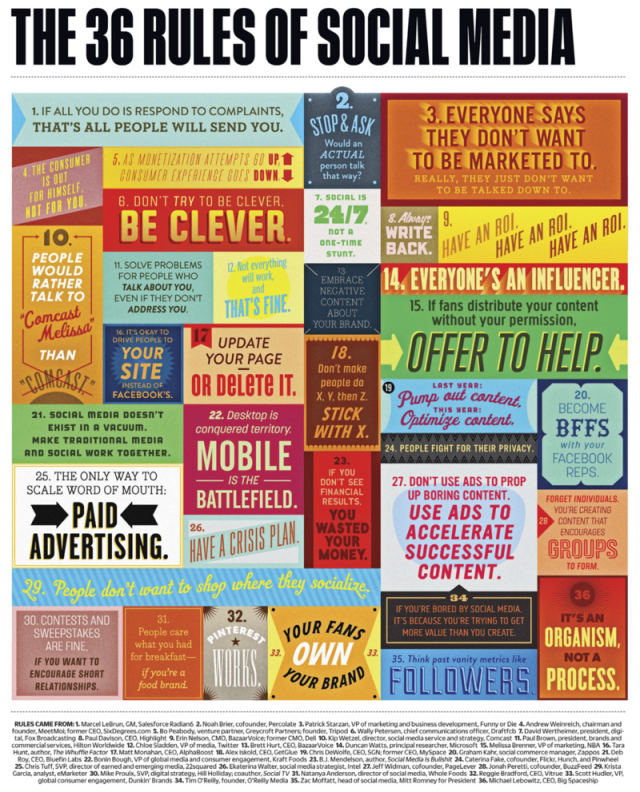
Community Managers Bible (Another Infographic)


How about one infographic (colorful illustration) with all the basic Rules you need to know as a Social Media Marketer or Community Manager.


Google Analytics in 1 InfoGraphic


I stumbled upon this infographic about Decoding Google Analytics on OpenForum.com
and would love to share it with you.