How to Check Your Search Position in Google
in this post i will explain a method to know you search position in google .
to do this we will use a website called where do i rank on google .
this website help you to find your SERP Ranking . meaning what page number your domain falls under in the google search engine.
the website of service : where do i rank on google .
first you must enter your domain name in it blank without http or https .
for exemple : themobilehub.blogspot.com
second enter you keyword that you would check it position on google
for exemple : download jingling
then clic find search engine page rank
then you will find your rank
tags : how to know you google position , google search position , google position rank tool
download the best blogger template friendly to seo and google
in this post i will give all blogger that follow our blog the best blogger template friendly to seo and google .
this template is free , simple , light and with a nice design .
this template called also : super seo template
template name : Johny Demosite
view download
tags: super seo template , template friendly to seo , seo blogger template , free seo google template , template friendly to google , blogger template 2013 seo , seo blogger 2013 , friendly blogger template to seo 2013 , how to make blogger template seo friendly
how to get us visitors to your website ?
in this i post i have to you a method that can help you to have usa trafic in your website (blog , forum , link ...... ) . and it can help to to be better in alexa .
this visitors are real and can help to to have usa visitors to your usa english nich .
![]() |
| have a usa traffic in your website |
Top Blog Directories To Submit Your Blog in 2013-2014
If you want to improve SEO of your blog and want to get high ranking in Search engine.Then Directory Submission is necessary.There are a lot of directories are there on the WebSphere.But some of them are spammy,So avoid spammy Directory They will loose your ranking instead of getting good raking.So today i searched some latest 2013-2014 directories which will helps you to get high rank.Also read below articles on SEO.ALSO READ:
- List Of RSS Blog Directories To Submit Your Blog
- Latest 2014 DoFollow CommentLuv Enabled Blogs To Get Backlinks
- Submit blog to 50+ Search Engines at one click 2013 -2014
spillbean.com
technorati.com
digg.com
indiblogger.com
blogadr.com
stumbleupon.com
blogoriffic.com
reddit.com
blogarama.com
blogadda.com
submitstart.com
bloghints.com
vanani.com
totalblogdirectory.com
alivedirectory.com
blog-search.com
submitblognow.info
blogged.com
interestingblogs.org
japanblogdirectory.com
addyourblog.com
blogdire.com
bloggeries.com
highclassblog.com
blogio.net
bloglines.com
problogdirectory.com
blogpulse.com
submitwebsiteurl.com
theblogresource.com
blogsitelist.com
bloggingfusion.com
conseillemoi.net
blogher.com
blogdirs.com
blogdigger.com
ablogin.com
blogdirectory.org.uk
blogflux.com
dmegs.com
bloggapedia.com
bloggernity.com
biggerblogger.com
blogbal.com
blog-directory.org
blogdirectory.ws
blogdir.co.uk
britblog.com
boingboing.net
blogpoint.com
bloggernity.com
thecanadianblogdirectory.com
blogdup.com
blogville.us
blogs-collection.com
bloglog.com
directoryblogs.com
dir.yahoo.com
bloghub.com
bloglisting.net
blogdirectorysubmission.com
blogratedirectory.com
topblogarea.com
blogdirectory.net
bloguniverse.com
portal.eatonweb.com
bestblogs.org
startupblogs.net
blogcatalog.com
globeofblogs.com
search4blogs.com
blogsearchengine.com
redtram.com
indianbloggers.org
oneblogs.in
blogskinny.com
bloguniverse.org
directory.org
weblogs.co.in
freewebsubmission.com
photoblogdirectory.net
blognation.com
blogsranker.com
free-web-submission.co.uk
download jingling 4.0.2 and have +20000 visitors per day to your link
this post is to all bloggers that search to have a big daily visitors to your link ( website , blog , forum , link ...... ) and reduce their alexa rank .
OK !!
to to this you can use a small and free tool called " jingling " and developped by a chinesse developpers .
it's very easy to use it and have visitors
just you must put your link in the blank .
NB : this visitors can give you a lot of USA visitors
=======================================
file name : jingling.exe
version : 4.0.2 ( latest version )
size : 600 kb
download link ( clic here )
=======================================
keywords :
jingling visitors booster , jingling 4.0.2 download ,jingling 4.0.2 tutorial , jingling 4.0.1 ,get usa visitors , get visitors from usa , visitors booster 2013 2014 ,visitors booster download, jingling latest full free version ,jingling bot , jingling traffic ,jingling linkbucks , jingling traffic software ,jingling.exe download , jingling program ,
download Google Adsense Secrets Revealed pdf ebook
if you have an adsense account and you would have a monthly sallery by it !!
you can use some tricks but you are forced to buy an adsense secrets book !!
but it's too expencive .
today we will give you and adsense free pdf book secrets
this book explain many tricks about adsense begin by " create an adsense account " and finish by " have your monthly sallery by your adsense account " .
if you will do the tricks that this book give to you . you can make 100 dollars per month without a big effort .
this book is free !!
this book contain 42 page
size : 600 kb
type : pdf book
download link : ( clic here )
keywords :
download adsense tricks
download adsense pdf secrets
download adsense books
free adsense secrets e-book
google adsense secrets
download No Hands SEO for free
download no hands seo and have your website the first in youtube .
you can easily boost 2000 backlink to you website in a few minutes using this software .
video tutorial
donwnload link :
http://nohandsseo.com/downloads/trial/No%20Hands%20SEO%20Trial.exe
keywords :
boost backlink to your site
no hands seo
tools seo
backlinks booster
How To Get More Traffics To Your Blog
5 Ways Of Promoting Your Blog For More Traffics
Role Of Social Media In Promotion Of A Blog Or Website.
5 Ways Of Promoting Your Blog For More Traffic
Importance Of Title Of The Article In Your Blog
Add Nofollow Tag To all Download, Demo & Iframed Link Pages
This is a short informative post for all those who share Download files or any other web related resources with there readers. A PageRank by Google is an important rank that determines the importance of your website or blog in the eyes of search engine spiders. A spider is a robot that is responsible for crawling your content and indexing it on data bases. Since the entire infrastructure of GOOGLE PR is based on quality backlinks therefore it very important that you should flow the PR juice wisely and do not waste it on useless links. By useless links I mean websites that use login structures or IFrames. An I framed webpage is not crawled by spiders because it can not access it. All social media networks have a login algorithm that allows visitors only with a unique password. When you link Facebook Profiles, Twitter or Blogger Profiles or any other social network, make sure you add the nofollow tag to them. Further you must also add a nofollow tag to the links in your table of contents. If you write tutorials like me and share a DEMO link or Download Link then make sure you tag them as nofollow because linking files and hosting websites will drink all your PR juice and will slow down your PR progress on next PR update.
There is also a noindex tag which should be added only when you feel that even the text of the link is not important.
How to add Nofollow Tag in HyperLinks
A link has this HTML code,
<a href="http:xyz.com">Download</a>
To make any link nofollow just change the link in this way,
<a rel="nofollow" href="http:xyz.com">Download</a>
To add a noindex tag which is not very necessary do this,
<a rel="noindex" rel="nofollow" href="http:xyz.com">Live DEMO</a>
now your PR is more healthy and safe.
What links should be kept dofollow
UPDATE: A detailed post has been written please read: When should you nofollow links?
Always make it a habit of linking well established websites and services. If you are sharing a Facebook Plugin then feel free to link the developers page else if you are sharing a news on AdSense then you must link to the AdSense blog and openly mention things that matter with relevant source links. This will increase your BLOG reputation in the eyes of robots and will help you you rank higher. Blogs become authorities by linking relevant stuff and avoiding useless iframed pages.
Even I have done the plunder of linking demo and download links a lot but the better you know the good it is. I hope this little info may help you preserve and protect your newly gifted PRs and may help you to utilize it wisely. Wish you all the best.
PageRank or Alexa Rank? Which One Is Important?
Google Page Rank and Alexa ranking are two different ways determine your site's performance. Here is a little description of the two,
Google Page Rank
Google Page Rank is a rank from 0 to 10. It is the way Google observes a website. It is mostly dependent upon how many quality backlinks the site has. However there are many other features that also count. Sometimes Google ban people from the ranking due to several reasons like copied content and black hat SEO tactics. . It is calculated from an algorithm (can be seen here :Wiki PageRank. )
Positive Aspects:
-
A good way to observe sites performance as it uses quality backlinks as a major factor. Follows an algorithm (attach algorithm link here Wiki). -
Can ban websites with copied content. -
Ranked by the biggest search engine in the world i.e GOOGLE -
Mostly Page Rank is considered a major factor when buying or selling a site. -
Calculated by Google itself which is major site that sends traffic. -
Offers a toolbar named 'Google Toolbar' to check the Alexa ranking of a site
Negative Aspects:
Updated very late (3-4 months)
People can buy quality backlinks and get good Page Rank.
They do not provide a toolbar for their own Google Chrome.
Alexa Ranking
Alexa is a web directory and provides free traffic metrics, search analytics, demographics, and more. Alexa ranking depends upon how many visitors you get daily.
Positive Aspects:
-
Updated sooner -
Calculation is based on a dependable factor i.e visitor count. -
Offers a toolbar named 'Alexa Toolbar' to check the Alexa ranking of a site.
Negative Aspects:
You can use a software and get as robot visits to your site and increase your hit count.
Conclusion:
Observing both the two factors it is seen that none of them actually is a perfect way to describe the success of a website. Both of them have their pros and cons. However PageRank gives an idea of how popular a website is in internet in building reputation and Alexa gives an estimate idea of how much traffic a website is receiving. In short both are important to receive handsome sponsorship and attract tons of Advertisers.
Fahad UddinAbout the Guest Author:
Fahad is an Undergraduate Student, pursuing his B.E Degree in Computer and Information System Engineering. He is an excellent programmer and part time blogger. He Writes at My C Snippets. You can always contact him at Facebook
Add "NoFollow" Tag to all Links in Table Of Contents
UPDATE: Please ignore this post and read this instead Never Tag internal links as No follow
What are the Disadvantages?
Take an example of these two pages at our blog :
You will find many links there but all these internal links are tagged as nofollow. This is an important SEO strategy to keep you blog optimized. Google spiders give a lot of value to hyperlinks and some even say that whenever a robot sees a link it enters automatically into that page to index it. Suppose you have added too many internal links on a single page without the nofollow tag. When the robot indexes that page it will be confused with too many links pointing to different subpages of a common domain. As a result your page will become doubted. The robot will treat that page as one where you are trying to linkback all your pages into to distribute the PR. You won't suffer at first but when you continue adding more links, your search engine reputation will keep on dropping.
Most experienced bloggers have experienced a PR drop from Pagerank 5 to 4 and PR4 to PR3 or even PR6 to PR3 ( I have seen them myselves with all domain names in my mind but can't disclose them) This happens because as soon as you reach PR-4 or PR-5 the indexing and crawling criteria for your blog takes a more serious turn. Your pages will be more better crawled and indexed but with more a more serious eye from the robot.
What is a No Follow Tag?
In easiest terms it is a small HTML code that tells the search engine robots not to crawl the link. This tag locks the link and robots treat the link more like a text without caring where the link points. The linked will not be crawled but indexed. The Text will still be stored in Google databases. The Page to which the link points will get no PR benefits.
This tag looks like this,
rel="nofollow"
How To NoFollow All links In Table Of Contents Page?
A link looks like this,
<a href="htpp://xyz.com">LINK TEXT HERE</a>
To make the link nofollow just add the nofollow tag before href like this,
<a rel="nofollow" href="htpp://xyz.com">LINK TEXT HERE</a>
Do this for all your links and make your blogs and pages better optimized. Hope this info proves helpful to most of you. Rest God knows best. Peace and blessings.
Publish Several Posts Per Day To Boost Traffic!
Today’s post can turn out to be the biggest utopia of your life if you take it seriously and apply it for at least a month. What do webmasters dream of? Obviously Traffic because it is the only tool that brings along all other blessings like success and revenue. Just look around internet and see it for yourself that how many tutorials are written every single day on Traffic tips and tricks where short cuts of driving huge number of visitors to your blogs are shared. Same is true about today’s post but then how come our post today is exceptional? With my small blogging network I have observed some guys like my home buddy Rafay owner of Rafay Hacking Articles and Techlo Tips receiving thousands of visitors within first few months of their blog release. Neither do they advertise their blog nor invest money anywhere else to promote it. So how do they actually do it? I chatted and visited them and then they shared just one simple tip that is the reason behind their huge traffic and subscribers and that simple rule of thumb is “Write More to Earn More!”
Yes the simplest yet the most effective key to the Blogging door of Success is publishing 5-7 posts a day if you are the only author and 10-12 if there are multiple authors. The more posts published per day the better the results.
How can Good Post Frequency Increase Blog Traffic?
Look around some mega blogs like Tech Crunch and Mashable. They publish several posts per day. One after each 3-5 hours. And that’s why these giants have occupied a great portion of the online traffic. But you can surely achieve that stage with better planning and time management. If you have a good friend circle then you can encourage them to write posts on your blog. After all great number of good articles is what you need to receive your desired traffic.
I have always personally observed my traffic expanding greatly when I post more and more. You might have observed that the traffic Percentage Change goes red in your Google Analytics when you don’t post and goes green again when you start posting actively.
Top 10 Reasons why you must Post Frequently!
This is how this simple yet most effective trick works:
- Robots visit blogs periodically depending on how often the blog is updated
- The faster a blog updates the faster it is crawled and indexed by Search Engines
- Since there is big competition amongst search engines themselves so they always look into more updated content and try their best to provide the searchers with the most up to date content
- By posting more your blog becomes an encyclopedia for Google where it can find variety of topics
- The smaller your number of posts and posting frequency, the smaller you get in the eyes of search engine robots.
- Robots are more like school teachers they love you when you provide them with complete homework on time and they penalize you (lower your ranking) when you turn lazy.
- When you post more, your readers will remain active and would often visit your blog and read your feeds. Thus you multiply Pageviews and page impressions. As a result revenue through Ads blossom.
- The only thing with which you can beat any competitor is by turning your blog into an Encyclopedia of your selected Topic. Remember the weakest point on a competitors side is always laziness so make his dumbness your strength and burst him with tonnes of articles and grab all his readers and traffic. That is surely legal!
- When you update more, your readership would increase because readers would often check back to see if you have something new to share. Subscribers mean a lot!
- Frequent updates when shared on Twitter and Facebook will surely expand your followers/ fans list.
How To Choose Posting Frequency For Your Blog?
Keep your Blogging goal in your mind and then decide which of the suggestions below best fits your needs:
- For Rapid Boost Up In Traffic: Publish Several times per day to drive tremendous flow of Traffic. As a rule of thumb posting 3-5 times a day is considered best for Power Bloggers.
- For Steady Boost Up In Traffic: Publish at least Once a Day.
- For Slower Boost Up In Traffic: Publish 2-3 times per week. This campaign suits those who blog as a hobby and with no goals in mind.
So which plan did you choose?
Do let me know how you find this new yet somehow very useful sharing. I would love to know which Post frequency Plan will you adopt to achieve what you always dreamt of. Peace out! :)
Let Search Engines and Visitors Enjoy Your Blog Posts! – How To?
Why Should I read Your Blog?
This is the question that comes first in our mind when we visit a blog and start roaming here and there. But this question is justified and you should always ask yourself as why should someone read your article and to answer it you must fill up all empty buckets. Before I may explain the optimization related tricks I would like you to first carefully see these two examples,
Below is a screenshot of a poorly optimized and organized post,
And below is the screenshot of the same post but with a look that both readers and search engines welcome warmly.
See the difference? Now learn the good way of beautifying your written style and making the best use of your online time.
How To Let Search Engines and Readers Love Your Posts?
My main focus today is not just to share optimizing tips but on how to write a best post possible. So lets learn the basic building blocks of a good online post. Following are some of the secrets and tips of adopting the best online writing style in order to attract both readers and search engines.
1- Write a highly optimized starting paragraph –The Intro
What catches a reader’s eye is how you win his interest from the starting intro Para and what catches a search engine robot’s attention is how you choose good keywords. So how exactly we do this. The tips are simple,
Start your Paragraph with an old story. i.e Link previous posts that may be related to the new one or link important tools and related websites. If the post is a unique one and has no relation with your previous posts then simply give some background story of it with a latest rumor related to it. Try drawing reader’s attention and let him believe that this post is not just an ordinary one. Use Google Keyword tool and choose the best words for your intro.
Advantages:
- Correct Keywords will attract robots more and more.
- With back links to Older Posts, their importance (PR) in the yes of robots will significantly increase.
- With an old story and link to previous posts, readers will get interested in the post.
2- Always Add an Intro Image
Add an intro image and align him at the left of your intro paragraph. Tag the image with proper keywords that may describe your post content. For example in the intro image of today’s post I have tagged the image in this way,
< img alt="Search Engines Love" src="Image-Link"/>
Advantages:
-
This way you will drive traffic from Google Images too. Tag also all other images that appear in your posts with relevant keywords but don’t tag them with same keywords again and again. Be versatile.
3- Add Anchor Tags To Important Sections Of Your Post
Divide Your Articles/posts into sections and link each section using an anchor link. Links do surely play more significant role than a plain text. The more you tag your posts with links the better it is. Anchor tags to each separate portion of your post will force the robot to crawl and index your posts more deeply. In fact engaging a robot more into your content is like seducing it with your play of words!
Advantages:
- Your content will be crawled and indexed better and not overlooked.
- This technique helps you to win over your competitors. Few months ago MBT blog was ranked 7th for the keyword “Blogger Tricks” and today it is ranked the third. See it for yourselves,
4- Add h4 and h5 Tags
UPDATE: Since We have recently updated the structure by adding H2 Tag to post titles so now instead of H4 use H3 and instead of H5 use H4. Rest everything remains the same.
What do we read and give importance first when we read a Newspaper? Of course the Headlines! Similar logic does apply to Headlines that appear in our posts. Readers and Robots attraction is greatly drawn by the HTML Heading tags. Heading Tags have more importance then a normal plain text. The largest size and most important Heading tag is the H1 tag and this tag by default is added to your Blog Homepage title in Blogger, next comes H2 which is added to Blog Description and the H3 which is added to Blog Post titles and what is left are H4 and H5 tags. So you must make use of this golden opportunity. The Blue headline text that you always see in my posts are the H4 tags and the green ones are the H5 tags in descending order of importance. As shown below,
Advantages:
- These tags will highlight important sections to robots and Readers
- Again an edge over your Competitors!
- More chances to get better indexed!
In order to know how to customize the HTML Heading tags in your blogs I am sure you would love reading 6 ways To Customize Heading Style In Blogger and Wordpress
5- Highlight What is important!
Read the text below,
Now Read this text,
Which one attracted your eyes the most? I am sure you chose the second one and that’s where the secret lies.. Just how it attracted you , a highlighted and well presented post attracts Robots and makes their job more easy and enjoying. Thus they rank you higher and fall in love with what you write!
Final Word Of Advise
I will let the rest things on you and would end up today’s tutorial with just a simple rule of thumb and that is “Whether it be a human or a machine, they all love grace and colors, so be graceful and be colorful. At least one of them could fall in love with you!”
That’s all for today! :>
How To Write Search Engine Friendly Blog Post Titles?
Nearly 80% percent of the traffic that you receive from Search engines depends on your Post title. Titles are termed as second to Content. Content is surely the King in SEO terminology but Titles follow just after in priority. If blog authors dedicate a minimum of their attention towards how they write their blog post titles then I believe there is nothing else left to optimize. Search engines need a reason to rank you higher in a particular topic and you must know how to provide them with a good reason. Learning SEO is the simplest yet the most important thing when it comes to earning Online and we all should know how to make proper use of this art. So lets look at some useful tips that have always helped me and thousands others.
What is an Optimized title?
An optimized title is one that succeeds in drawing maximum attention of search engine robots towards itself. The simplest way to understand how to develop good SEO skills is to treat search engines like humans and take their likes and dislikes as those of humans. Using this approach here are some of the things that you must know while writing a title. And again its not a philosophy subject with thousands of confusing things to remember. I am just sharing few tips that work and make sense. The three tips below are more than enough to understand what exactly is a search engine friendly title.
1- Use Google Keyword Tool
Always research the words that you use. Using smart words bring smart results. For example if you wish to write a country’s name in your title like America, then check how majority of people write it. Do they write it as America, US, or United States
To know which word is used widely globally then you must research it using Google Keyword tool. Simply Write one word per line and hit the Search button to see the results as shown below,
Note:- Always select All countries in Advanced Options and English as the Language
You can clearly see that the word US is the highly search word with 83,100,000 Monthly Global searches followed by the word America with 45,500,000 searches. So if you use the Word US instead of United States or America then obviously the traffic flow to your website will be greater. Always use this tool for keyword analysis. It takes minutes to know what keyword you should use.
2- Keep the Title length to 66 characters
Web masters and even most search engine optimizers use repeated keywords/phrases that are relevant to their site. Though this seems like a great idea, you're actually destroying your chances of being ranked higher on a particular category on search engine results. Search engines gives importance to keyword density i.e Keywords per line. So if you use too many keywords in your title then you are simply making your title more confusing to search engines and they will take it as a spam. Google displays about first 66 characters of your title and yahoo displays 120. The rest of the title is chopped off. See some of my mistakes of the past,
See how the titles are chopped off just after about 66 characters? This is what you need to avoid. Now see these titles,
See the difference? In fact the above two posts bring us around 100-200 visitors per day which counts a lot.
And this is how the current post appears in Google while appearing on the top first link. Even if you search for “How to write search engine friendly titles” this post appears on first page and that’s how optimize title gifts you in the end! :)
To make sure you may not exceed the maximum number of characters in your title, our Character Counter tool will always be at your service.
3- Make your title Attractive
Why should your article be ranked higher by search engines? You must prove it to search engine robots that your title is the best in every aspect. Keep robots and your readers always in mind. Robots love keywords and short titles and readers love what attracts them the most!
See the following title as an example,
Learn best tips on how to write search engine friendly titles for your websites
The words in the above title contain many useless phrases and count a total of 80 characters including spaces. Now see this title,
How To Write Search Engine Friendly Blog Post Titles?
The above title is attracting, contains three keywords i.e Search Engine Friendly , Blog and Post titles with an attracting How-to start and question mark (?) at the end of the title and all this count a total of 53 characters. That's how you hit three birds with one stone!
Analysis,
- The word websites in the first title is useless for me because this post is for bloggers only and they will often write blogs while searching a query instead of websites.
- The words Learn, best tips are less effective and not well organized compared to the keywords used in the second title.
- The first title uses no question marks or good starting keyword while the second does. Exclamation marks (!) and question Marks (?) will always entice the searcher to click, and visit your website over your competitors.
I don’t need to add anything more here because you all are genius enough to apply the common sense and make things more smarter, stunning and intriguing.
Summary
This is what you always need to do while writing highly optimized and attractive Post titles,
- Always analyze your keywords using Google Keyword tool.
- Spell your words correctly and keep School Grammar in mind
- Write Short titles with one or two keywords
- Always Keep title length less than 66 characters
- Make your title attractive to both robots and readers by adding attention-drawing phrases and symbols. Use words like How to, Best tips, Top 10, free, easy etc
- Always try to end your title with a question mark or an exclamation mark when necessary.
That’s All!
On my next tutorials I will share some important tips on how to optimize the opening paragraph of your articles/posts and will share some secrets of mine. I have also not discussed some more basic things related to title URLs in today’s post because I don’t wanted to make things difficult and we will surely discuss it on coming posts. Till then I hope you will find it really useful and I just hope you learnt something new today. Peace and blessings! :d
Do also read the following post,
Is Directory Submission a Waste of Time?
Driving continuous flow of traffic to your blog is a wish that never seems to end. With the growing expansion of social media networks and creation of more advanced search engines, traditional methods of driving traffic to your blog is slowly loosing its importance. Indeed Blog directories that once flooded the blogosphere are loosing reputation considerably. Check your Google Analytics and discover it for yourselves that how much Traffic are these directories paying you in return for their reciprocal links and banners? I am sure the answer would not be a delightful one. So today we are going to remove all doubts regarding directory submission and will try to educate you all with something that may be worth trying.

Why Should You not Submit Your Blog to Blog Directories?
Following are some of my strong reasons against this tradition.
Reason #1
When there is competition then quality service emerges by its own. Five years back Search engines were battling with one another to reach a status and today we finally have Google as an ever developing Search Engine that has turned out to be a multi million dollar company now. Before 2005 blog directories were trusted and often visited by all international traffic to find blogs of their interest and read the specific articles. But today what do you do when you have to find an answer to a problem? Of course you Google it. Who will in today’s hectic life would waste time navigating blog directories in order to read content of their interest.
Reason #2
Most Blog directories seem inactive and their service seem dead. Many exist today just by name with no active query service. You will have to wait for weeks in order to get something done. For instance I once submitted my blog to xyz.com (This anonymous directory has good PR and traffic but dead!) with my previous domain tnt-by-stc and when I changed to themobilehub.blogspot. I requested them to kindly update my domain and months past but got no reply. I had to then remove my URL from the list.
Reason #3
Most of these directories share reciprocal links which means in order to submit your blog to them you will have to add their banner or link to your homepage. This surely benefits them but harms your search engine ranking. Its best when people link you. But when you link websites which are not in your niche, you simply flow your precious PR juice in waste!
Reason #4
Most Blog directories have no authority. Directories with PR<3 and with Alexa Rank> 100,000 itself have no proper traffic then how can it benefit you? Many of these directories have Alexa Rank in 132,000 which means they receive around 300-400 daily visitors.
Reason #5
Linking Directories and adding their banners on your homepages diverts your traffic and effects your PR. Ask yourself what impression do you get from blogs which have long list of ugly banners added on their sidebars? The first impression that you get is that “Man he is just a newbie!”
You blog needs a professional touch and your readers want a clean touch. Serve them with justice.
Do not be a Blind Blogger!
A good blogger is one who respects what others share but do not take things blindly. You should test what others are advising and examine if they really make some sense. Almost every tutorial on Blog Directories tell you that by submitting your Blog to one of them can boost your Traffic significantly. But your criteria of work should be such that you must always keep a good look at your Google Analytics and ensure if a particular Directory is bringing you some traffic. If they are bringing you one or five visitors a month then you must rethink your idea of submission and may give priority to what is more important.
Are All Directories not useful?
Well of course not. There are some directories where search engine robots love to crawl. They sometimes provide the biggest hits and do really contribute in building fair traffic. It can be accepted to some extent that well established Directories like DMOZ and Yahoo Directory do bless you with good PR and Traffic but then again the traffic even from these directories is temporary.
For newbie Bloggers Who wish to drive readers to their Blogs, I have shared below some Directories which can help you to some extent.
But again don’t add their widgets. Just add their code in your templates. Keep your template as clean as possible. Add only those widgets which the readers want and not those which makes your blog look like a Widgets Shop.
What is Alternative to Blog Directories?
The answer is simple. Its all about better understanding the Search Engine crawling, indexing and ranking criteria more and more. In other words, do what Search robots love and stop what they hate. I may be sounding complicated here but my future posts on SEO will help you better understand how exactly are people getting several visitors a day by making use of their good optimization skills.
Optimizing your Blog is the easiest but the most significant thing when it comes to achieving your Online Goals. The only way to drive consistent and good traffic is to write what the current era demands and give more importance to Post titles, Post frequency and search engine likings. Simple but fact. I will write consecutive posts on SEO from today on wards. I will try my best to make this SEO term look more like eating chocolate for all of you. Things that will be required will be shared and those tips that never helped will surely be avoided.
That’s All!
Hope you may understand my point and may take mature steps in making your Blog a place where readers may find comfort. Do let me know about any interesting story that you may wish to share with all of us. Peace and blessings :)
Meta Tag Generator Tool For Blogger
Meta description and meta keywords are the most popular html tags which are still recommended despite many arguments by several expert Search engine Optimizers. The first thing that every blogger must do after creating a log is to optimize his template by submitting it to search engines and by adding important meta tags inside the template. To make your job easy I have created a simple Meta Tag Generator Tool below which will help you create important tags within seconds with no SEO knowledge required at all!
Follow these tips for writing best blog description and for choosing the most relevant keywords for your blog.
Meta Description:
Describe your blog in max 150 letters. The Character Counter tool can help you. For example I have chosen the following words for describing my blog,
A Blog about Blogger Tricks, Blogger Templates, Widgets, SEO, Make Money Online, CSS and HTML Tricks etc.
You can choose a similar format to describe your blog with most relevant words.
Note:- I have enclosed the meta description inside a dynamic HTML tag in order to avoid duplicate content issue. Confused? Let me explain. If Meta description appears for all pages in your blog then search engine robots would think that all your pages are having same description. Since robots deal each page as a separate website therefore your blog could get penalized for using same meta description over and over again. To avoid this I have added two pieces of code before and after meta description so that it may appear to robots at homepage only. Following are the two codes added to the tool by default,
<b:if cond='data:blog.url == data:blog.homepageUrl'>
<META NAME="Description" CONTENT="Your Blog description">
</b:if>
Meta Keywords:
Choose words that describe the core topics of your blog. Keywords are high traffic targeted words that define your blog content. Most people use dozens of most competitive keywords but doing this is unnecessary and further effects your search engine listing. Choose few but smart keywords that may reflect the overall content of your blog. Google keyword Tool can immensely help you in choosing the right keywords. The best tip is to use similar keywords as used by your competitors. You can press Ctrl + U to open the source file of your competitor while you are on his blog. Through source file you can easily see what keywords and description your competitor is using.
Write a maximum of three words per keyword and separate each keyword using a comma. See my keywords as an example,
Blogger tricks,blogger tips, SEO guide, make money online, blogger widgets, css html tricks
Meta Author:
This is not a very important tag but still everyone likes to attach his name to his website so why should you left behind! :p Simply write your full name and avoid using nicknames or special symbols.
If you don't want to add your name then simply leave the blank empty in the tool below.
Meta Robot:
Sometimes you don't want search engine robots to crawl and index your blog so you can simply tell the robots that don't crawl the data of the blog using the No follow tag or No index tag. By default blogger tags all blogs as ALL
If you don't want to be bothered with this tag then simply leave the blank empty in the tool below.
Meta Tag Generator Tool
Google Crawls This Blog Every Minute!
I published two posts today and was shocked when I found out that how fast is Google crawling this website. It took less then a minute for my search results to appear. It was interesting to see how fast Google crawls a blogger site. I immediately took a screenshot as a proof to show it to most of you. I will share just one Search engine optimization tip which will help you achieve the fastest crawl rate possible! But first have a look at the screenshot below,
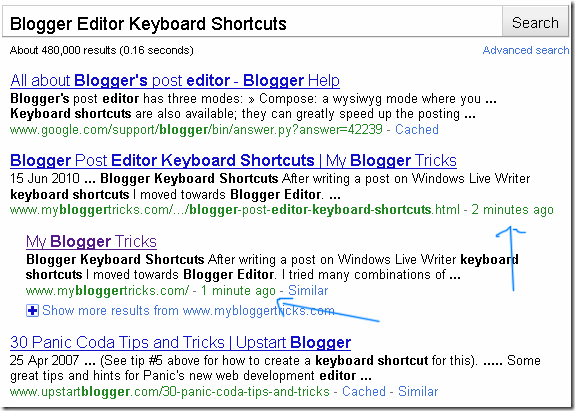
Note:- In actual it might have taken even less than a minute for Google to crawl the last post that I published. Due to my reaction delay I took long to observe this amazing crawl rate and then to take the screenshot.
How to let Google Crawl your Website Faster?
As I promised that there is only one SEO tip which will boost the crawl rate of your blog or website and the tip is,
Start publishing useful and valuable content so that more and more people could link to your blog. The more one way linking you receive the better your rank increase in Google search listings. PageRank greater than 2.0 in short means a faster crawl rate! The higher your Site PR grows the better your ranking increase in Search engine listings. So work hard from today to flow the PR juice from other developed blogs to your blog.
Write Guest Posts at blogs with good PR and traffic and just don't waste any further time by commenting on forums and blogs! MBT has just started offering guest posting and is offering three Links to your blog for one post that you write for us. Further we have promised that if you come up with at least 6 quality Guest posts for MBT we will add your homepage link to our Friends list permanently! You can read further details here -> All Brilliant minds invited to write Guest Posts at MBT!
Kindly let me know what are your valuable views on increasing the crawl rate of a site.
Related post
- uc browser 9.5 | uc browser 9.5 free download for mobile | uc browser for android
- PicsArt - Photo Studio 3.14.0 | Download PicsArt 3.14.0 Java Mobile App Free
- Top Link Audit Tools for offsite SEO Audit
- Mobo Market 2.0 | Download Mobo Market 2.0 For Mobile Free | android app free download
- Facebook 3.4.1 | Download Facebook 3.4.1 Mobile App Free | Facebook 3.4.1 Software free Download
- My Boy! Free - GBA Emulator 1.5.21 Apk Free Download
- Play KBC 7 : HINDI | Download Play KBC 7 : HINDI Game For Free
- The Sims™ 3 1.5.21 Apk Free Download
- Facebook 3.3.1 | Download Facebook 3.3.1 Mobile App Free | Facebook 3.3.1 Software free Download
- Opera mini 8.5 | Download opera mini 8.5 | Opera mini for Android